maintain tools and filter
03 MAINTAIN TOOLS AND FILTER
troubleshooting
PROBLEM SOLUTION
Motor does not start
• Check cable, pulg and socket.
• Leave to cool.
Suction force is gradually
decreasing
• Check for blockage and remove.
Cord does not rewind fully • Pull the cord out 2-3m and push down the cord rewind button.
Vacuum cleaner does
not pick up dirt
• Check hose and replace if required.
Low or decreasing suction
• Please check lter and, if required, clean as illustrated in the
instructions. if lters are out of condition change them to new ones.
Body overheating • Please check lters, If required clean as illustrated in the instruction.
Static electicity discharge • Please decrease power suction.
This Vacuum cleaner is approved the following.
EMC Directive : 2004/108/EEC
Low Voltage Directive : 2006/95/EC
maintain tools and filter
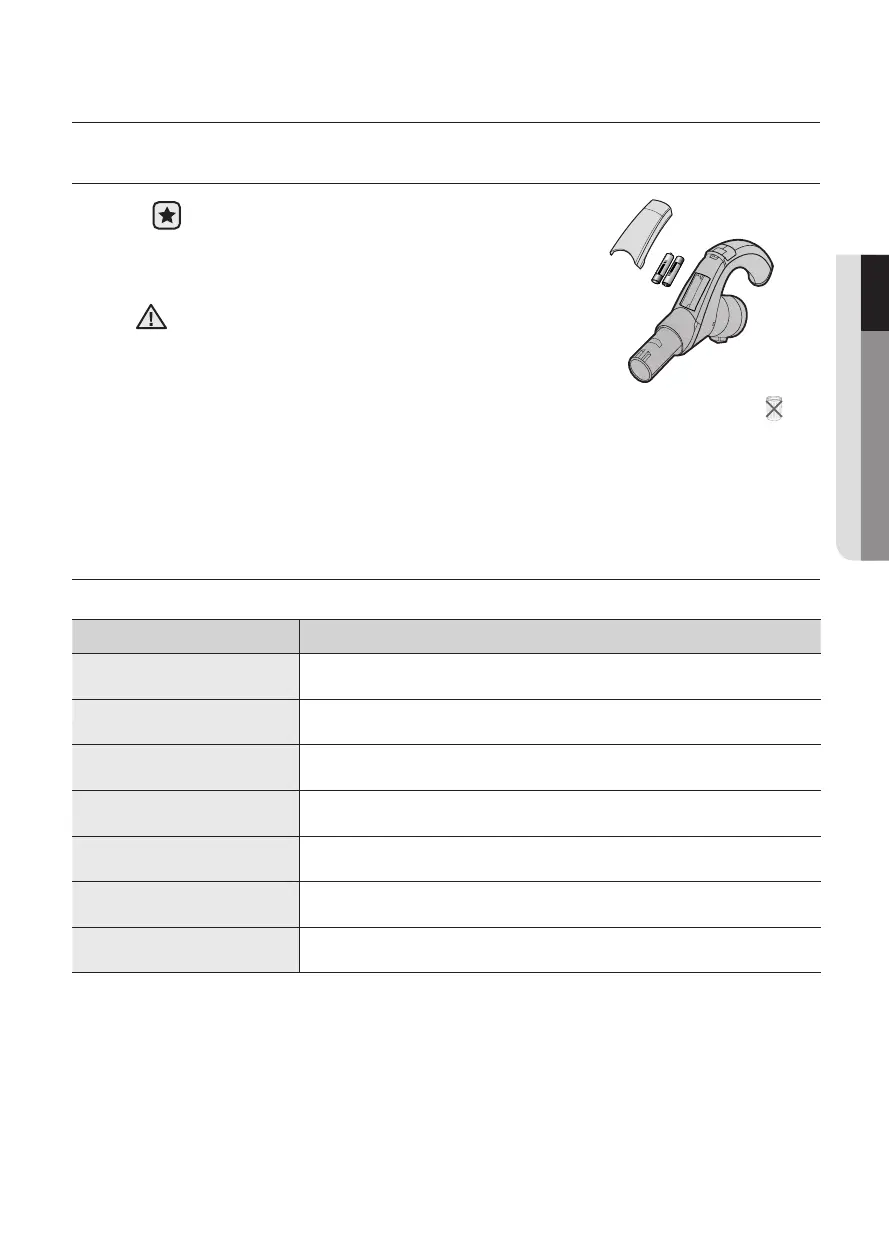
CHANGE THE BATTERY (OPTION)
1. When the vacuum cleaner does not work, replace
the batteries. If the problem persists, please
contact our authorized dealer.
2. Use 2 batteries of size AAA.
BATTERY TYPE : AAA Size
1. Never disassemble or recharge the batteries.
2. Never heat up the batteries or throw them into fire.
3. Do not reverse (+), (-) poles.
4. Dispose of the batteries property.
CAUTION
Make sure the filter is completely dry before putting it back into the vacuum
cleaner. Allow 12 hours for it to dry.



 To Next Page