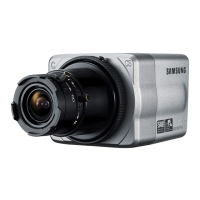
This document describes the Samsung SCC-B1310N Digital Color Camera, a surveillance camera designed for security applications.
Function Description
The SCC-B1310N is a high-resolution box camera that utilizes Digital Signal Processing and OLPF technologies to achieve a horizontal resolution of 380 lines. It is designed to capture color images and includes features to address common issues in surveillance, such as color rolling caused by mechanical fluorescent lighting. The camera can be used with a manual iris lens or an auto iris lens, and its functions are controlled via switches and adjustments on the camera body.
Important Technical Specifications
Item: SCC-B1310N
- Product Type: Surveillance Camera
- Broadcasting System: NTSC STANDARD SYSTEM
- Imaging Device: 1/3" IT, S-HAD-CCD
- Number of Effective Pixels: 510(H) x 492(V)
- Scanning: 525 Lines, 2:1 interlace
- Line Frequency: INTERNAL: 15.734Hz(H) / 59.94 Hz(V); LINELOCK: 15.750Hz(H) / 60 Hz(V)
- Synchronous Mode: INTERNAL, LINE LOCK (AC 24V)
- Horizontal Resolution: 380TV Lines
- S/N Ratio: Approx. 50dB
- Minimum Subject Illumination: 0.25Lux (F1.2, 50IRE), 0.15Lux (F1.2, 30IRE), 0.08Lux (F1.2, 15IRE)
- ALC/ELC: ALC: DC IRIS Lens Only; ELC: Electronic Shutter Iris (max. 1/120Ksec)
- FL(FLICKERLESS): OFF/ON
- Lens: Manual/Auto Iris DC Lens
- Lens Mount: C, CS Lens Adaptable
- AWB (Auto White Balance): ON: ATW; OFF: AWC
- BLC (Back Light Compensation): ON/OFF
- AGC: AUTO
- Signal Out: COMPOSITE VIDEO OUT 1V p_p 75 Ω / BNC
- Power: AC24V ±10%(60Hz+0.3Hz), DC12V+10%~-5%
- Power Consumption: Approx. 3 Watts
- Operation Temperature: -10°C ~ +50°C
- Operation Humidity: ~90%
- Dimensions (mm): 68(W) x 55(H) x 77.1(D)
- Weight: 220 g
Usage Features
High Color Sensitivity: The camera incorporates the latest 1/3" Super-HAD IT CCD to enhance color sensitivity, allowing for better image capture in various lighting conditions.
Resolution: It utilizes Full Digital Image Processing technology to implement a high-resolution image, ensuring clear and detailed surveillance footage.
Excellent Back Light Compensation: This feature guarantees a sharp image by compensating for back light, ensuring that subjects are visible even when strong light sources are behind them.
Digital Power Synchronization: The camera adopts a full digital line lock system to enable vertical synchronization, enhancing manipulation and reliability.
Dynamic CCD Defect Compensation: Advanced technology is used to compensate for CCD defects, providing clear, sharp, and noise-free images, even in low contrast scenes.
Color Rolling Correction: In environments with mechanical fluorescent lighting, the camera can experience "color rolling" due to the flickering of the lights. This issue can be resolved by using the Line Lock function or the Auto Iris Lens, which adjusts the color temperature input to the camera.
Power Port: The camera is powered by an AC24V or DC12V adapter.
Power Indication LED: An LED indicates when the camera is powered on.
Vertical Synchronization Phasing Switch (Left/Right): These switches are used to adjust the vertical synchronization phasing, allowing for precise alignment of the video signal.
Function Switches (SW1-SW4):
- SW1 (ELC - Electronic Light Control): Used for manual iris lenses. It adjusts the electronic shutter speed to maintain proper screen brightness. For auto iris lenses (DC control type), this switch should be set to OFF.
- SW2 (BLC - Back Light Compensation): Compensates for displays that are too bright or too dark when indoor lighting or windows reflect against the subject.
- SW3 (FL - Flickerless): An anti-flicker system that prevents flickering of the image due to mismatch between the vertical sync frequency and the on-off frequency of lighting. It is recommended to set SW3 to ON if SW1 (ELC) is set to ON, otherwise it may not work.
- SW4 (AWB - Auto White Balance): Automatically adjusts the image color according to the temperature change of the lightning color. It can be set to ATW (Auto Tracking White Balance) for continuous adjustment or AWC (Auto White Balance Control) for a normal color temp switch with the OFF to operate at a certain white balance level. Note that AWB can cause an error in the following conditions: a big subject of a uniform color with a high saturation exists in the center of the screen or if few part of the image is in white, or if lighting is made of special material like sodium.
Function Switch (L/L INT EXT):
- INT (Internal Synchronization Mode): Operates in the internal synchronization mode.
- EXT (Power Synchronization Mode): Operates in the power synchronization mode. If the camera uses DC 12V for power source, it operates in the internal mode regardless of the position (EXT/INT) of the L/L switch.
DC IRIS Level Bar: Used to adjust the iris level of the DC iris lens using a screwdriver. Anti-clockwise decreases luminance, and clockwise increases luminance. The DC iris range is between 80IRE and 120IRE. For other words, the DC lens adopts a variable range limitation system, rather than Iris Full Open/Close system. Depending on the type of the lenses used that allows setting the value below 75 IRE may cause IRIS hunting. Therefore, make sure that the range is set to an appropriate level (higher than 80 IRE).
Video Out Port: Connects to the Video Out port of a monitor. The video signal is output via this port.
Lens Installation: The camera supports both lens without zooming feature and lens with zooming feature. Adjustments involve loosening screws on the adjustable ring of the flange back and turning it anti-clockwise/clockwise to set the "C" direction (anti-clockwise) to the end. The internal image sensor or the lens on the camera should be installed. For lenses with zooming, adjustments are made for both sharp subject capture and zoom levels.
Back Focus Adjustment: The back focus is predefined by the factory default. If the camera is out of focus, follow the instructions to adjust the back focus. The procedure is used to set the proper back focus point in fixed focus lenses.
Maintenance Features
Safety Precautions:
- Always use the adapter certified as "Class 2" according to NFPA 70.
- Incorrectly connecting the power supply or replacing the battery may cause explosion, fire, electric shock, or damage to the product.
- Do not connect multiple cameras to a single adapter to avoid abnormal heat generation or fire.
- Securely plug the power cord into the power receptacle to prevent insecure connections that may cause fire.
- When installing the camera, fasten it securely and firmly to prevent personal injury from falling.
- Do not place conductive objects (e.g., screwdrivers, coins, metal parts, etc.) or containers filled with water on top of the camera to avoid fire, electric shock, or falling objects.
- Do not install the unit in humid, dusty, or sooty locations to prevent fire or electric shock.
- If any unusual smells or smoke come from the unit, stop using the product immediately, disconnect the power source, and contact the service center.
- If the product fails to operate normally, contact the nearest service center. Do not disassemble or modify the product in any way.
- When cleaning, do not spray water directly onto parts of the product to avoid fire or electric shock.
- Installation should be made by a qualified service person and should conform to all local codes.
- Do not drop objects on the product or apply strong blows to it.
- Keep away from a location subject to excessive vibration or magnetic interference.
- Do not install in a location subject to high temperature (over 122°F), low temperature (below 14°F), or high humidity.
- If you want to relocate the already installed product, be sure to turn off the power and then move or reinstall it.
- Remove the power plug from the outlet when there is a lighting storm.
- Keep out of direct sunlight and heat radiation sources.
- Install it in a place with good ventilation.
- Avoid aiming the camera directly towards extremely bright objects such as sun, as this may damage the CCD image sensor.
- Apparatus shall not be exposed to dripping or splashing and no objects filled with liquids, such as vases, shall be placed on the apparatus.
- The Mains plug is used as a disconnect device and shall stay readily operable at any time.
General Care:
- Do not disassemble the camera on your own.
- Always be careful when handling the camera. Do not strike the camera by your fists or shake it.
- Do not place or operate the camera in any wet environment such as rain or wet surfaces.
- Do not clean the camera with rough sandpaper. Please always use a dry cloth when cleaning it.
- Put the camera in a cool area free from direct sunlight. Otherwise, the camera may be damaged.
- For auto iris lenses, if the camera gets dirty on the surface of the lens, apply ethanol to the provided tissue or a dry cloth and wipe it out.
Grounding:
- Installing the lightning conductor and grounding the camera chassis prevents the CCTV camera from lightning strikes.
- When installing the CCTV camera outside, avoid damages from lightning strikes by using the lightening conductor and camera grounding.
- Grounding method: Class 3
- Thickness of the Grounding wire: 1.6mm² ↑
- Ground resistance: 100Ω ↓
FCC Statement:
- This device complies with part 15 of the FCC Rules. Operation is subject to two conditions: (1) this device may not cause harmful interference, and (2) this device must accept any interference received, including interference that may cause undesired operation.
- This equipment has been tested and found to comply with the limits for a Class A digital device, pursuant to part 15 of FCC Rules. These limits are designed to provide reasonable protection against harmful interference when the equipment is operated in a commercial environment.
- This equipment generates, uses, and can radiate radio frequency energy and, if not installed and used in accordance with the instruction manual, may cause harmful interference to radio communications. Operation of this equipment in a residential area is likely to cause harmful interference in which case the user will be required to correct the interference at his own expense.
IC Compliance Notice:
- This Class A digital apparatus meets all requirements of the Canadian Interference-Causing Equipment Regulations of ICES-003.

 Need help?
 General

 To Next Page