Samsung Electronics 2-1
✤ The Service materials (Lamp, Plier) will be supplied by SEC Korea.
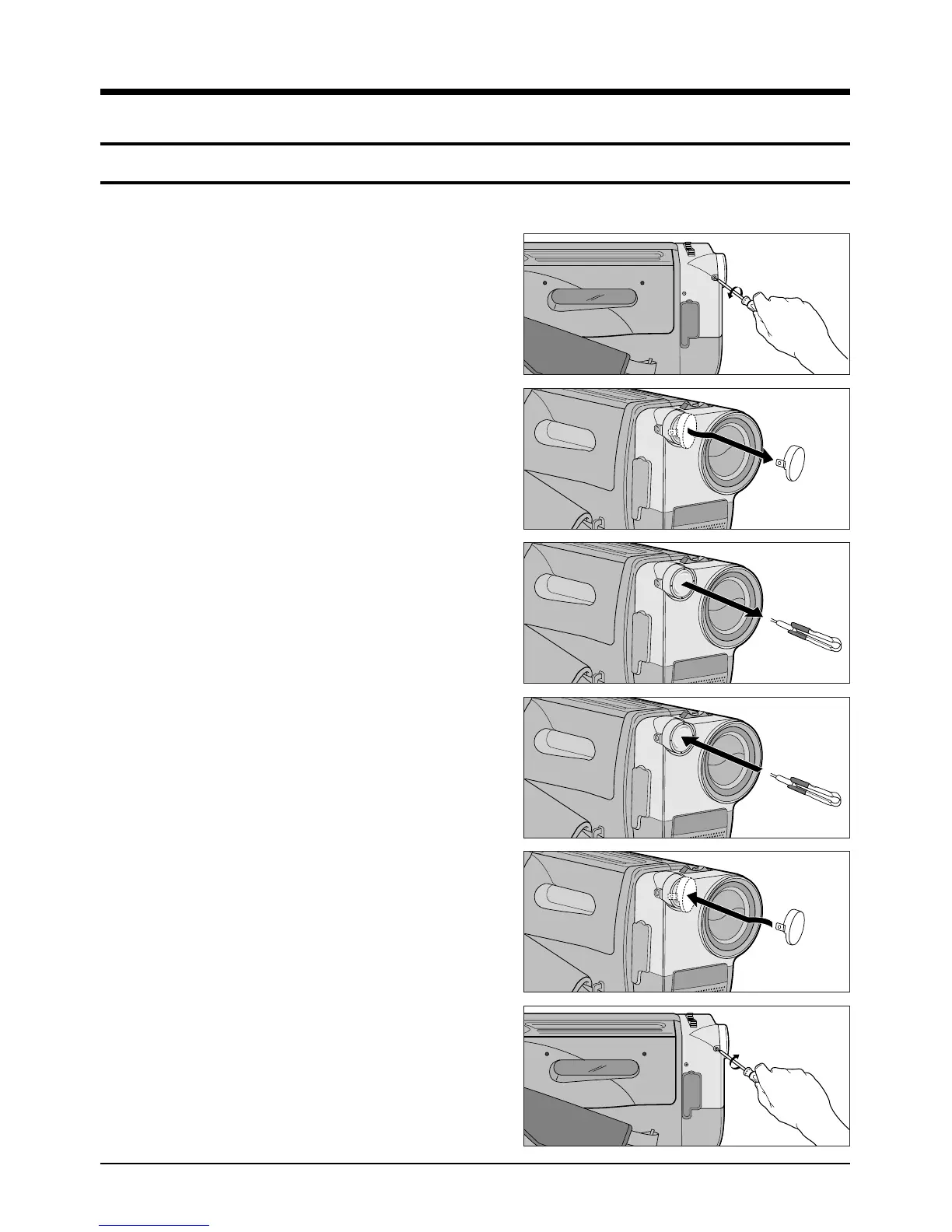
1. Disassemble the screw from the camcorder with a
small screw driver as figure.
2. Pull out the video light cover unit carefully as figure.
❚ Do not apply excessive force because the cover is
easy to be broken.
❚ The right side of the cover is fixed by hitch, and the
left by a screw.
3. Pull out the bulb with flat pliers supplied as a service
tool.
❚ Do not apply excessive force because the cover is
easy to be broken.
4. Insert a new BULB(JC 6V-3W/G2.5) with a pliers as
figure.
❚ Do not apply excessive force because the cover is
easy to be broken.
❚ Make sure that the bulb is in place exactly.
❚ To prevent the smudge of the finger prints reducing
the life of the bulb, do not touch the bulb with fingers.
5. Reassemble the video light cover unit to the cam-
corder carefully as figure.
❚ Do not apply excessive force because the cover is
easy to be broken.
6. Reassemble the screw with a small screw driver to
the camcorder.
2. Service Tip
2-1 Replacing The Bulb For The Video Light
1
2
3
4
5
6



 To Next Page