Need help?
Do you have a question about the Samsung SE-T084M and is the answer not in the manual?
Explains safety symbols for extremely dangerous and dangerous matters.
Highlights important information and warns against disassembling the device.
Advice on using non-cracked discs and avoiding damage.
Guidance on avoiding shocks, sunlight, and extreme temperatures during installation.
Precautions against shocks, moving during operation, and using eject hole.
Do not use cracked discs, disconnect power, or overload.
Keep drive casing free from particles and liquids.
Do not repair or modify without approval.
Explains Samsung's eco-friendly mark and RoHS restrictions.
Instructions for proper electronic waste disposal.
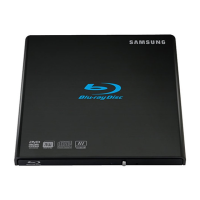
Identification of drive parts and list of included accessories.
Required PC hardware and operating system specifications for the drive.
Supported read/write formats and disc types.
Lists compatible brands for various disc types.
Explains Light Scribe and buffer underrun technology.
Details speeds for different media formats.
Steps for connecting the USB cable and powering the system.
Considerations for USB hubs and power requirements.
Advice for PCs that do not have a USB connector.
Procedure for safely disconnecting the USB converter cable.
Verifying USB 2.0 support and installing necessary drivers.
Steps for downloading and installing firmware updates from the website.
Verifying correct driver installation via Device Manager in Windows.
Guidelines for using the drive, including LED status warnings and installation.
Information on supported discs, copyright, and DVD region protection.
Connecting devices and creating DVD titles using the TruDirect feature.
Best practices for storing optical discs to prevent damage.
Recommended techniques and materials for cleaning optical discs.
Explanation of different LED blinking patterns and states.
Solutions for problems like eject key, connectivity, audio, and disc recognition.
Tips to prevent writing errors and understanding speed limitations.
Lists supported disc types and random access times.
Details read/write speeds for various formats.
Buffer memory, installation, operating conditions, dimensions, and weight.
Details on FCC compliance and laser safety standards.
 General
| Type | External Blu-ray Drive |
|---|---|
| Interface | USB 2.0 |
| Buffer Size | 2 MB |
| BD-ROM Read Speed | 6x |
| DVD-ROM Read Speed | 8x |
| CD-ROM Read Speed | 24x |
| DVD-R Write Speed | 8x |
| DVD+R Write Speed | 8x |
| DVD-RW Write Speed | 6x |
| DVD+RW Write Speed | 8x |
| CD-R Write Speed | 24x |
| CD-RW Write Speed | 16x |
| Supported Formats | BD, DVD, CD |


 To Next Page