Samsung Electronics5-4
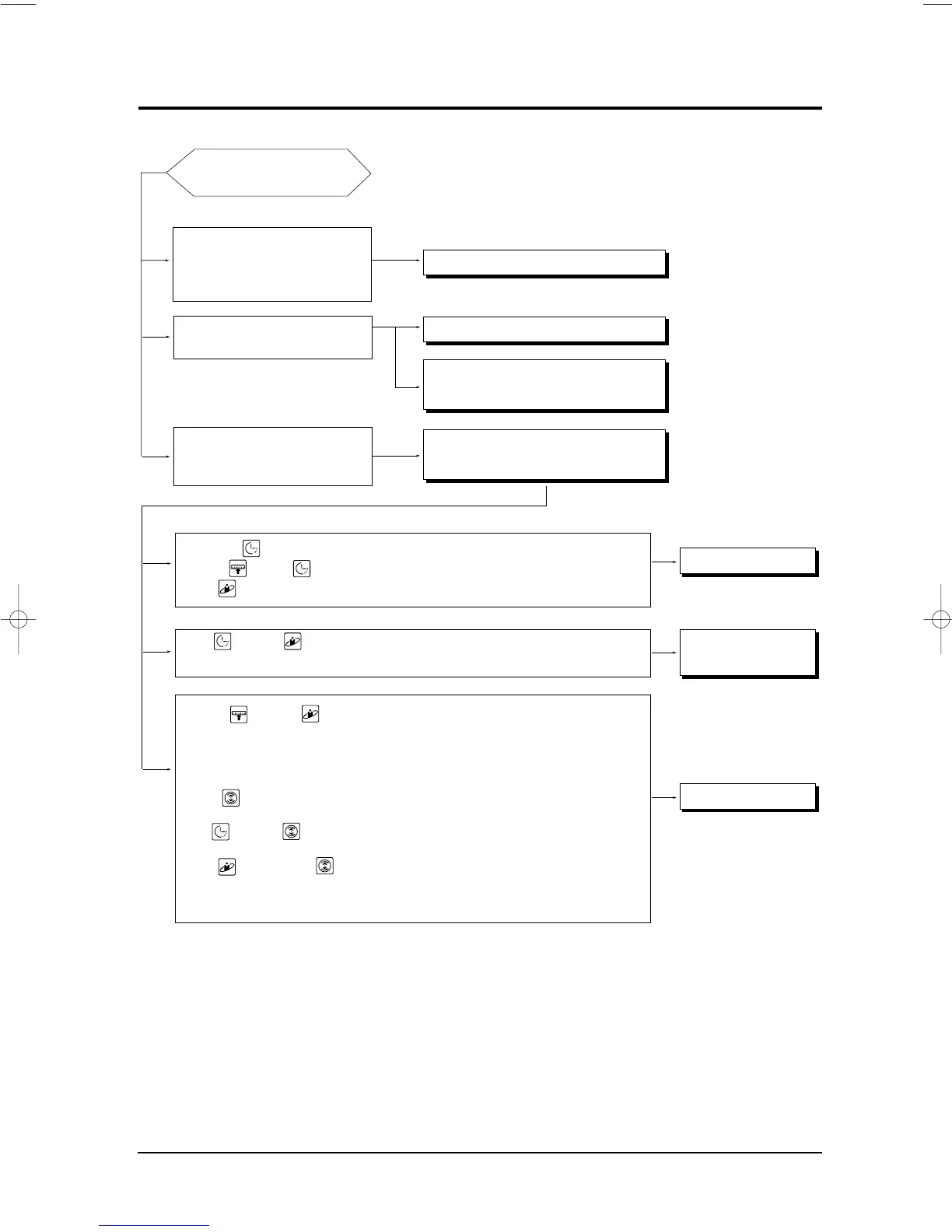
5-3 Sequence of trouble shooting for inverter aircon
OPERATION START
• The indoor unit does not work even
though the power is plugged.
•There is no sound “DING”
•The lamp is not on the display.
The indoor unit does not work when
operated by the remocon.
The lamp of the indoor display is flick-
ering and the indoor unit stops several
minutes after the indoor unit starts.
Timer lamp( ) flickering → Check of the indoor temperature sensor (5-3-3)
Standard( ), Timer( ) lamp flickering → Check of the indoor heat exchanger (5-3-3)
Nature( ) lamp flickering → Check of indoor unit fan motor (5-3-4)
Timer( ), Nature( ) lamp flickering → Check the lines of the indoor and outdoor
communication (5-3-5)
Standard( ), Nature ( ) lamp flickering → Check of the outdoor unit temperature sensor
: Discharge temperature sensor (5-3-6)
: Comp top OLP temperature sensor (5-3-6)
: Deice temperature sensor (5-3-7)
: Outdoor temperature sensor (5-3-7)
POWER( ) flickering → Check of the abnormal increase protection
of the operation Current (5-3-8)
Timer( ), POWER( ) lamp → Check of the instantaneous over-current protection
flickering mode of IPM circuit (5-3-9)
Nature( ), POWER lamp( ) → Check the abnormal increase of the comp
flickering discharge gas temperature and OLP protection
mode.(5-3-10)
Check the indoor unit control board. (5-3-1)
Checking the Remocon. (5-3-2)
Check the control board and the display board
of indoor unit.(5-3-2)
Check the error mode by confirming the lamp
flickering of indoor unit display.
Check the indoor unit
Check of the
Communication line
Check of the Outdoor unit
DB98_08728A(1)_SM_1 12/20/02 3:25 PM Page 3-14


 To Next Page