17
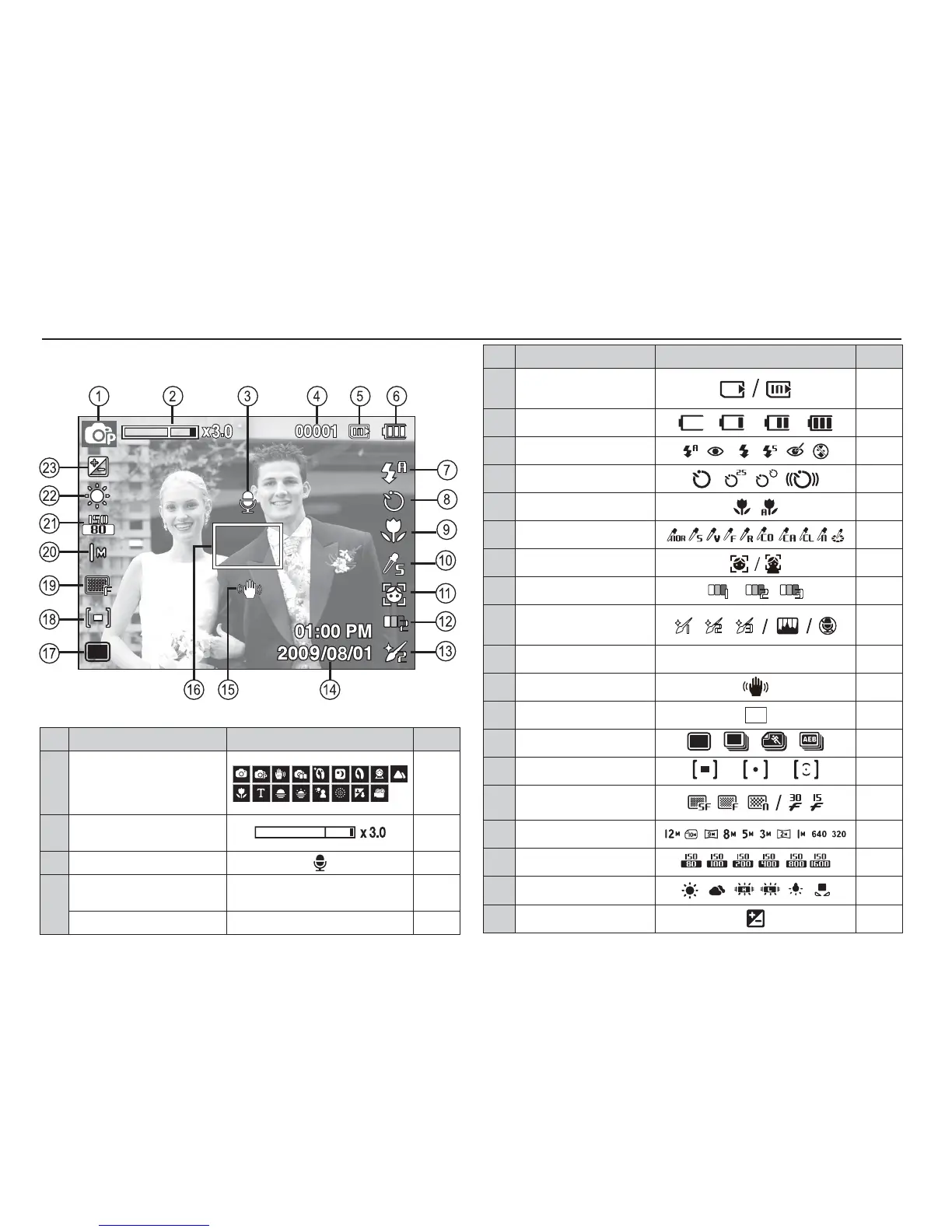
The LCD monitor displays information about the shooting
functions and selections.
LCD monitor indicator
No. Description Icons Page
1 Recording mode
p.19
2
Optical / Digital Zoom bar /
Digital Zoom rate
p.25
3
Voice Memo
p.43
4
Number of available shots
remaining
00001 p.15
Remaining time 00:00:00 p.15
[Image & Full Status]
No. Description Icons Page
5
Memory card icon /
Internal memory icon
-
6 Battery
p.13
7 Flash
p.29
8 Self-timer
p.31
9 Macro
p.27
10 Photo Style Selector
p.41
11 Face Detection
p.36
12 Face Tone
p.38
13
Face Retouch / Image Adjust
/ Without Sound
p.38/
42/44
14 Date / Time 2009/08/01 01:00 PM p.49
15 Camera shake Warning
p.24
16
Auto Focus Frame
p.40
17 Drive mode
p.40
18 Metering
p.39
19
Image Quality /
Frame Rate
p.39
20 Image Size
p.38
21 ISO
p.36
22
White Balance
p.35
23
Exposure compensation
p.34



 To Next Page