
 Need help?
Do you have a question about the Samsung SM-G891A and is the answer not in the manual?
Details on warranty, dispute resolution, and opt-out procedures.
Explains terms and conditions for software usage.
Outlines limitations on Samsung's warranty and liability.
Details on RF energy exposure limits and SAR.
Information on making emergency calls and service limitations.
Explains FCC regulations for hearing aid compatibility.
Explains dispute resolution and arbitration policies.
This document outlines the safety precautions associated with using your Samsung mobile device, referred to as "mobile device" or "cell phone" throughout this section. It is crucial to read this information before operating your mobile device.
Your Samsung mobile device is a radio transmitter and receiver designed and manufactured to meet exposure limits for Radio Frequency (RF) energy set by the Federal Communications Commission (FCC) of the U.S. Government. It operates using radio signals, wireless and landline networks, as well as user-programmed functions. The device is equipped with diagnostic software that reports usage and performance information, used solely to deliver improved network quality and overall device experience to AT&T customers. It is also designed to receive wireless emergency alerts from the Commercial Mobile Alerting System (CMAS), also known as the Personal Localized Alerting Network (PLAN), if your wireless provider participates in CMAS/PLAN.
Certain Samsung mobile devices can utilize a Global Positioning System (GPS) signal for location-based applications. GPS relies on satellites controlled by the U.S. Government, which are subject to changes based on Department of Defense policy and the 2008 Federal Radio Navigation Plan (FRP). These changes may impact the performance of location-based technology on your device. Additionally, some Samsung mobile devices can use an Assisted Global Positioning System (AGPS), which enhances GPS performance by obtaining information from the cellular network. AGPS uses your wireless service provider's network, and therefore airtime, data charges, and/or additional charges may apply according to your service plan.
The device also incorporates Samsung Knox™, a security platform for Samsung devices tested for enterprise use. Additional licensing fees may be required for Knox.
The device supports emergency calls. However, it is important to note that, like any wireless mobile device, it cannot guarantee connection in all conditions, areas, or circumstances. Therefore, you should never rely solely on it for essential communications, such as medical emergencies. Before traveling to remote or underdeveloped areas, plan an alternate method for contacting emergency services. To make an emergency call, ensure the device is switched on and within a service area with adequate signal strength. Open the phone dialer, enter the emergency number for your location (e.g., 911), and tap Call/Send. Emergency numbers vary by location.
When using AGPS in emergency calls, the cellular network may activate AGPS technology to provide emergency responders with your approximate location. However, AGPS has limitations and might not work in all areas. Always tell the emergency responder your location to the best of your ability and remain on the mobile device as long as instructed.
Location-based information, including data from applications requiring it (e.g., driving directions), may be transmitted by your device. This information may be shared with third parties, including your wireless service provider, application providers, Samsung, and other third-party service providers. Maps, directions, and other navigation data may contain inaccuracies or be incomplete, and circumstances can change over time. Always visually confirm navigational instructions with actual road conditions, closures, traffic, and other factors that may impact safe driving or walking. Always obey posted road signs.
The device has been tested and rated for use with hearing aids for some wireless technologies. This is based on FCC Hearing Aid Compatibility (HAC) Regulations for Wireless Devices. M-Ratings (M3 or M4) indicate less interference to hearing aids operating in acoustic coupling mode, with M4 being better. T-Ratings (T3 or T4) indicate less interference to hearing aids operating in telecoil mode, with T4 being better. The American National Standards Institute (ANSI) C63.19 standard combines hearing aid and mobile device rating values to indicate usability. For example, an M2 hearing aid and an M3 mobile device sum to M5, suggesting normal use. A sum of 6 or more indicates excellent performance. However, these ratings are not guarantees, and individual results may vary. It is recommended to try out the mobile device with your hearing device to evaluate its suitability for your personal needs. For newer wireless technologies, it is important to test the device thoroughly in different locations with your hearing aid or cochlear implant to determine if you hear any interfering noise.
This device is water-resistant and dustproof based on an IP68 rating, which means it can withstand submersion up to 5.0 feet for up to 30 minutes. It has also passed military specification (MIL-STD-810XXXG) testing against a subset of 20 specific environmental conditions, including temperature, dust and sand, shock/vibration, and low pressure/high altitude. However, the device is not impervious to water damage in all situations, and all compartments must be closed tightly.
To prevent damage, always dry your device thoroughly with a clean, soft cloth if it gets wet. Do not expose it to salt water or ionized water, or to water deeper than 5.0 feet for more than 30 minutes. If exposed to fresh water, dry it thoroughly. If exposed to any liquid other than fresh water, rinse it immediately with fresh water and then dry it thoroughly. Failure to do so may cause operability or cosmetic issues. Avoid exposing the device to high-pressure water, such as ocean waves or waterfalls. If the device is dropped or receives an impact, its water and dust resistant features may be compromised. The touchscreen and other features may not work properly if the device is used in water or other liquids.
Exercise care when using the card removal tool to eject an internal card slot.
Proper disposal of your mobile device and its battery is important for safety and environmental benefits. Batteries must be recycled or disposed of properly. Samsung encourages customers to recycle their mobile devices and genuine Samsung accessories through approved recyclers. You can find recycling information at call2recycle.org or by calling 1-800-822-8837. Samsung-branded mobile devices and batteries are accepted for free at numerous Samsung Recycling Direct (SM) locations. To find the nearest location, visit www.samsung.com/recyclingdirect or call 1-877-278-0799. You can also use PLUG-IN to eCYCLING with EPA at www.call2recycle.org/. The Samsung Mobile Take-Back Program offers a free recycling mailing label; visit https://pages.samsung.com/recycling/index.jsp or call 1-800-822-8837 for more information. Always follow local regulations for disposing of mobile devices and batteries, as disposal in household or business trash may be prohibited in some areas. Never dispose of batteries in a fire, as they may explode.
Some applications or prolonged usage may increase device temperature. Prolonged skin contact with a hot device can cause discomfort, redness, or low-temperature burns. If the device feels hot, discontinue use, close all applications, or turn off the device until it cools. Ensure adequate ventilation and airflow. Covering the device with bedding, your body, thick clothing, or any other materials that significantly affect airflow can impact performance and pose a risk of fire or explosion, potentially leading to serious bodily injuries or property damage.
Your mobile device is not a toy. Do not allow children to play with it, as they could hurt themselves or others, damage the device, or incur increased mobile device bills. Keep the mobile device and all its parts and accessories out of the reach of small children.
 General
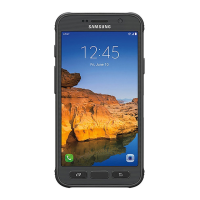
| Model | SM-G891A |
|---|---|
| Also known as | Samsung Galaxy S7 Active |
| Network Technology | GSM / HSPA / LTE |
| Announced | 2016, June |
| Dimensions | 148.8 x 74.9 x 9.9 mm (5.86 x 2.95 x 0.39 in) |
| Weight | 185 g (6.53 oz) |
| SIM | Nano-SIM |
| MIL-STD-810G compliant | Yes |
| Display Type | Super AMOLED |
| Display Size | 5.1 inches |
| Protection | Corning Gorilla Glass 4 |
| Chipset | Qualcomm MSM8996 Snapdragon 820 (14 nm) |
| CPU | Quad-core (2x2.15 GHz Kryo & 2x1.6 GHz Kryo) |
| GPU | Adreno 530 |
| Internal Storage | 32 GB |
| RAM | 4 GB |
| Main Camera Features | LED flash, auto-HDR, panorama |
| Selfie Camera Features | Dual video call, Auto HDR |
| Selfie Camera Video | 1440p@30fps |
| Loudspeaker | Yes |
| 3.5mm jack | Yes |
| WLAN | Wi-Fi 802.11 a/b/g/n/ac, dual-band, Wi-Fi Direct, hotspot |
| Bluetooth | 4.2, A2DP, LE, aptX |
| GPS | Yes, with A-GPS, GLONASS, BDS |
| NFC | Yes |
| Radio | No |
| Status | Available |
| Build | Glass front (Corning Gorilla Glass 4), aluminum frame, plastic back |
| IP rating | IP68 dust/water proof (up to 1.5m for 30 mins) |
| Resolution | 1440 x 2560 pixels |
| Operating System | Android 6.0 (Marshmallow), upgradable to Android 8.0 (Oreo) |
| Main Camera | 12 MP |
| Main Camera Video | 2160p@30fps, 1080p@60fps, 720p@240fps, HDR |
| Selfie camera | 5 MP |
| USB | microUSB 2.0 |
| Sensors | Fingerprint (front-mounted), accelerometer, gyro, proximity, compass, barometer |
| Battery | 4000 mAh |
| Charging | Fast charging 15W |
| Talk time | Up to 32 hours (3G) |
| Colors | Camo Green, Titanium Gray, Sandy Gold |




 To Next Page