
 Need help?
Do you have a question about the Samsung SM-G950FD and is the answer not in the manual?
Important information before using the device for safe and proper use.
Addresses device heating during charging and solutions.
Details the physical layout and functions of device components.
Illustrates the front view of the device with component labels.
Explains the function of the device's physical buttons.
Describes the function of the on-screen navigation buttons.
Provides instructions and precautions for charging the device battery.
Details the process of charging using a Micro USB cable.
Offers tips to conserve battery power and optimize usage.
Provides essential advice and safety precautions for charging.
Explains how to enable and use the fast charging feature.
Details how to use the wireless charging feature with a compatible charger.
Step-by-step guide for inserting the SIM or USIM card into the device.
Illustrates the correct placement of SIM and microSD cards in the trays.
Explains how to use two SIM cards for dual phone numbers or service providers.
Guidance on how to install a memory card correctly into the device.
Instructions on how to power the device on, off, and restart it.
Procedure for restarting the device, including force restart.
Guides users through the initial setup process after turning on the device.
Introduction to Samsung accounts and their integrated services.
Step-by-step process for registering a new Samsung account.
Guide to transferring data using the Smart Switch feature.
Provides guidelines and precautions for using the touchscreen effectively.
Details the function and use of the on-screen navigation buttons.
Overview of the Home and Apps screens and their functions.
How to navigate between the Home and Apps screens.
Options for setting screen lock methods like pattern, PIN, or biometrics.
Methods for taking screenshots and editing them.
How to open, view, and manage notifications and quick settings.
How to use and rearrange quick setting buttons for faster access to features.
Information on keyboard layout and entering text.
How to copy, cut, and paste text on the device.
How to install and uninstall applications from the device.
How to manage installed applications, including disabling and uninstalling.
How to manage app permissions for data access and device features.
Introduction to Bixby, the intelligent voice assistant.
Steps to set up and begin using Bixby for the first time.
How to interact with Bixby using voice commands and examples.
Introduction to scheduling reminders and receiving notifications.
Detailed steps for creating reminders based on time or location.
Introduction to the Phone app for making and receiving calls.
Step-by-step guide to making voice and video calls using the Phone app.
How to answer and reject incoming calls.
How to block unwanted phone numbers and unknown callers.
How to add phone numbers to contacts.
Introduction to managing contacts on the device.
Steps to add new contacts to the device.
How to sync contacts with online accounts like Samsung or Google.
Methods for quickly finding contacts in the list.
Introduction to taking photos and recording videos with the camera.
Introduction to Samsung Pay for secure mobile payments.
Introduction to Samsung DeX for using the smartphone like a computer.
How to customize settings for the locked screen.
How to configure security settings for the device.
How to set up and use face recognition to unlock the device.
Introduction to fingerprint recognition for device security.
How to sync, back up, and restore device data using Samsung Cloud and Smart Switch.
Solutions for common device issues like codes, network errors, and power.
 General
| Model | SM-G950FD |
|---|---|
| Display | 5.8 inches, Super AMOLED |
| Resolution | 1440 x 2960 pixels, 18.5:9 ratio (~570 ppi density) |
| RAM | 4 GB |
| Internal Storage | 64 GB |
| Rear Camera | 12 MP, f/1.7, 26mm (wide), 1/2.55", 1.4µm, Dual Pixel PDAF, OIS |
| Front Camera | 8 MP, f/1.7, 25mm (wide), 1/3.6", 1.22µm, AF |
| Battery | 3000 mAh, non-removable |
| Operating System | Android 7.0 (Nougat), upgradable to Android 9.0 (Pie), One UI |
| SIM | Hybrid Dual SIM (Nano-SIM, dual stand-by) |
| Network | GSM / HSPA / LTE |
| Announced | 2017, March 29 |
| Status | Discontinued |
| Dimensions | 148.9 x 68.1 x 8 mm (5.86 x 2.68 x 0.31 in) |
| Weight | 155 g (5.47 oz) |
| Build | Glass front (Gorilla Glass 5), glass back (Gorilla Glass 5), aluminum frame |
| Protection | Corning Gorilla Glass 5 |
| Main Camera Features | LED flash, auto-HDR, panorama |
| Video | 4K@30fps, 1080p@60fps, 720p@240fps, HDR, dual-video rec. |
| Selfie Video | 1440p@30fps |
| Loudspeaker | Yes |
| 3.5mm jack | Yes |
| WLAN | Wi-Fi 802.11 a/b/g/n/ac, dual-band, Wi-Fi Direct, hotspot |
| Bluetooth | 5.0, A2DP, LE, aptX |
| GPS | Yes, with A-GPS, GLONASS, BDS, GALILEO |
| NFC | Yes |
| Radio | No |
| USB | USB Type-C 3.1 |
| Sensors | Iris scanner, fingerprint (front-mounted), accelerometer, gyro, proximity, compass, barometer, heart rate, SpO2 |
| SAR EU | 0.32 W/kg (head) 1.27 W/kg (body) |
| Selfie Features | Auto-HDR |
| Charging | Fast charging 15W |
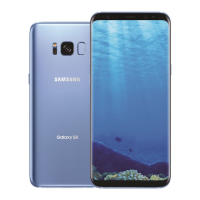
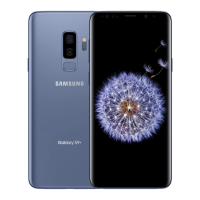
| Colors | Midnight Black, Coral Blue, Maple Gold, Arctic Silver |






 To Next Page