
 Need help?
Do you have a question about the Samsung SM-T365 and is the answer not in the manual?
Information on RF signals and device compliance with exposure limits.
Details on SAR certification, guidelines, and measurement units.
Device compliance with Part 15 of FCC Rules and operational conditions.
Warnings on modifications, accessories, handling, and Wi-Fi usage.
This document outlines the essential features, usage instructions, and safety guidelines for the Samsung SM-T365 device. It serves as a comprehensive guide for users to understand and operate their device effectively, while also emphasizing important maintenance and safety considerations.
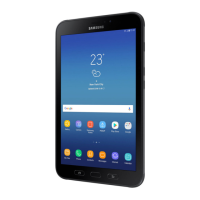
The Samsung SM-T365 is a mobile device designed for various functions, including communication, information access, and entertainment. It is equipped with standard mobile device components such as a power button, volume buttons, a home button, recent apps button, back button, and a multipurpose jack. The device is designed to be water and dust resistant, offering enhanced durability in various environments. It supports wireless connectivity, including WLAN, for accessing the internet and other network services. The device is intended for use in all European countries, with specific considerations for WLAN operation.
To begin using the device, users must first charge the battery. The charger should be kept close to an electric socket and easily accessible during charging. To turn on the device, the power button needs to be pressed and held for a few seconds. The device's layout includes clearly marked buttons for power, volume, home, recent apps, and back functions, facilitating intuitive navigation. The multipurpose jack allows for connection to various accessories.
Accessing the user manual and additional information is straightforward. Users can open the web browser on their device and select the bookmark for the user manual from the bookmarks list. Alternatively, they can visit www.samsung.com to view device information, the user manual, and more. It is important to note that the availability of the user manual may vary depending on the web browser or service provider.
The device's software and content may differ based on the region, service provider, or software version, and are subject to change without prior notice. This flexibility allows for regional customization and updates.
Maintaining the device's water and dust resistance is crucial for its longevity and performance. The back cover must be closed tightly to prevent water and dust from entering the device. An open or loose back cover can compromise the device's integrity and lead to damage. The rubber seal fitted to the back cover is a critical component for maintaining this resistance, and care should be taken to avoid damaging it when opening and closing the cover.
Users are advised to follow specific guidelines to ensure the device's water and dust resistance:
The device has been tested in a controlled environment and certified to be water- and dust-resistant under specific conditions (IP67 classification: 15-35 °C, 86-106 kPa, 1 meter, 30 minutes). However, this classification does not guarantee imperviousness to water damage in all situations.
Safety is paramount when using the Samsung SM-T365. Users should read and adhere to all safety information to prevent injury, fire, or explosion. Comprehensive safety information can be accessed on the device by navigating to Settings → General → About device → Legal information → Safety information.
To prevent possible hearing damage, avoid listening to sound at high volume for long periods when using a headset.
The device uses a non-harmonized frequency and is intended for use in all European countries. While WLAN can be operated without restriction indoors, it cannot be operated outdoors.
The device complies with international guidelines for exposure to radio waves. Users can view SAR certification information by going to Settings → General → About device → Legal information → Safety information. The device is designed not to exceed the limits for exposure to radio waves recommended by international guidelines, which include a substantial safety margin. The SAR limit for mobile devices is 2.0 W/kg. For specific SAR values for other countries, users can visit www.samsung.com/sar and search for their region and device model number.
The device complies with Part 15 of the FCC Rules, meaning it will not cause harmful interference and must accept any interference received. This equipment has been tested and found to comply with Class B digital device limits, providing reasonable protection against harmful interference in residential installations. If interference occurs, users are encouraged to reorient or relocate the receiving antenna, increase separation between equipment and receiver, connect the equipment to a different circuit, or consult a dealer/radio/TV technician.
The device may cause TV or radio interference if used in close proximity to receiving equipment, and the FCC may require discontinuation of use if interference cannot be eliminated. Vehicles using petroleum gas must comply with NFPA-58.
Changes or modifications not expressly approved by Samsung will void the user's authority to operate the equipment. Unauthorized accessories may cause damage and void the device warranty. The device is sturdy but can be broken, so avoid dropping, hitting, bending, or sitting on it.
The device supports 802.11a/n mode. For 802.11a/n devices operating in the 5.15 - 5.25 GHz frequency range, operations are restricted to indoors to reduce potential harmful interference for Mobile Satellite Services (MSS) in the US. If a WIFI network supports this mode, users should restrict WIFI use indoors to comply with federal regulations protecting Mobile Satellite Services.
 General
| Model | SM-T365 |
|---|---|
| RAM | 1.5 GB |
| Internal Storage | 16 GB |
| SIM | Micro-SIM |
| GPU | Adreno 305 |
| Main Camera Video | 720p@30fps |
| Loudspeaker | Yes |
| 3.5mm jack | Yes |
| WLAN | Wi-Fi 802.11 a/b/g/n, dual-band, Wi-Fi Direct, hotspot |
| Bluetooth | 4.0, A2DP |
| GPS | Yes, with A-GPS, GLONASS |
| NFC | No |
| Radio | No |
| USB | microUSB 2.0 |
| Sensors | Accelerometer |
| Display | 8.0 inches |
| Processor | Quad-core 1.2 GHz |
| Battery | 4450 mAh |
| Rear Camera | 5 MP |
| Operating System | Android 4.4.2 (KitKat) |
| Chipset | Qualcomm Snapdragon 400 |










 To Next Page
