Maintenance
English76
Maintenance
Replacement
Water lter
WARNING
• Do not use third-party water lters. Use only Samsung-provided or -approved lters.
• Unapproved lters may leak and damage the refrigerator, causing electric shock.
Samsung is not responsible for any damage that may occur from use of third-party
water lters.
The Filter Reset indicator ( ) turns red to let you know it is time to replace the water
lter. Before replacing the lter, make sure the water supply line is shut off.
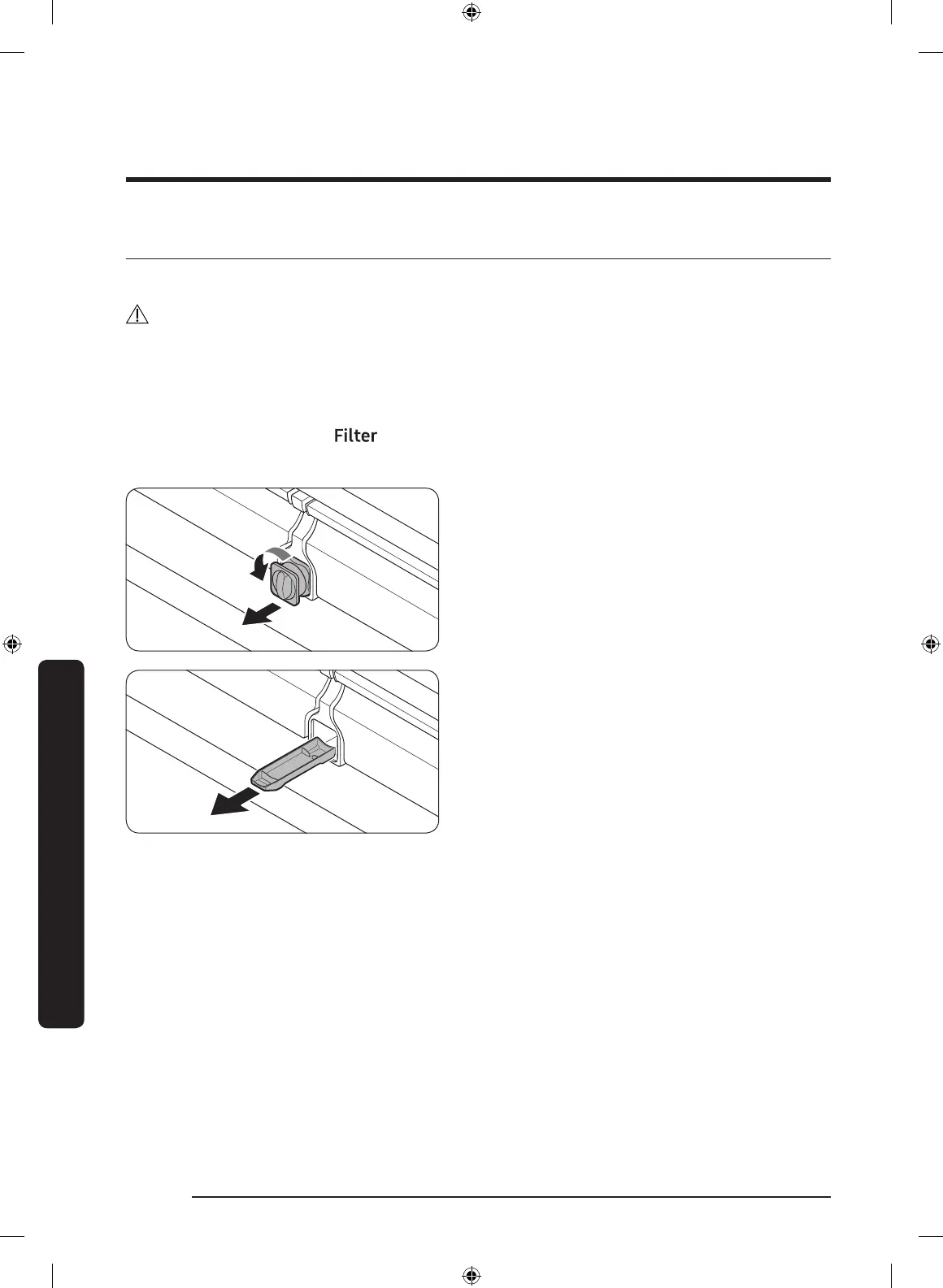
1. Shut off the water supply line.
2. Turn the knob of the lter cartridge
counter clockwise 90 degrees (1/4
turn). The lter cartridge unlocks.
3. Pull out to remove the cartridge.
- If the water lter is severely
contaminated, the cartridge may not
be easy to remove. If that is the case,
use force to remove the cartridge.
- To prevent water leaks from the
lter opening, pull the cartridge
straight out while removing it.
4. Insert a new lter cartridge. Use only
Samsung-provided or approved lters.
Untitled-2 76 2019-02-28 5:57:58













 To Next Page