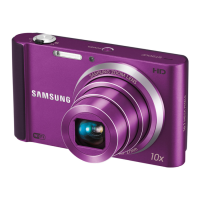
This is a user manual for a Samsung ST64/ST69 digital camera. It provides detailed instructions on how to use, maintain, and troubleshoot the device.
Function Description:
The Samsung ST64/ST69 is a digital camera designed for capturing photos and recording videos. It features various shooting modes, including Smart Auto, Program, Live Panorama, Picture-in-Picture, Scene, and Movie mode, to cater to different photographic needs and skill levels. The camera allows users to adjust settings such as resolution, image quality, timer, flash, ISO sensitivity, focus, brightness, and color. It also offers burst modes for capturing fast-moving subjects and Smart Filter effects for creative image adjustments. For playback, the camera supports viewing photos and videos, editing images (resizing, rotating, cropping, applying filters, adjusting brightness/contrast/saturation, removing red-eye), and creating print orders. It can connect to a computer (Windows or Mac) for file transfer and to a TV or PictBridge-compatible printer for direct viewing or printing.
Important Technical Specifications:
- Image Sensor: 1/2.3" (Approximately 7.78 mm) CCD
- Effective Pixels: Approximately 14.2 mega-pixels
- Total Pixels: Approximately 14.6 mega-pixels
- Lens Focal Length: Samsung Lens f = 4.5–22.5 mm (35 mm film equivalent: 25–125 mm)
- F-stop Range: F2.5 (W)–F6.3 (T)
- Zoom: Still image mode: 1.0–5.0X (Optical zoom X Digital zoom: 25.0X)
- Display: TFT LCD, 2.7" (6.9 cm) QVGA (230K)
- Focusing: TTL auto focus (Multi AF, Center AF, Face Detection AF, Tracking AF, Smart Face Recognition AF)
- Normal (AF) Range: Wide (W) 80 cm-infinity, Tele (T) 250 cm-infinity
- Macro Range: 5-80 cm, 100-250 cm
- Auto Macro Range: 5 cm-infinity, 100 cm-infinity
- Shutter Speed: Smart Auto: 8–1/2,000 sec., Program: 1–1/2,000 sec., Night: 8–1/2,000 sec.
- Exposure Control: Program AE
- Metering: Multi, Spot, Center-weighted, Face Detection
- Compensation: ±2EV (1/3 EV Step)
- ISO Equivalent: Auto, ISO 80, ISO 100, ISO 200, ISO 400, ISO 800, ISO 1600
- Flash Range: Wide: 0.3–4.2 m (ISO Auto), Tele: 0.5–1.6 m (ISO Auto)
- Flash Recharging Time: Approximately 5 sec.
- Shake Reduction: Digital Image Stabilization (DIS)
- White Balance: Auto WB, Daylight, Cloudy, Fluorescent_H, Fluorescent_L, Tungsten, Measure: Shutter
- Video Recording: MJPEG format, Max. recording time: 20 min
- Video Size: 1280 X 720 HQ (Per one file: Max. 4 GB), 640 X 480, 320 X 240
- Frame Rate: 30fps, 15fps
- Sound Alive: Sound Alive On, Sound Alive Off, Mute
- Storage: Internal memory (Approx. 70 MB), External memory (microSD card (1–2 GB guaranteed), microSDHC card (up to 8 GB guaranteed))
- File Format: Still Image: JPEG (DCF), EXIF 2.21, DPOF 1.1, PictBridge 1.0; Movie Clip: AVI (MJPEG)
- Battery: Lithium-ion battery (BP70A, 700 mAh, 3.7 V)
- Charging Time: Approximately 160 min (when camera is switched off)
- Dimensions (W X H X D): 90.9 X 53.9 X 16.9 mm (without protrusions)
- Weight: 101 g (without battery and memory card)
- Operating Temperature: 0–40 °C
- Operating Humidity: 5–85 %
- Software: Intelli-studio
Usage Features:
- Smart Auto Mode: Automatically selects optimal camera settings based on scene detection (e.g., portraits, landscapes, sunsets, night scenes, close-ups, moving subjects).
- Program Mode: Allows manual adjustment of most options except shutter speed and aperture value.
- Live Panorama Mode: Captures and combines a series of photos to create a wide panoramic image.
- Picture-in-Picture Mode: Captures or selects a full-sized background photo and inserts a smaller photo into the foreground.
- Scene Mode: Offers preset options for specific scenes like Magic Frame (various frame effects), Beauty Shot (hides facial imperfections), Intelligent Portrait (extracts close-up portraits), Funny Face (distorts faces), Night, Landscape, Text, Sunset, Dawn, Backlight, Beach & Snow.
- Movie Mode: Records HD videos with options for frame rate and Sound Alive function to reduce zoom noise.
- Timer: Delays shooting by 2 or 10 seconds, or captures two photos with a delay.
- Flash Options: Includes Off, Red-eye Fix, Slow Sync, Fill in, Red-eye, and Auto modes.
- Focus Options: Normal (AF), Macro, Auto Macro, and Tracking AF for continuous focus on moving subjects. Focus area can be set to Center AF or Multi AF.
- Face Detection: Automatically detects human faces, adjusts exposure, and offers features like Self-Portrait (beeps when faces are centered), Smile Shot (captures when a smile is detected), Blink Detection (captures two photos if closed eyes are detected), and Smart Face Recognition (prioritizes focus on registered faces).
- Exposure Adjustment (EV): Manually adjusts brightness to prevent over or underexposure.
- Auto Contrast Balance (ACB): Compensates for backlighting to prevent dark subjects.
- Metering Options: Multi, Spot, and Center-weighted modes for measuring light quantity.
- White Balance Settings: Auto WB, Daylight, Cloudy, Fluorescent (H/L), Tungsten, and custom Measure option.
- Burst Modes: Single, Continuous (captures photos continuously while shutter is pressed), Motion Capture (captures 6 photos per second up to 30 photos), and AEB (Auto Exposure Bracket, captures 3 photos with different exposures).
- Smart Filter Effects: Applies various creative filters to photos and videos (Normal, Miniature, Vignetting, Half Tone Dot, Sketch, Fish-eye, Defog, Classic, Retro, Negative, Palette Effects).
- Image Adjustments: Adjusts contrast, sharpness, and saturation of photos.
- Playback Features: Views files as single images, thumbnails, or slide shows with music and effects.
- Photo Editing: Resizing, rotating, creating close-up portraits, applying Smart Filter effects, adjusting brightness/contrast/saturation, removing red-eye, and adding noise.
- Print Order (DPOF): Selects photos and sets print options for DPOF-compatible printers.
- Connectivity: Connects to Windows or Mac computers via USB for file transfer (with Intelli-studio software for Windows) and to TVs via A/V cable for viewing.
- Settings Menu: Configures camera sounds (volume, start sound, shutter sound, beep sound, AF sound), display settings (display type, start image, wallpapers, date/time display, brightness, quick view, power save), and system settings (format, reset, language, time zone, date/time set, date type, file number, imprint, auto power off, AF lamp, USB mode, PC software, open source licenses).
Maintenance Features:
- Cleaning:
- Camera Lens and Display: Use a blower brush to remove dust, then gently wipe with a soft cloth. For stubborn dust, apply lens cleaning liquid to lens paper. Avoid pressing on the lens cover.
- Camera Body: Wipe gently with a soft, dry cloth. Avoid using benzene, thinners, or alcohol.
- Storage:
- Extended Periods: Remove batteries, place camera in a sealed container with absorbent material (e.g., silica gel).
- General: Avoid extreme temperatures, high humidity, dusty/dirty/poorly-ventilated areas, direct sunlight, and flammable gases/liquids. Protect from impact and excessive vibration.
- Battery Care:
- Use only authentic, manufacturer-recommended Lithium-ion batteries, chargers, and cables.
- Avoid exposing batteries to extreme temperatures, high pressure, crushing forces, or moisture.
- Do not disassemble or puncture batteries.
- Charge batteries only as described in the manual.
- Dispose of used batteries according to local regulations.
- Memory Card Care:
- Insert memory cards correctly.
- Format memory cards with the camera before use.
- Do not remove or turn off the camera while the status lamp is blinking (data transfer).
- Protect memory cards from liquids, dirt, foreign substances, electrostatic discharges, and strong magnetic fields.
- Transfer important data to other media regularly.
- Troubleshooting: The manual provides a comprehensive list of common problems and suggested remedies, including issues with red-eye, dust spots, blurry photos, dark subjects, flash, display, memory card errors, and connectivity.
- Service Center Information: Provides guidance on what to do before contacting a service center and what to bring if a repair is needed.

 Need help?
 General

 To Next Page