English-1
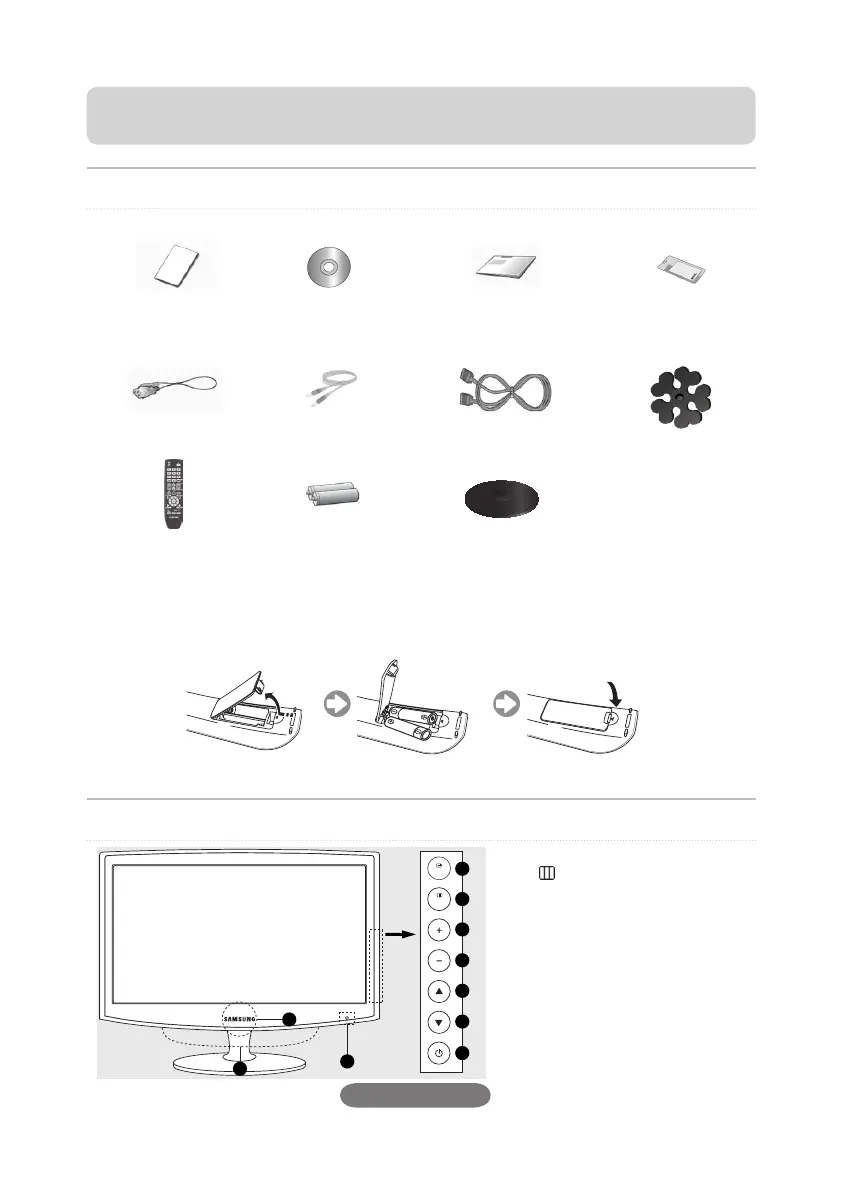
The Supplied Accessoris
If any items are missing, contact your dealer.
Warranty Card
(Not available in all
locations)
User's Guide Quick Setup Guide Cleaning Cloth
Power Cord Stereo Cable D-Sub Cable Cable holding ring
Remote Control Batteries (AAA X 2)
(Not available in all
locations)
Stand Base
Installing Batteries in the Remote Control N
Viewing the Control Panel
1
E
SOURCE
2
MENU
3
4
Adjusts the audio volume.
5
6
Press to change the channel.
7
P
(POWER)
8
Remote Control Sensor
9
Power indicator
0
Speaker
Contact SAMSUNG WORLDWIDE
If you have any questions or comments relating to Samsung products, please contact the SAMSUNG customer care
centre. (See back cover for more information.)
Book 1.indb 1 2009-06-25 �� 1:21:59




 To Next Page