Using the Product 3-4
Picture [ TV / AV / Component / HDMI ]
Picture Options • <Color Tone>
The tone of the color can be changed.
Available in <PC> / <DVI> mode only.
• <Cool> - <Normal> - <Warm> - <Custom>
• <R-Gain > - < G-Gain > - <B-Gain >
Adjusts the individual R, G, B (Red, Green, Blue) color controls.
• <Size>
You can switch the Size.
• <16:9> - <4:3>
Reset Picture parameters are replaced with the factory default values.
•<OK> - <Cancel>
MENU DESCRIPTION
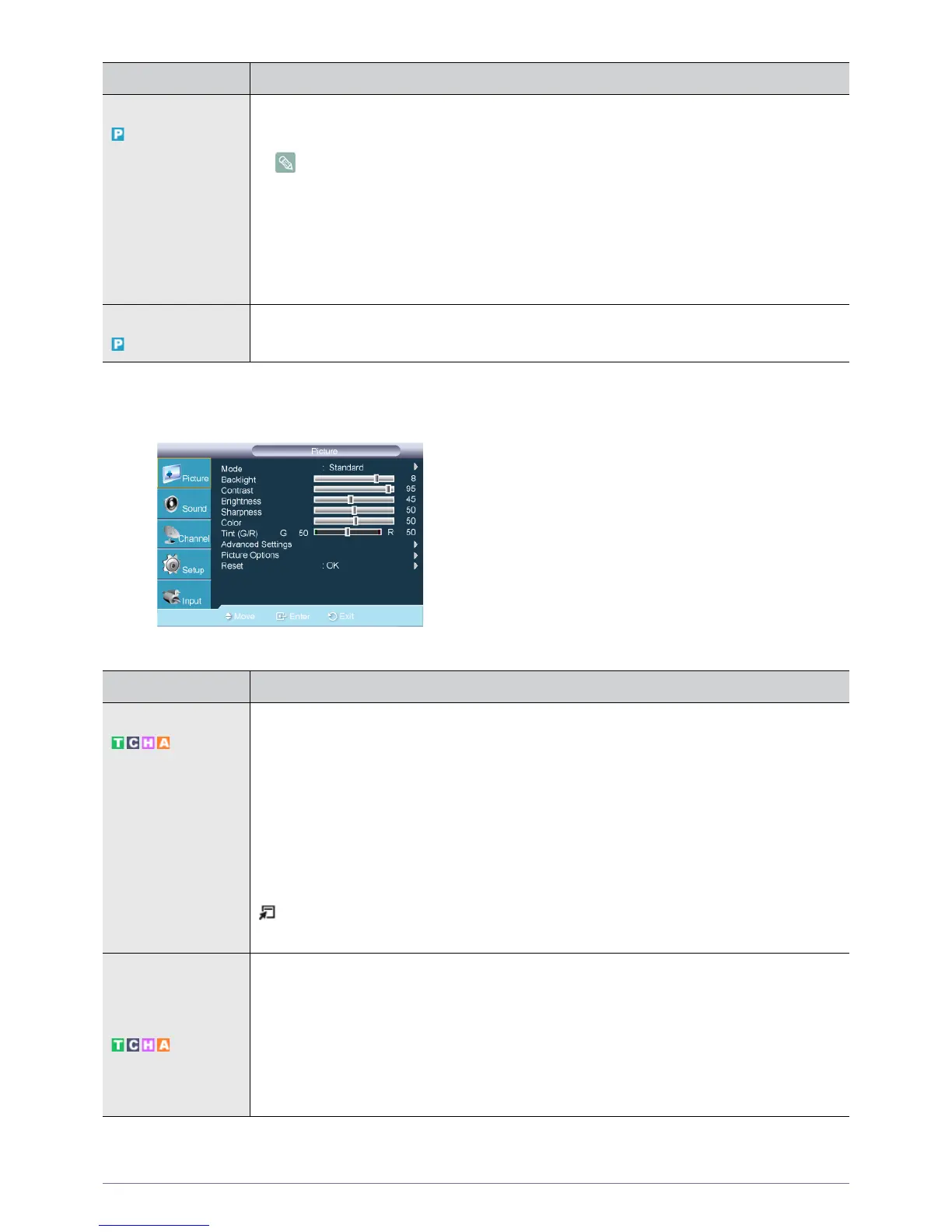
Mode The Monitor has three automatic picture settings (<Dynamic>, <Standard>, and <Movie>) that are
preset at the factory.
You can activate either <Dynamic>, <Standard>, or <Movie>.
• <Dynamic>
Selects the picture for high-definition in a bright room.
• <Standard>
Selects the picture for optimum display in a normal environment.
•<Movie>
Selects the picture for viewing movies in a dark room.
Press the [TOOLS] button to display the Tools menu. You can also set the <Picture Mode> by
selecting <Tools>
→<Picture Mode>.
Backlight / Contrast /
Brightness / Sharp-
ness / Color / Tint (G/
R)
Your television has several setting options that allow you to control the picture quality.
• <Backlight > - Adjusts the brightness of LCD back light.
• <Contrast> - Adjusts the contrast level of the picture.
• <Brightness> - Adjusts the brightness level of the picture.
• <Sharpness> - Adjusts the edge definition of the picture.
• <Color> - Adjusts color saturation of the picture.
• <Tint (G/R)> - Adjusts the color tint of the picture.
MENU DESCRIPTION









 To Next Page