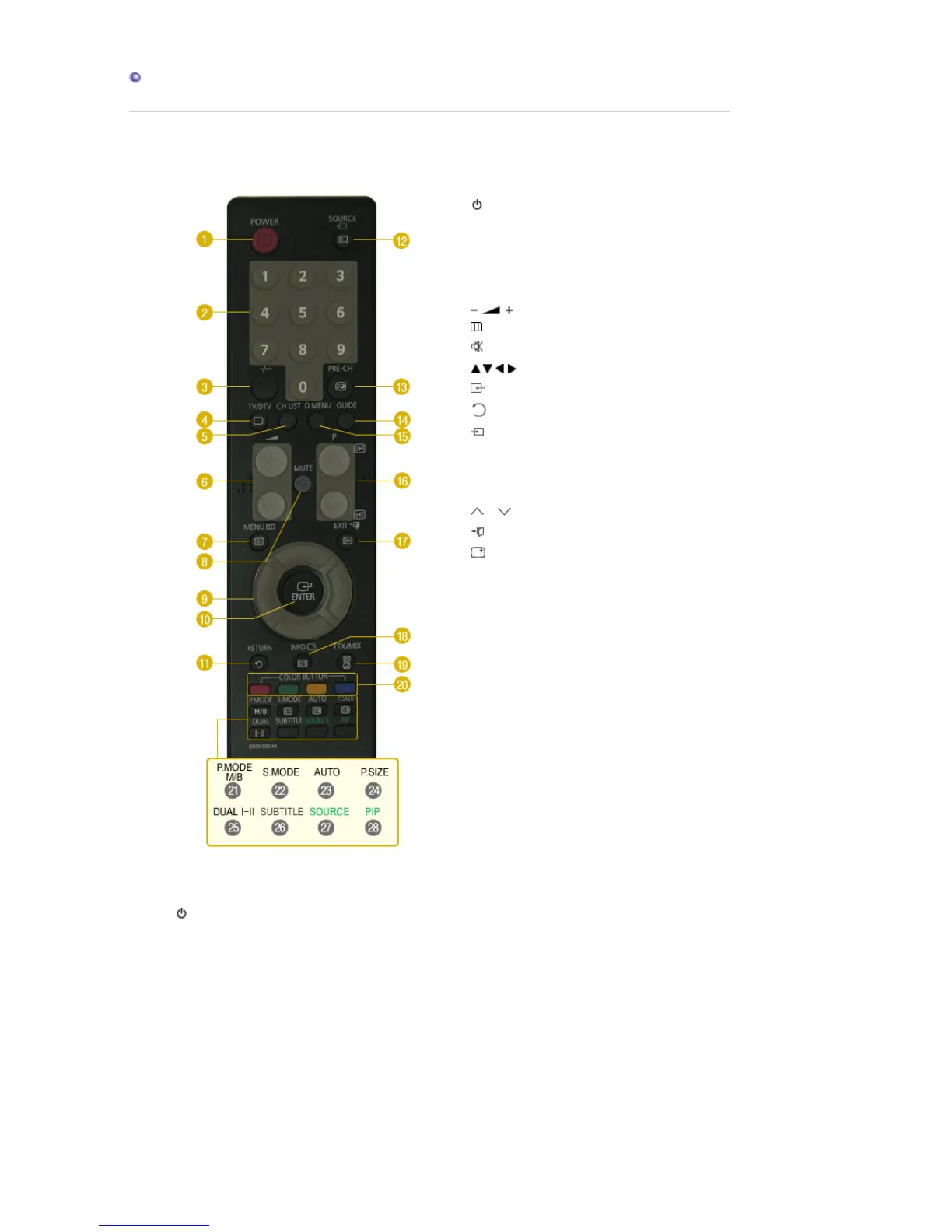
.
1.
POWER
2. Number button
3. -/--
4. TV/DTV
5. CH LIST
6.
7. MENU
8.
MUTE
9. Up-Down Left-Right buttons
10. ENTER
11.
RETURN
12.
SOURCE
13. PRE-CH
14. GUIDE
15. D.MENU
16. P
17.
EXIT
18.
INFO
19. TTX/MIX
20. COLOR BUTTONS
21. P.MODE, M/B (MagicBright™)
22. S.MODE
23. AUTO
24. P.SIZE
25. DUAL I-II
26. SUBTITLE
27. SOURCE
28. PIP
1. POWER
Turns the monitor On/Off.
2. Number button
Selects TV channels in the TV mode.
Used to change channels when PIP is selected and the PIP SOURCE is set to TV.
3. -/--
(One/Two-Digit channel selection)
Use to select a channel numbered ten or over.
Press this button, and the "--" symbol is displayed.
Enter the two-digit channel number.
4. TV/DTV
Selects the TV and DTV mode directly





 To Next Page