• The server program's Power-On option works only if the LCD Display's power is
completely shut off.
Please make sure not to use the Power-On option when the LCD Display is in the
process of shutting down since this may cause system errors on the LCD Display.
• When using MagicInfo with the MagicInfo Server Program: perform Network mode.
• When using MagicInfo with the device directly connected to LCD Display : execute
Device mode.
• Press ALT + ESC to directly go to the MagicInfo Window screen.
• To setup MagicInfo on a Windows screen, a keyboard and mouse are required.
• To setup MagicInfo on a Windows screen, refer to the MagicInfo Server Help.
It is highly recommended not to turn off the AC power during an operation.
• For pivoted LCD Displays, ticker transparency is not supported.
• For pivoted LCD Displays, a screen resolution of up to 720*480(SD) is supported
for movies.
• For drive D:, EWF is not applied.
• To save Setup contents that have been changed when EWF is in the Enable state,you
must Commit them.
• By selecting Disable, Enable or Commit, the system is restarted.
MagicInfo
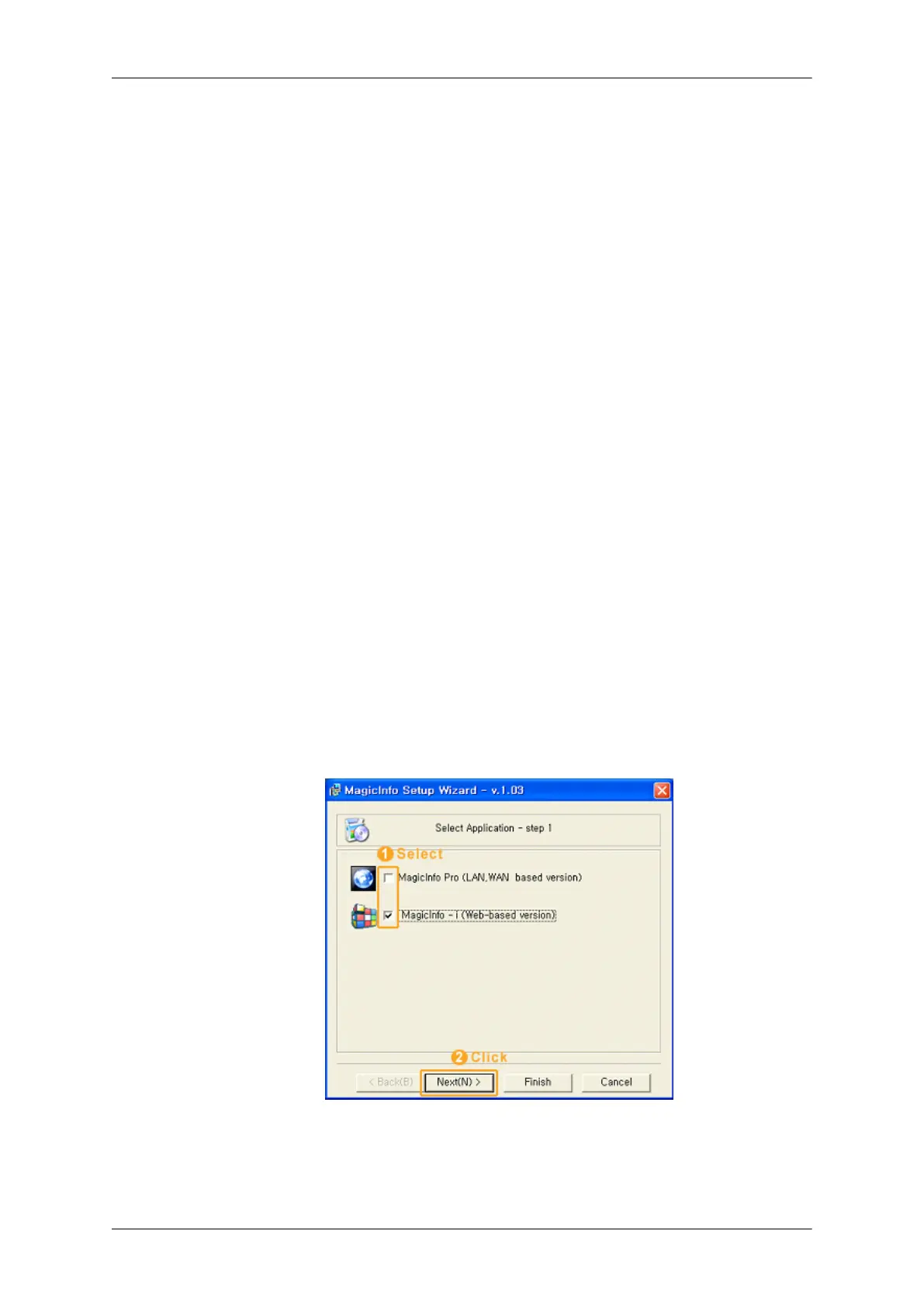
1. Select Application - step 1
You can select an Application to be executed in your computer when Windows starts.
2. Select TCP/IP - step 2
Adjusting the LCD Display
86







 To Next Page