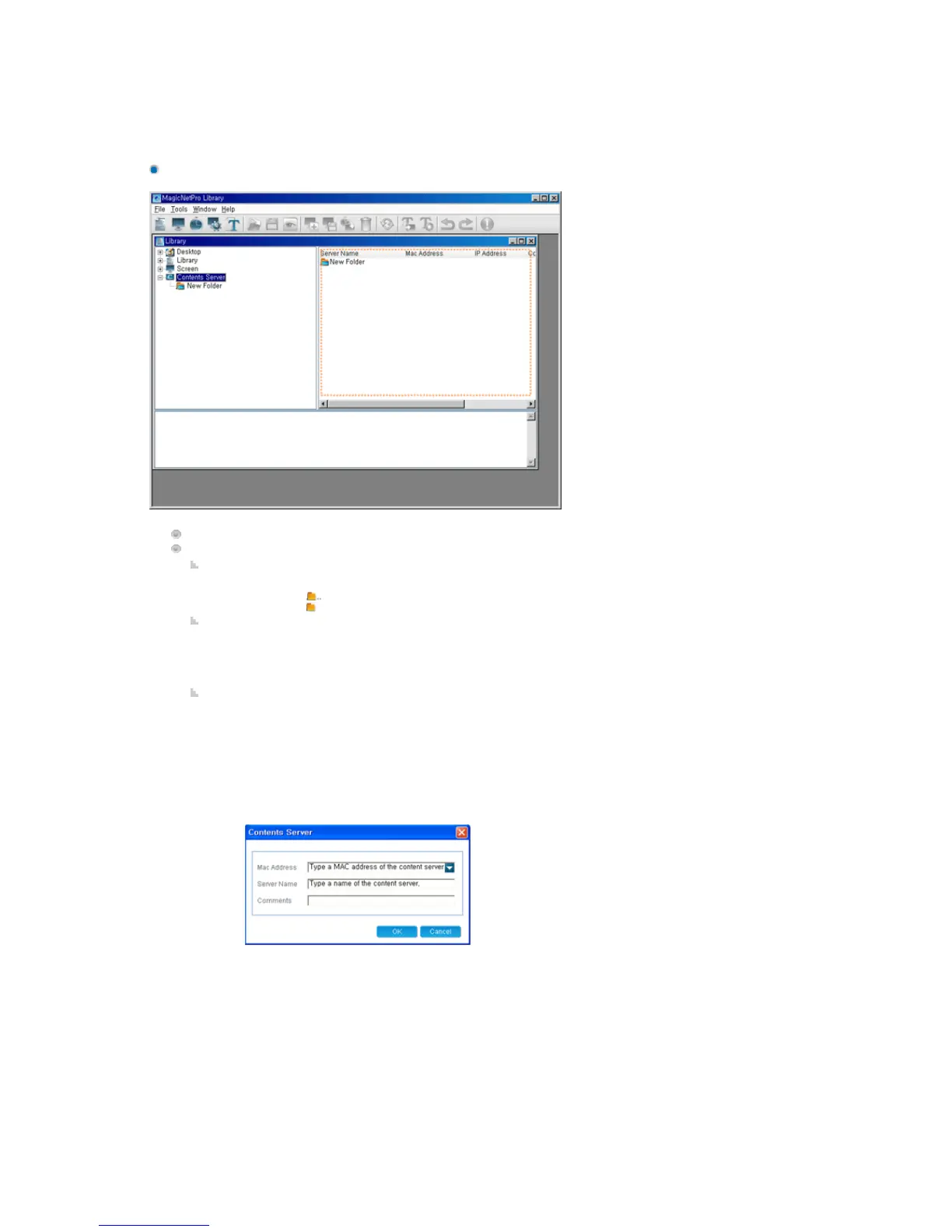
Exploring the Content Server
z F2 key: Renames the selected folder. However, you cannot rename a file.
z Delete key: Deletes the selected folders, subfolders, and screen files.
z Ctrl + X keys: Cuts the selected screen files to the clipboard so that you can paste them
to another location. However, this hot key is not supported for a folder.
z Ctrl + V keys: Pastes the screen files cut to the clipboard to the selected location.
Displays the subfolders and content servers below the selected folder.
Function:
Double-Click
z
Double-click to move to the upper folder.
z Double-click to move to the lower folder.
Drag & Drop
z
If
content servers to a content server folder in the tree view or the list
view, they are moved to that folder. However, the drag & drop function is not supported
for folders.
Context Menu
z
Open: If you click Open for a folder, you are moved to that folder. However, this menu
item is deactivated when a content server is selected.
z
New Server: Only activated when no folder or file is selected. You can enter the MAC
address, server name, and comments for a new server using this menu item.
- Mac Address: The MAC address of the newly created content server
- Server Name: The name of the newly created content server
- Comments: Comments about the newly created content server
z
New Folder: This is only activated when neither a folder nor a file is selected. If you
select this menu item, a new folder is created in the selected location.
z
Cut: Cuts the selected content servers to the clipboard so that you can paste them to
another location. However, this menu item is deactivated when a folder is selected.
z
Paste: Pastes the content servers cut to the clipboard to the selected location.
z
Rename: Renames the selected folder. However, for a content server, you can only
rename it using the Properties window.
z
Delete: Deletes the selected content servers and folders. However, if the selection
includes ".." which refers to a higher level folder, this menu item is deactivated.
z
Property: Allows you to edit the MAC address, server name, and comments for the
selected content server.






 To Next Page