Connect the [RGB/DVI/DP/HDMI AUDIO
IN] terminal of the monitor and the speaker
output terminal of your computer's sound
card using a stereo cable (sold separately).
DP IN
Receives a signal from the Display port.
Connect a DP cable to [DP IN] on the product
and DP IN on another display.
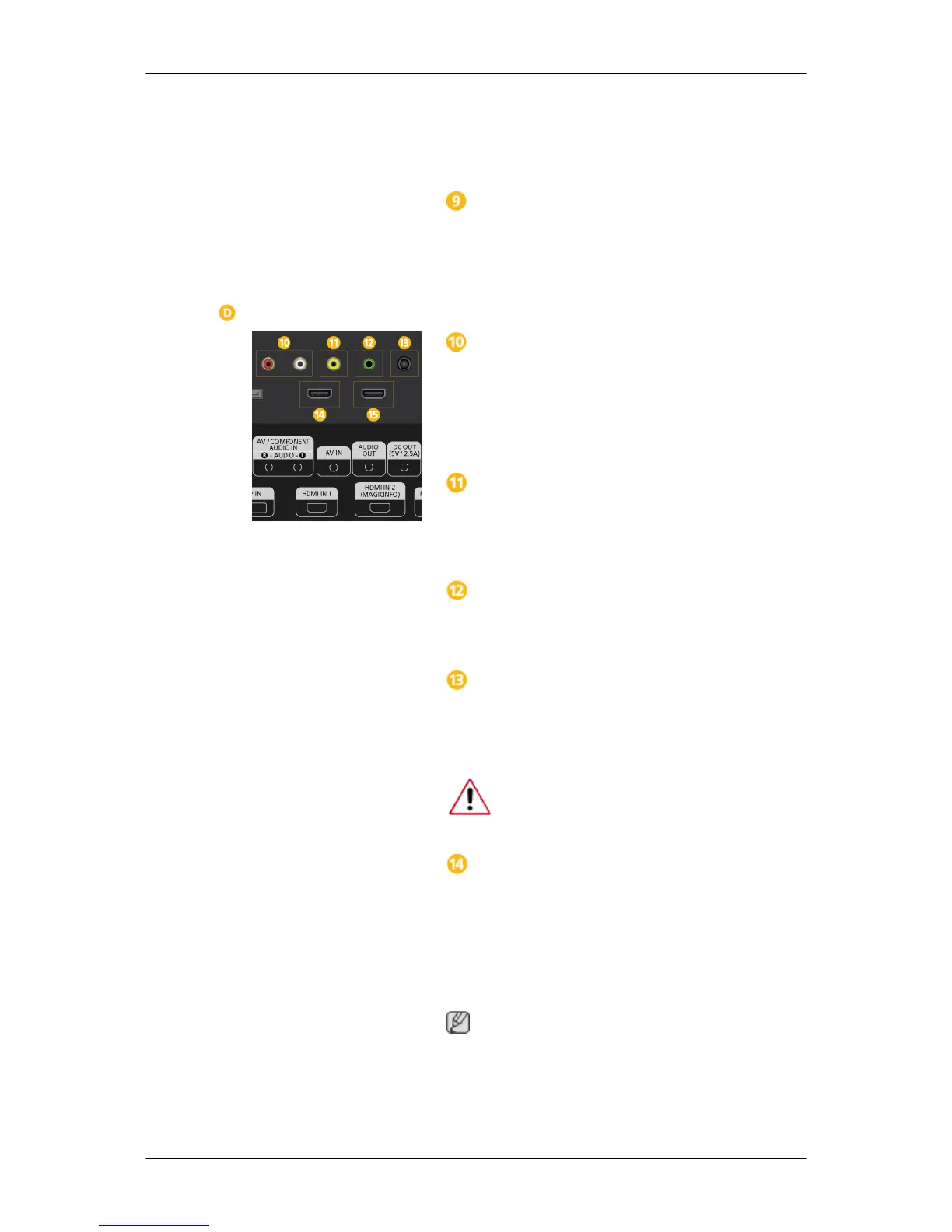
AV/COMPONENT AUDIO IN [R-AUDIO-
L]
Connect the [AV/COMPONENT [R-AUDIO-
L]] port on the monitor to the audio output
port on the PC or on the external device us-
ing an audio cable.
AV IN
Connect the [AV IN] terminal of your monitor
to the video output terminal of the external
device using a VIDEO cable.
AUDIO OUT
Connect a headphone or an External speak-
er.
DC OUT
Make sure to use connecting [DC OUT] ter-
minal to the authorized TV-Tuner Box.
(US Only)
Otherwise, this may result in damage
to the product.
HDMI IN 1
• Connect the [HDMI IN 1] terminal at the
back of your LCD Display to the HDMI
terminal of your digital output device us-
ing a HDMI cable.
• Up to HDMI 1.3 can be supported.
Note
• The [HDMI IN 1] port can be connected
to general external devices (DVD play-
ers, camcorders, etc.) or the TV set-top
box.
Introduction







 To Next Page