Using the Product 3-5
Application
Anynet+ (HDMI-CEC)
What is <Anynet+>?
<Anynet+> is a function that enables you to control all connected Samsung devices that
support <Anynet+> with your Samsung TV‘s remote. The <Anynet+ > system can be used only
with Samsung devices that have the <Anynet+> feature. To be sure your Samsung device
has this feature, check if there is an <Anynet+> logo on it.
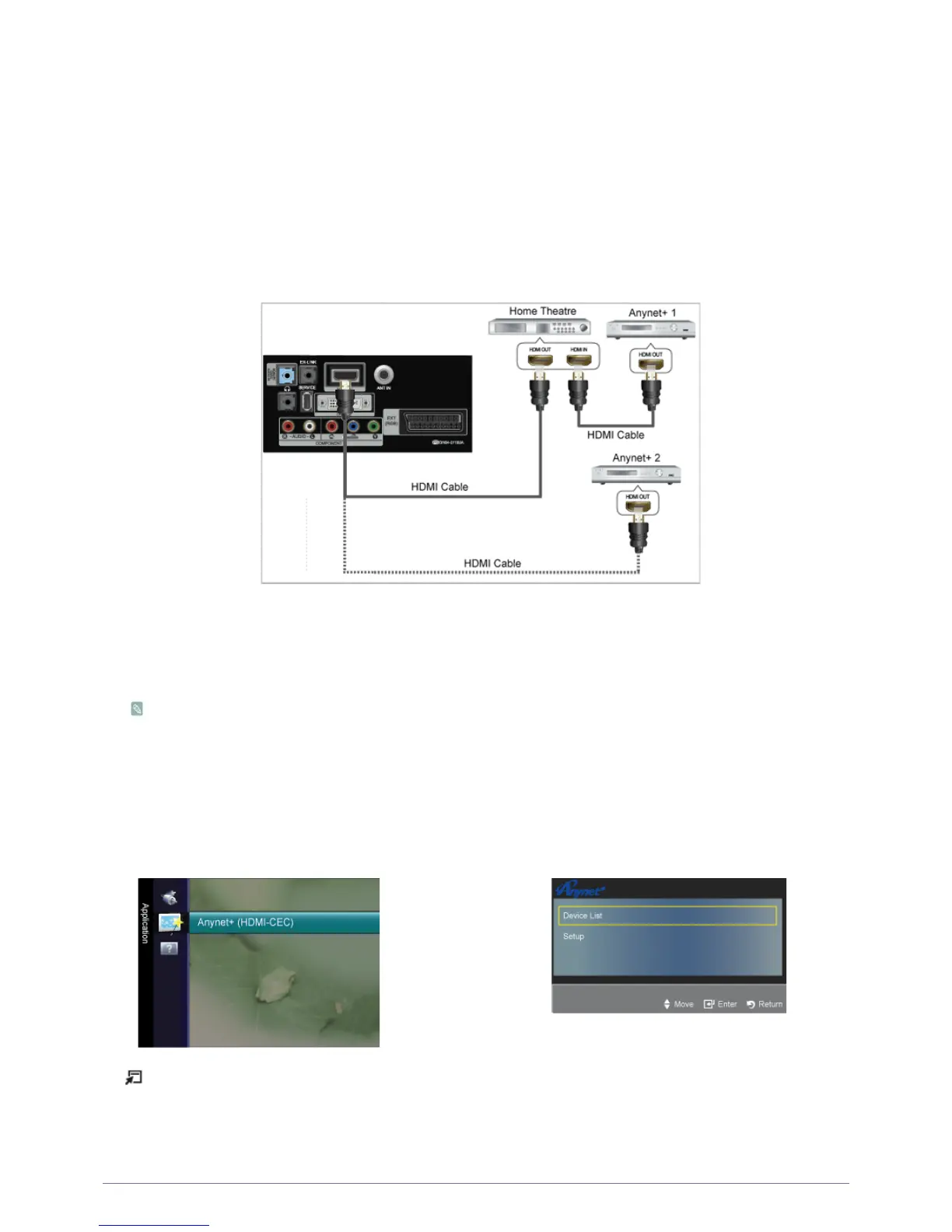
Connecting Anynet+ Devices
1. Connect the [HDMI IN] jack on the TV and the HDMI OUT jack of the corresponding <Anynet+> device using an HDMI
cable.
2. Connect the [HDMI IN] jack of the home theatre and the HDMI OUT jack of the corresponding <Anynet+> device using an
HDMI cable.
Connect only one Home Theatre.
Some HDMI cables may not support <Anynet+> functions.
<Anynet+> works when the AV device supporting <Anynet+> is in the Standby or On status.
<Anynet+> supports up to 10 AV devices in total. Note that you can connect up to 3 devices of the same type.
Setting Up Anynet+
Press the [TOOLS] button to display the Tools menu. You can also display the <Anynet+> menu by selecting <Tools> →
<Anynet+ (HDMI-CEC)>








 To Next Page