Using the Product 3-4
Setting Up Anynet+
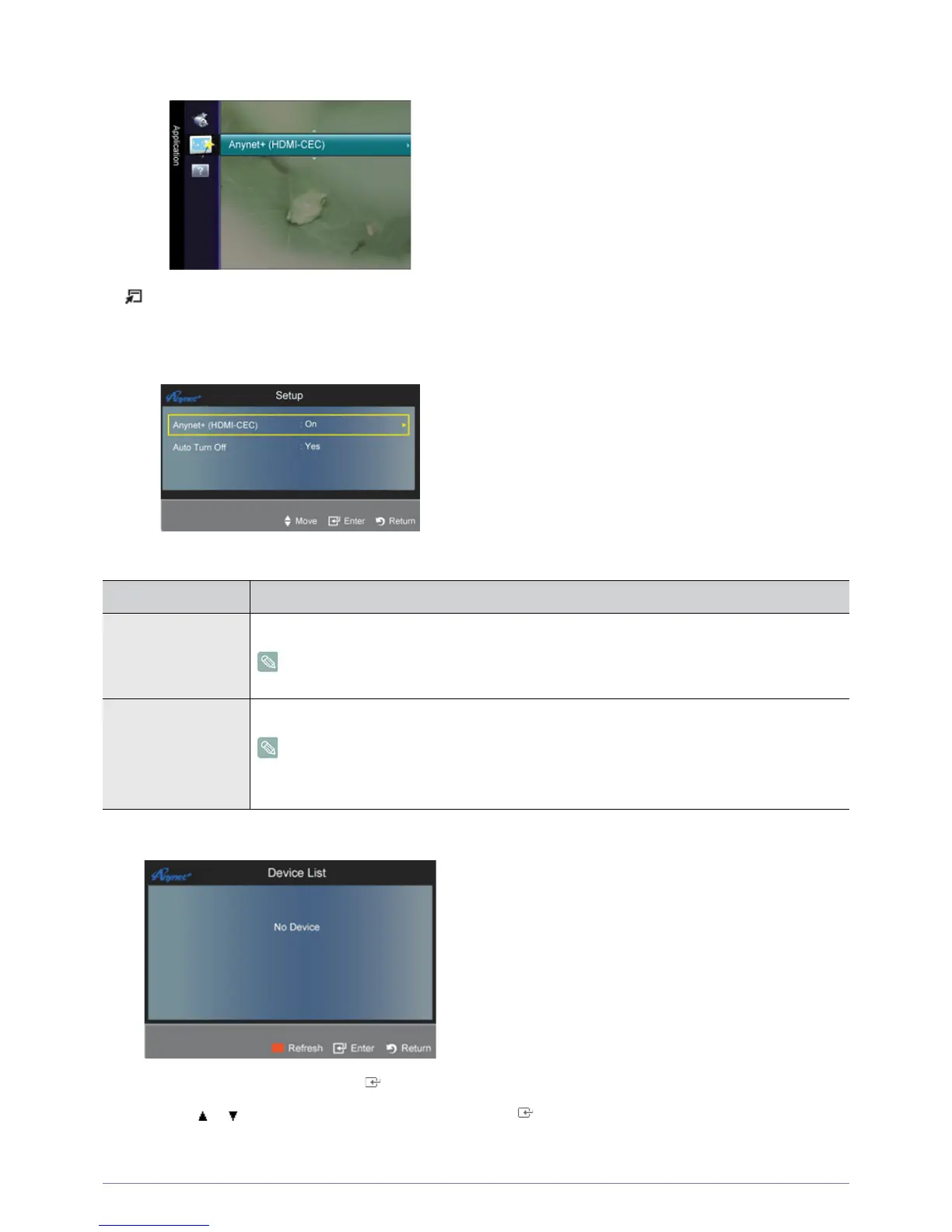
Press the [TOOLS] button to display the Tools menu. You can also display the <Anynet+> menu by selecting
<Tools>→<Anynet+ (HDMI-CEC)>
Setup
Device List
1. Press the [TOOLS] button. Press the [ ] button to select <Anynet+ (HDMI-CEC)>.
2. Press the or button to select <Device List>, then press the [ ] button.
- <Anynet+> devices connected to the TV are listed.
MENU DESCRIPTION
Anynet+ (HDMI-CEC) To use the <Anynet+> Function, <Anynet+ (HDMI-CEC)> must be set to On.
When the <Anynet+ (HDMI-CEC) >function is disabled, all the< Anynet+> related operations
are deactivated.
Auto Turn Off Setting an <Anynet+> Device to turn Off automatically when the TV is turned off.
The active source on the TV remote must be set to TV to use the <Anynet+> function.
If you set Auto Turn Off to Yes, connected external devices are also turned off when the TV is
turned off. If an external device is still recording, it may or may not turn off.










 To Next Page