4
•
Important
: Points out important information about
the current feature that could affect performance.
•
Warning
: Brings to your attention important
information to prevent loss of data or functionality or
even prevent damage to your phone.
Text Conventions
The following terms and icons appear in this
manual to describe the steps and procedures for
using your phone:
Setting Up Your Phone
Removing and Replacing the Battery
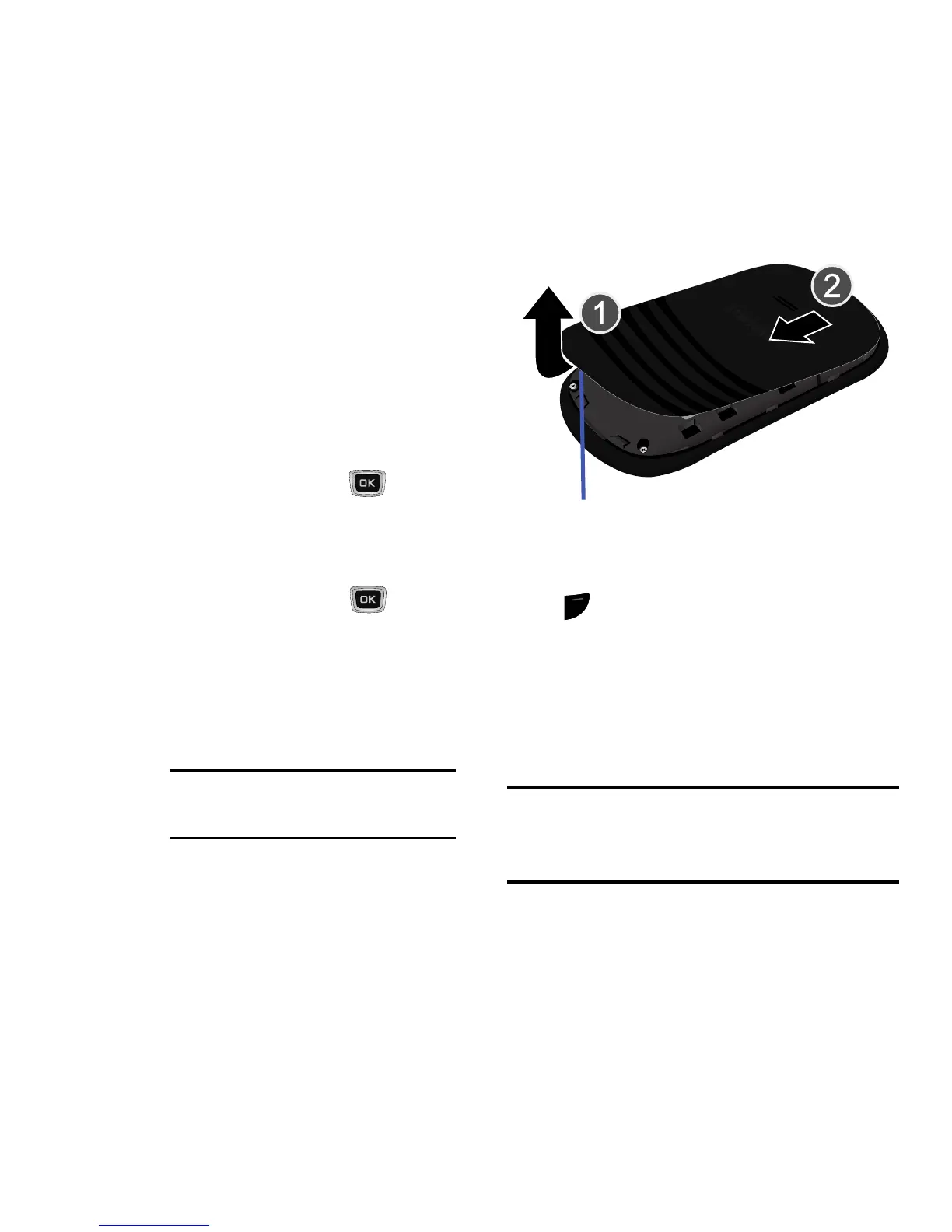
To remove the battery:
1. If the phone is turned on, press and hold
until the phone turns off.
2. Locate the release latch (1) and in a single
motion, carefully lift the cover up and away
from the phone (2).
3. Lift the battery up (3) and away from the
phone (4).
Warning!
Failure to unplug the travel adapter
before removing the battery can cause
damage to the phone.
highlight
Use the Navigation key ( ) to move
a highlighting effect onto a menu item
or screen item of interest.
select
After highlighting a menu item or
screen item, press the key
to launch, access, or save a
highlighted menu item or screen field
of interest.
➔ Used in place of “select” in long “drill-
down” procedure steps.
Example: Settings
➔
Personalize
➔
Language
.









 To Next Page