
 Need help?
Do you have a question about the Samsung VCC4135S37/BOL and is the answer not in the manual?
This document provides operating instructions for a Samsung vacuum cleaner, model VCC4135S37/BOL. It includes information in Bulgarian, Macedonian, and English.
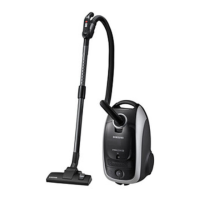
The Samsung VCC4135S37/BOL is a bag-type vacuum cleaner designed for indoor use. Its primary function is to clean dry surfaces by sucking up dust and debris. The vacuum cleaner features a power control (for volume type models) to adjust suction strength, a suction control for delicate fabrics, and a blower function for specific tasks. It also incorporates a self-resetting thermal cut-out that automatically shuts off the unit in case of overheating, preventing damage to the motor.
1. Assembling the Cleaner: * The document illustrates how to connect the hose, extension wand, and various nozzles. * Features may vary depending on the specific model. * For storage, the floor nozzle can be parked on the unit. * There is a designated area for tool storage.
2. Operating the Cleaner: * Power Cord: The power cord is retractable. To retract, pull the cord out 2-3 meters and then press the cord rewind button. When unplugging, always grasp the plug, not the cord, to avoid damage. * ON/OFF Switch: A simple push-button switch to turn the vacuum cleaner on or off. * Power Control (Volume Type Only): A rotary dial to adjust suction power from MIN (for delicate fabrics) to MAX (for hard floors and heavily soiled carpets). * Suction Control: An air vent slide on the hose handle allows for manual reduction of suction power, useful for cleaning draperies, small rugs, and other light fabrics. * Blower Function: The blower outlet is located on the left rear side of the cleaner. To use, disconnect the hose from the main body and connect the hose clamper to the blow hole.
3. Using Floor Tools: * Floor Nozzle: Standard nozzle for general floor cleaning. * Dusting Brush: Used for cleaning furniture, shelves, books, and other surfaces. * Crevice Tool: Designed for cleaning radiators, crevices, corners, and between cushions. For enhanced efficiency, the floor nozzle can be cleaned with the crevice tool. * Blanket Brush: Used for cleaning bedclothes or blankets. Accumulated pet hairs or threads on the brush can be cut off with scissors. * Transparent Drum Cover (Optional): Some nozzles have a transparent drum cover that can be detached for easier cleaning. * Specific accessories and features may vary by model.
4. Dust Bag Indicator Lights: * The vacuum cleaner has an indicator light that changes color when the dust bag is full, signaling that it needs to be replaced.
1. Changing the Dust Bag: * The document provides a four-step visual guide for replacing the dust bag. * Cloth Bag (Optional): If using a reusable cloth bag, it should be cleaned when full and can then be reused. * WARNING: The vacuum cleaner should not be operated without a dust bag fitted, as this can cause damage.
2. Cyclonic Filter (Only Cyclonic Filter Types): * This system allows for extended dust bag usage by separating larger dust particles into a dust barrel. * Cleaning the Dust Barrel: When the dust barrel is filled to the indicating line, it needs to be removed and cleaned. 1. Turn the dust barrel to the left and pull it out. 2. Disconnect the cyclonic filter from the extension wand and handle. 3. Remove any tangled threads or hair from the net. 4. After cleaning the dust barrel and cyclonic filter, reconnect the cyclonic filter with the extension wand and handle. Ensure washed parts are thoroughly dried in the shade before reassembly. 5. Push and turn the dust barrel to the right, aligning the indicating marks on the dust barrel and cyclonic filter.
3. Cleaning the Inlet Filter (Optional): * The document provides a four-step visual guide for cleaning the inlet filter. * NOTE: It is crucial to prevent the filter from becoming clogged, as this can reduce suction power and potentially damage the motor.
4. Troubleshooting: * Motor does not start: * Cause: No power supply, thermal cut-out. * Remedy: Check cable, plug, and socket. Allow the unit to cool if it was overheated. * Suction force is gradually decreasing: * Cause: Nozzle, suction hose, or tube is blocked. * Remedy: Remove the obstruction. * Cord does not rewind fully: * Cause: Cord is twisted or wound unevenly. * Remedy: Pull the cord out 2-3 meters and push down the cord rewind button. * Vacuum cleaner does not pick up dirt: * Cause: Crack or hole in the hose. * Remedy: Check the hose and replace if required.
 General
| Brand | Samsung |
|---|---|
| Model | VCC4135S37/BOL |
| Category | Vacuum Cleaner |
| Language | English |





 To Next Page