WEC8500/WEC8050 (APC) Operation Manual v10.1 220
©Samsung Electronics America
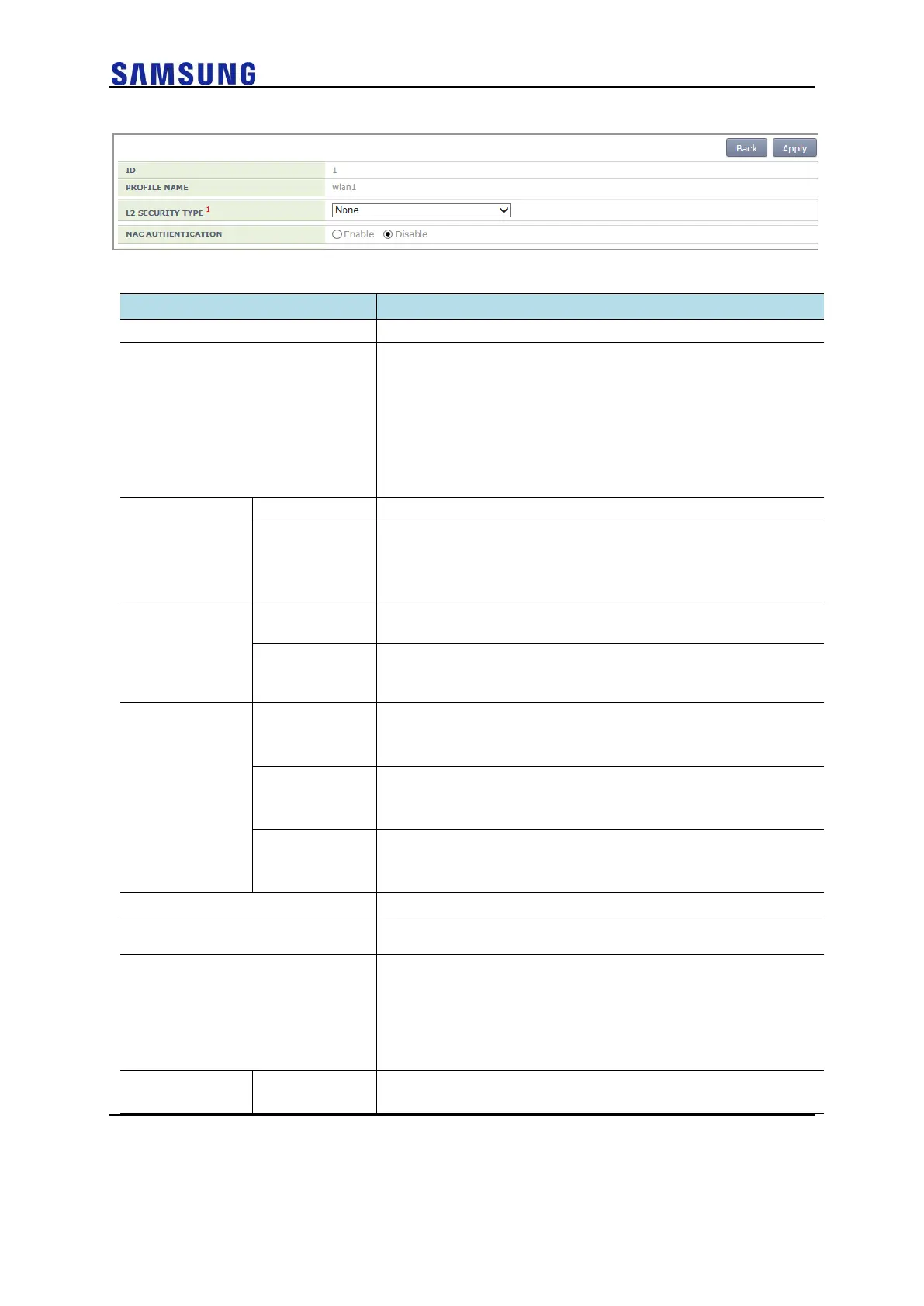
Figure 154. Initialization of WLAN Security Function
The configuration items available in the window are as follows.
A WLAN configuration name is displayed.
Layer2 security function type
• None: Security function disabled (Select this to initialize the WLAN
security function.)
• Static WEP: Static WEP security function
• 802.1x (Dynamic WEP): Dynamic WEP security function
• Static WEP + 802.1x (Dynamic WEP): Static/Dynamic WEP security
function
• WPA + WPA2: WPA/WPA2 PSK/802.1x security function
WPA Version 1 function is enabled when selected
Encryption type
• TKIP: TKIP type
• CCMP: AES-CCMP type
• Both: TKIP, AES-CCMP type
The WPA Version 2 function is always enabled and cannot be
changed.
The only supported encryption method is CCMP and this cannot be
changed.
• CCMP: AES-CCMP method
Authentication key management type
• PSK: PSK (shared key) authentication type
• 802.1x: 802.1x authentication type through a RADIUS server
PSK key input type
• ASCII: ASCII character string
• HEX: Hexadecimal value
PSK key
• 8-63 ASCII character string
• 64-characters of hexadecimal value
PMK effective time (unit: s, range: 0-1000000, default: 43200)
EAPOL REAUTHENTICATION
PERIOD
EAP re-authentication interval (unit: s, range: 0-100000, default: 0)
PROTECTED MANAGEMENT
FRAME
Protected management frames (802.11w) function
• Disabled: Disables the function
• Optional: Enables the function and allows connection even by
devices not using the function
• Required: Enables the function but allows connection only by
devices using the function
key input format
• ASCII: ASCII character string


 To Next Page