14_ setting up your new washing machine
STEP 2
Removing the shipping bolts
Before installing the washing machine, you must remove the three shipping bolts from the back
of the unit.
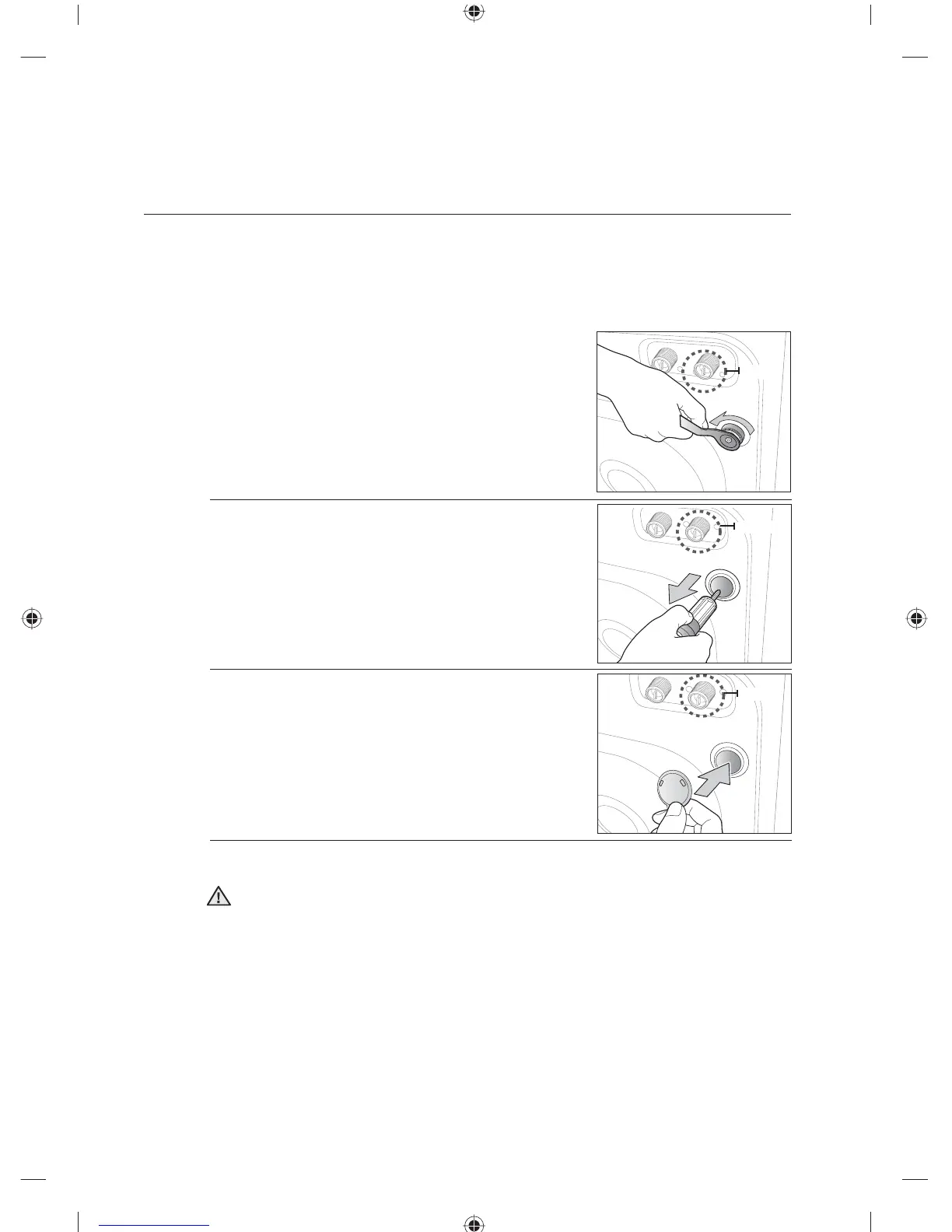
1. Loosen all the bolts with the supplied wrench.
2. Hold the bolt with the spanner and pull it through the wide
section of the hole. Repeat for each bolt.
3. Fill the holes with the supplied plastic covers.
4. Store the shipping bolts away safely in case you have to move the washing machine in the
future.
Packaging materials can be dangerous to children; keep all packaging material (plastic
bags, polystyrene, etc.) well out of the reach of children.
setting up your washing
machine
WARNING
Option
Option
Option
WF0702NCE-02824U_EN.indd Sec4:14WF0702NCE-02824U_EN.indd Sec4:14 2011-03-09 10:45:422011-03-09 10:45:42




 To Next Page