setting up your washing machine _13
01SETTINGUP
setting up your washing
machine
Be sure to have your installer follow these instructions closely so that your new
washing machine works properly and so that you’re not at risk of injury when doing
laundry.
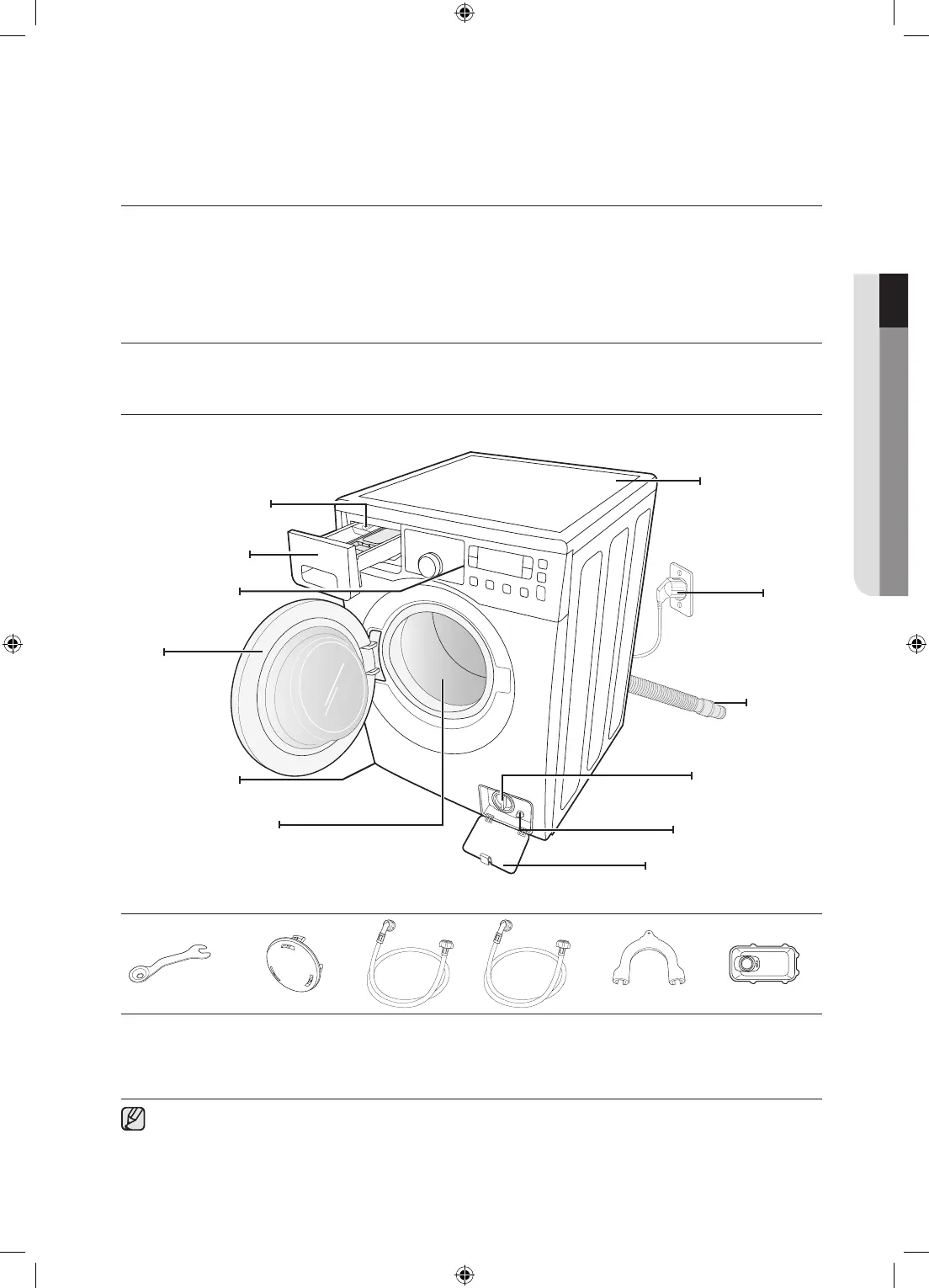
CHECKINGTHEPARTS
Carefully unpack your washing machine, and make sure you’ve received all of the parts shown below.
If your washing machine was damaged during shipping, or if you do not have all of the parts, contact
Samsung Customer Service or your Samsung dealer.
Spanner
*Bolthole
covers
Cold
Hot
(Selected
model)
Hoseguide
Liquid
detergentbox
(Selected
model)
Watersupplyhose
*Boltholecovers : The number of bolt hole covers depends on the model (3~5 covers).
Detergentdrawer
Controlpanel
Door
Levellingfeet
Worktop
Plug
Drainhose
Debrislter
Emergencydraintube
FilterCover
Tub
Releaselever
(Scout 2)WF0804W8N-02842G_EN.indd 13 2011-2-14 15:30:19



 To Next Page