
 Need help?
Do you have a question about the Samsung WMN750M/XC and is the answer not in the manual?
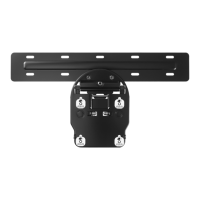
This document describes the Samsung Mini Wall Mount, a versatile mounting solution for LED, LCD, and PDP TVs ranging from 33 to 65 inches. The manual provides comprehensive instructions for both assembling the mount to the TV and installing it on a wall, ensuring a secure and aesthetically pleasing setup.
The primary function of this device is to securely mount a television to a wall, offering a sleek and space-saving alternative to traditional TV stands. It is designed to be compatible with a wide range of Samsung TV models across various years and series, including QLED, LED, and older PDP models. The mount supports multiple VESA patterns (200x200, 400x300, 400x400, 600x400), making it adaptable to different TV sizes and designs.
One of the key usage features of this wall mount is its flexibility in installation. The manual presents two distinct installation methods, labeled "I" and "II," which differ in the distance the TV sits from the wall. Method "I" results in a 17 mm (0.67 inch) gap between the TV and the wall, providing a very close-to-wall appearance. Method "II" creates a 40 mm (1.57 inch) gap, which can be useful for managing cables or if the TV has a slightly thicker profile. This choice allows users to select the optimal setup based on their aesthetic preferences and practical needs, such as cable management or access to ports.
The assembly process is broken down into two main stages: "Assembly to TV" and "Assembly to Wall."
This stage involves attaching the mounting brackets to the back of the television. The manual meticulously details the specific screws and components required for different TV models and series. For instance, it differentiates between curved and flat TVs, and provides guidance for various Samsung TV series from 2016 to 2019, including QLED, LED, and older models. The components are clearly labeled with codes like S-2, S-5, S-6, S-7, S-8, S-9, S-10, G, H, I, J, K, and L, each corresponding to a specific screw type, washer, or bracket. The instructions highlight the importance of using the correct screws (e.g., M8 x L35, M8 x L40, M8 x L30, M8 x L42, M8 x L64, M8 x L47, M8 x L55) to ensure a secure fit and prevent damage to the TV. Some TV models may also require a "Holder-Ring," which is typically supplied with the TV itself, indicating a thoughtful integration with the TV's original accessories. The visual aids, with clear diagrams showing where each component attaches to the TV's back panel, simplify the process for users.
This stage focuses on mounting the wall plate to the desired location on the wall. The manual provides detailed instructions for preparing the wall and securing the mounting hardware. It specifies the required distances between the wall mount components, with measurements provided in both millimeters and inches (e.g., 200 mm/7.88", 400 mm/15.75", 600 mm/23.62"). This ensures proper alignment and weight distribution.
A crucial usage feature is the distinction between concrete and wood walls. The manual provides separate instructions and hardware recommendations for each wall type, emphasizing safety and structural integrity. For concrete walls, users are instructed to drill holes and insert wall anchors (components B and D) before securing the wall plate (component A) with screws. For wood walls, the screws can be directly driven into the studs. The manual also specifies drill bit sizes and depths (e.g., 5 mm/0.2" for pilot holes, 9 mm/0.3" for anchors), ensuring precise installation. The inclusion of a "Mini wall mount" component (F) suggests a modular design, where multiple smaller mounting points are used to distribute the TV's weight evenly across the wall.
After the wall plate is secured, the TV, with its attached brackets, is carefully lifted and hooked onto the wall plate. The manual includes visual cues, such as "OK" and arrows, to guide users on how to properly engage the TV with the wall mount. It also illustrates how to adjust the TV's position horizontally after it's mounted, allowing for fine-tuning of its placement. The ability to tilt the TV slightly forward or backward, as shown in the diagrams, is another convenient usage feature, enabling users to optimize viewing angles and access rear ports for cable connections.
While the manual does not explicitly detail ongoing maintenance, the design of the mount implies certain maintenance-friendly aspects. The robust construction, with components like M8 screws and sturdy metal brackets, suggests durability and long-term stability. The clear instructions for proper installation, including the use of appropriate hardware for different wall types, are preventative maintenance in themselves, ensuring the mount remains secure over time. The ability to slightly pull the TV away from the wall (as depicted in the tilting diagrams) can facilitate access to cables and ports for occasional adjustments or cleaning, without requiring complete dismounting. The "Holder-Ring" for certain TV models also suggests a design that minimizes stress on the TV's mounting points, contributing to its longevity.
In summary, the Samsung Mini Wall Mount is a well-designed and user-friendly product that prioritizes secure installation, aesthetic integration, and practical functionality. Its detailed instructions, clear component labeling, and consideration for different TV models and wall types make it an accessible solution for anyone looking to mount their Samsung television.
 General
| Type | Wall Mount |
|---|---|
| Compatibility | Samsung TVs |
| Weight Capacity | 50 kg |
| VESA Standard | 200x200 mm, 400x400 mm |
| Color | Black |
| Brand | Samsung |
| Model | WMN750M/XC |
| Maximum Screen Size | 75 inches |
| Material | Metal |





 To Next Page