EasyManua.ls Logo

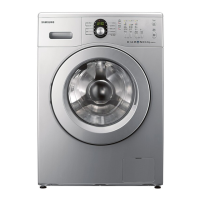
Samsung WW DG5 Series - User Manual

Samsung WW DG5 Series
68 pages
Print Icon
To Next Page IconTo Next Page
Loading...
Washing Machine
User manual
WW**CGC*****/WW**DG5*****
Untitled-16 1 2024-01-05  12:28:13

Questions and Answers

  • M
    Monica SanchezAug 10, 2025
    How to fix a Samsung WW DG5 Washer that does not start?
    • S
      Sarah WatsonAug 10, 2025
      If your Samsung Washer isn't starting, here are a few things to check: * Ensure the washing machine is properly plugged in. * Verify that the door is completely closed. * Confirm that the water taps are fully open. * Press the Start/Pause button to initiate the cycle. * Deactivate Child Lock if it's enabled. * Be aware that the washer makes clicking noises and does a quick drain before filling. * Examine the fuse or reset the circuit breaker.
  • E
    Emily SweeneyAug 17, 2025
    What to do if Samsung WW DG5 has insufficient water supply?
    • C
      Chad AdamsAug 17, 2025
      If your Samsung Washer isn't getting enough water, consider the following: * Make sure the water tap is fully open. * Ensure the door is properly closed. * Check that the water supply hose isn't frozen, kinked, or clogged. * Confirm that there's sufficient water pressure.
  • T
    Tabitha JenkinsAug 25, 2025
    Why is my Samsung WW DG5 Washer vibrating excessively and making noise?
    • A
      Anthony AustinAug 26, 2025
      If you notice excessive vibrations or noise coming from your Samsung Washer, here are some potential causes and solutions: * Ensure the washer is on a level, solid, and non-slippery floor. Adjust the leveling feet if needed. * Verify that the shipping bolts have been removed. * Make sure the washer isn't touching any other objects. * Check that the laundry load is balanced. * Be aware that the motor can cause noise during normal operation. Also, overalls or metal-decorated clothes and metal objects like coins can cause noise during washing.
  • R
    robert97Sep 2, 2025
    What to do if detergent remains in the detergent drawer after cycle in Samsung Washer?
    • M
      Michelle AndersonSep 2, 2025
      If detergent remains in the detergent drawer of your Samsung Washer after a cycle, consider these points: * Ensure the washing machine is running with sufficient water pressure. * Add detergent to the center of the detergent drawer. * Make sure the rinse cap is properly inserted. * If using granular detergent, position the detergent selector to the upper setting. * Try removing the rinse cap and cleaning the detergent drawer.

Summary

Safety Information

Understanding Safety Instructions

Key information about operating the appliance safely.

Important Safety Precautions

Essential precautions to reduce risks during use.

Critical Installation Warnings

Critical warnings specifically related to appliance installation.

Critical Usage Warnings

Critical warnings to follow during appliance operation.

Installation

Installation Requirements

Details electrical, water supply, and drain requirements.

Step-by-Step Installation Guide

Detailed instructions for installing the appliance.

Before You Start

Operations

Control Panel Overview

Explanation of the washing machine's control panel features.

Troubleshooting

Common Problems and Solutions

Table of common issues and suggested actions.

Information Codes and Error Messages

Explains error codes displayed on the screen and their solutions.

Samsung WW DG5 Series Specifications

General IconGeneral
BrandSamsung
ModelWW DG5 Series
CategoryWasher
LanguageEnglish

Related product manuals