Need help?
Do you have a question about the SANEI ELECTRIC SK1-211 and is the answer not in the manual?
Explains safety symbols used in the manual for equipment safety and damage prevention.
Lists precautions for operating the printer to prevent failure or damage.
Details critical safety warnings for handling the printer unit, adapter, and power cord.
Provides cautions for handling the thermal head and general printer operation to prevent minor damage.
Details the importance of using specified paper and substances to maintain thermal head life.
Provides guidelines for proper storage of thermal paper to maintain its quality and prevent degradation.
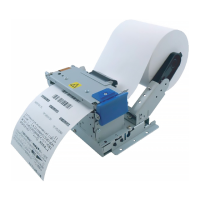
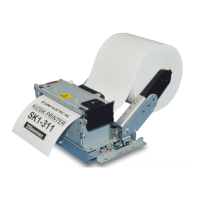
Introduces SK1-211 and SK1-311 open frame printers, highlighting their design and application versatility.
Lists key features of the SK1 printers, including speed, sensors, paper handling, and durability.
Explains the product numbering system for SK1-311, detailing options, barcode, and series.
Details the product numbering system for SK1-211, covering options, barcode, and series.
Recommends specific paper types and lists available printer options for SK1-211/311 models.
Illustrates and labels the external components and features of the SK1 printer.
Identifies and describes the main internal components of the printer, such as the thermal head and auto cutter.
Provides step-by-step instructions and illustrations for loading a paper roll into the printer.
Explains how to adjust the paper near-end sensor for different paper roll diameters.
Details changing the 1-inch core adapter and adjusting paper position for various roll diameters.
Provides a step-by-step guide on how to safely remove jammed paper from the printer.
Compares the detailed specifications of SK1-311 and SK1-211 models, covering printing and interfaces.
Details the operating and storage environment requirements and specifications for paper compatibility.
Explains the operation of the paper-end sensor, head open sensor, and thermistor for printer monitoring.
Illustrates printable area, margins, and print head/cutter positions based on paper width.
Details the location and distance from paper edge for various sensors on the SK1-311 model.
Details the location and distance from paper edge for various sensors on the SK1-211 model.
Discusses paper feeding mechanisms, potential issues like backlash, and paper cut behavior.
Provides detailed external dimensions for the SK1-311 model, including connector information.
Shows external dimensions for different paper roll diameters (83mm and 120mm).
Presents detailed external dimensions for the SK1-211 model, including connector information.
Displays external dimensions for the SK1-311 model with 83mm and 120mm paper rolls.
Explains how to perform a self-test print to verify printer functionality and displays sample output.
Describes how to print data in hexadecimal format for debugging or analysis purposes.
Details how to enter and navigate the function setting mode to configure printer parameters.
Lists common settings, interface settings, memory switch configurations, and voltage details.
Provides a flowchart illustrating the process of changing printer parameters via the memory switch.
Details the options and descriptions for common settings configurable via the memory switch.
Lists and explains the configurable interface settings, including baud rate and parity.
Explains how to adjust printing density based on paper type for optimal print quality and head life.
Describes the meaning of the STATUS LED lights and blinks for different operational states and errors.
Details LED indications for auto-recovery and unrecoverable errors, including voltage and cutter issues.
Outlines the structure of the printer's memory, including input buffer and user memory capacity.
Describes the different bezel operating modes (A, B, C) and their functions related to ticket handling.
Lists the specifications for the presenter function, including operating modes and speed.
Explains the Clamp/Retraction/Eject and Continuous operating modes for the presenter.
Specifies the required stock space for paper rolls and the retraction box at the exit.
Details the USB interface pin layout, version, device class, and electronic characteristics.
Describes the serial interface pin layout, recommendable plugs, and communication conditions.
Explains hardware and software control methods (RTS/CTS, XON/XOFF) for serial communication.
Details the pin layout and function for the power supply connector, including peak current considerations.
Guides on setting up label printing, including memory switch configuration and sensor sensitivity.
Explains intermittent and continuous label modes and their usage.
Covers media setting for labels and recommends designing black marks for receipt printing.
Lists requirements for label paper, including dimensions, black mark size, and density.
Defines the printing area and margins for labels, considering sensor and feed tolerances.
Provides instructions for cleaning the print head, platen roller, and sensors to maintain print quality.
Offers contact information for maintenance, service, and troubleshooting assistance from Sanei Electric.
Lists commands for controlling paper feed and line feed operations in standard and page modes.
Details commands for setting format, margins, character size, and modification.
Explains commands for bit image operations and page mode settings.
Covers commands for peripheral equipment, status responses, and printer ID.
Lists commands for registering and managing print images in non-volatile memory.
Details commands for drawing ruled lines and setting various printer functions.
Covers commands for barcode generation, 2D barcode, and label printing setup.
Lists commands specific to controlling presenter operations and error factors.
Presents character code tables (PC437, KATAKANA, PC850) for data mapping.
 General
| Print Method | Thermal Transfer |
|---|---|
| Print Resolution | 203 dpi |
| Display | LCD |
| Print Speed | 20 mm/sec |
| Label Material | Thermal paper |
| Interface | USB |

 To Next Page