EasyManua.ls Logo

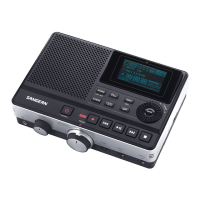
Sangean DAR-101 - User Manual

Sangean DAR-101
42 pages
Print Icon
To Next Page IconTo Next Page
Loading...
Version 1
中文
GB
DAR-101

Other manuals for Sangean DAR-101

Question and Answer IconNeed help?

Do you have a question about the Sangean DAR-101 and is the answer not in the manual?

Summary

Important Safety Instructions

Controls and Connections Overview

Battery Operation

Using the AC Adaptor

Charging the Batteries

Setting the Clock and Date

Setting the Clock Time

Steps to set the device's clock to 12 or 24-hour format.

Setting the Date

Preparing for Recording

Inserting and Removing SD Cards

Instructions for inserting and removing SD cards from the device.

Preparing an SD Card for Use

Preparing Recording Inputs

Recording with Built-in Microphone

Using the device's internal microphones for recording.

Recording with External Microphone

Connecting and using external microphones for recording.

Recording from External Device (LINE IN)

Connecting audio sources via the LINE IN jack for recording.

Recording Telephone Calls

Connecting a telephone for recording calls.

Adjusting Recording Input Level

Setting Microphone Sensitivity

Adjusting input gain (Mic Gain) for optimal recording.

Adjusting Recording Level

Adjusting Input Volume and Balance

Adjusting input volume and left/right balance for recording.

Music Mode Recording

Steps for Music Mode Recording

Detailed steps to record audio in Music mode using various inputs.

Recorded File Naming Convention

Playback Operations

Listening to and Deleting Audio Files

Navigating, playing, and deleting audio files from the SD card.

Controlling Playback

Playback Modes

Repeat File within Section A-B

Reminder Mode

Recording Voice Notes

Recording voice notes in Reminder mode.

Playback in Reminder Mode

Playing back recorded voice notes in Reminder mode.

Telephone Mode Recording

Setting Up Telephone Call Recording

Steps to connect and prepare the device for recording telephone calls.

Other Recording Setup Options

Setting Recording Quality

Adjusting the bit rate for recording quality (64/128/192 kbps).

Automatic Save Feature

Recording with Timer Record

Recording Monitor Function

VAR Function (Voice Activated Recording)

Timer Play Function

Using the REMOTE Jack

Advanced Settings and Information

Adjusting Contrast and Backlight

Adjusting LCD contrast and brightness settings on the device.

Power Saving Settings

Software Version Information

System Reset Procedure

Headphone Socket

Digital Output Function

Software Upgrade Process

Technical Specifications

Sangean DAR-101 Specifications

General IconGeneral
Impedance8 Ω
Built-in microphoneYes
Maximum recording time- h
Audio formats supportedMP3, WMA
Media types supportedFlash card
Compatible memory cardsMMC, SD, SDHC
Number of built-in speakers1
Display typeLCD
Display size (HxV)60 x 29 mm
InterfaceUSB
Weight and Dimensions IconWeight and Dimensions
Depth131 mm
Width180 mm
Height51 mm
Weight541 g

Related product manuals