Need help?
Do you have a question about the Sangean DDR-47BT and is the answer not in the manual?
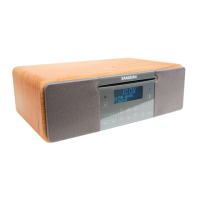
Details buttons and indicators on the unit's front.
Details all input/output sockets on the rear.
Explains buttons on the remote control.
Lists and describes the unit's display indicators.
Instructions for replacing batteries in the remote.
How to use the touch-sensitive controls.
Specific functions unique to the remote.
Guides users through initial power-on and setup.
Explains controlling the radio via Bluetooth apps.
Basic DAB tuning and station selection.
Detailed steps for tuning to specific DAB stations.
Accessing additional services linked to DAB stations.
Explains various information displayed during DAB listening.
How to scan for newly available DAB stations.
Direct tuning to DAB channels by frequency.
Adjusting sound compression for noisy environments.
Removing unavailable stations from the list.
Viewing the installed software version for DAB.
Automatic scanning for FM stations.
Direct tuning to FM stations.
Switching between stereo and mono reception.
Explains various information displayed during FM listening.
Storing favorite DAB and FM stations.
Accessing stored stations.
Displays the installed system software version.
Guidelines for using and caring for CDs.
How to insert a disc into the player.
Starting, pausing, and stopping CD playback.
Navigating and selecting tracks on a CD.
Functions like search, repeat, random play.
Creating custom playback sequences.
Information on playing MP3/WMA CDs.
Steps to play MP3/WMA files.
Navigating and selecting files.
File navigation and playback options.
General information on SD/USB compatibility.
Playing audio files from external media.
Navigating and selecting files on SD/USB.
File navigation and playback options.
How to record audio to external media.
Information on file structure and stopping recording.
Recording audio files in MP3/WMA format.
Removing files or formatting media.
Procedure for erasing all content from media.
Steps to establish a Bluetooth connection.
How to stream audio via Bluetooth.
Steps to end the Bluetooth connection.
Manually setting the time and date.
Configuring alarm times, modes, and days.
How to stop or delay an active alarm.
Setting the unit to turn off automatically.
Adjusting display brightness in standby.
Selecting preset sound modes.
Adjusting high-frequency sound.
Adjusting low-frequency sound.
Temporarily silencing the audio output.
Connecting external audio sources.
Outputting audio to external amplifiers.
Connecting headphones and muting speakers.
Instructions for removing the telescopic aerial.
Adjusting the responsiveness of the touch panel.
Restoring the unit to factory default settings.
Information on charging devices via USB.
How to update the unit's firmware.
Important safety warnings and usage advice.
Detailed technical data of the unit.
 Power
Power| power requirement | Mains AC 230 volts, 50 Hz |
|---|---|
| battery for remote control | 2 x AAA |
 Frequency Coverage
| FM frequency coverage | 87.5-108 MHz |
|---|---|
| DAB frequency coverage | 174.928-239.200 MHz |
| Bluetooth frequency coverage | 2.4 - 2.485 GHz class-II |
Circuit Features| output power | 2x7 watts |
|---|---|
| headphone socket diameter | 3.5mm |
| auxiliary in socket diameter | 3.5mm |
| line out socket diameter | 3.5mm |

 To Next Page