Need help?
Do you have a question about the Sangean DT-110 and is the answer not in the manual?
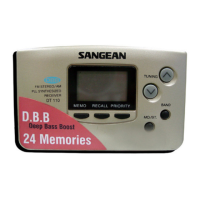
The primary button to turn the radio on and off.
The screen that shows station frequency, settings, and status.
Button to decrease the frequency or tune to lower stations.
Button to increase the frequency or tune to higher stations.
Located on the back, this is where batteries are inserted.
Used for storing and recalling preset radio stations.
Button to access previously saved radio stations.
Button to recall favorite or priority stations.
Selects FM stereo or mono reception for better sound.
Switches between AM and FM broadcast bands.
Information on memory limits, station replacement, and full memory status.
 General
| Type | Portable Radio |
|---|---|
| Tuning | Digital |
| Display | LCD |
| Headphone Jack | Yes |
| Clock | Yes |
| Frequency Range FM | 87.5 - 108 MHz |
| Speaker | Built-in |

 To Next Page