9.
REPLACEMENT
OF
MAIN
PARTS
<
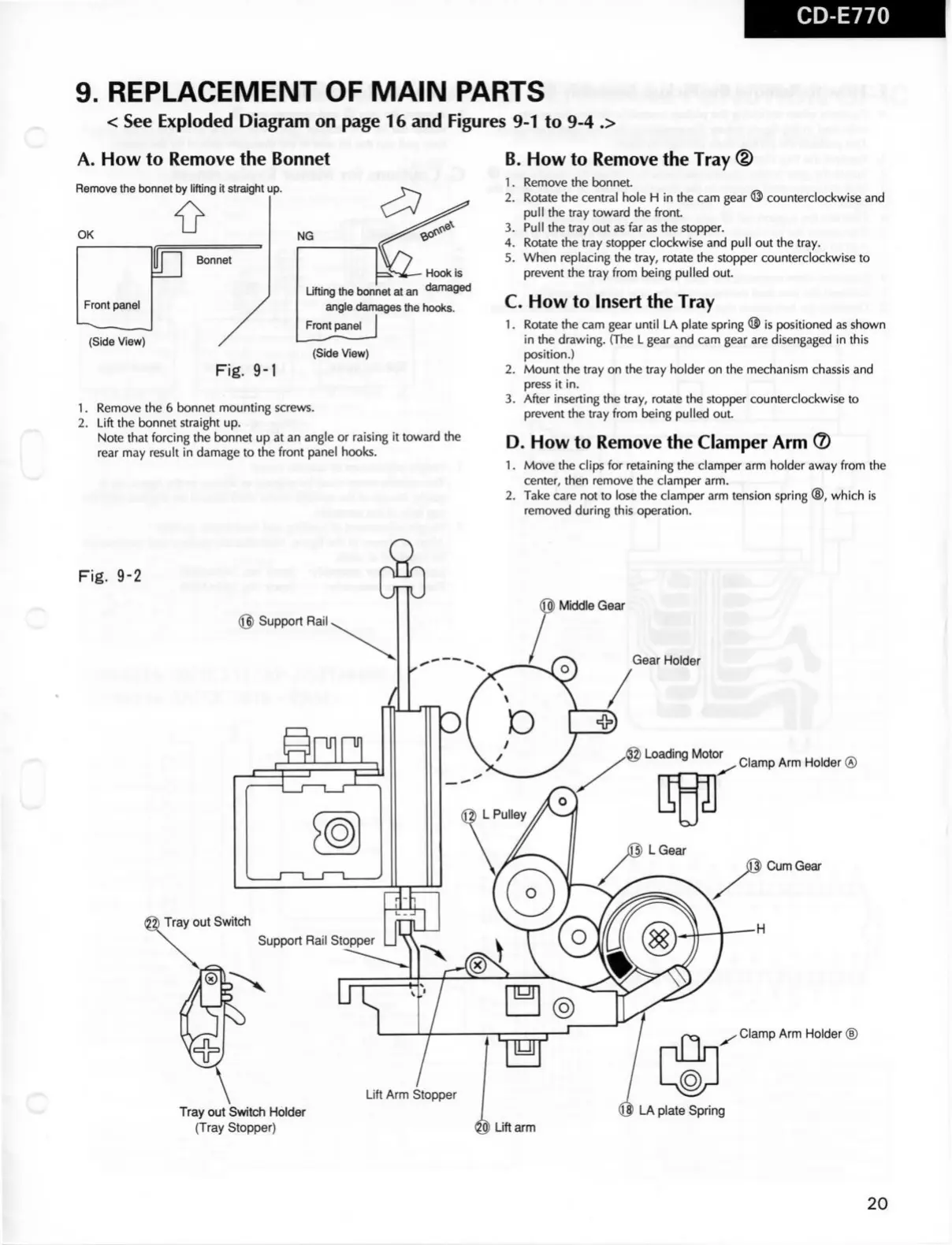
See Exploded Diagram on page 16 and Figures 9-1 to 9-4 .>
A.
How to Remove the Bonnet
Remove
the bonnet by
lifting
it straight up.
OK
Bonnet
Front panel
(Side
View)
Hoek is
Lifting the bonnet at an ^amaged
angle damages the hooks.
Front panei
Fig.
9-1
(Side
View)
1.
Remove the 6 bonnet
mounting
screws.
2.
Lift the bonnet straight up.
Note
that
forcing the bonnet up at an angle or raising it toward the
rear
may result in damage to the
front
panel hooks.
I
counterclockwise and
B.
How to Remove the Tray ®
1.
Remove the bonnet.
2.
Rotate the central hole H in the cam gear ^
pull
the tray toward the
front.
3.
Pull the tray out as far as the stopper.
4.
Rotate the tray stopper clockwise and
pull
out the tray.
5.
When replacing the tray,
rotate
the stopper counterclockwise to
prevent the tray
from
being pulled out.
C.
How to Insert the Tray
1.
Rotate the cam gear
until
LA plate spring ® is positioned as shown
in the drawing. (The L gear and cam gear are disengaged in this
position.)
2.
Mount
the tray on the tray holder on the mechanism
chassis
and
press
it in.
3.
After inserting the tray,
rotate
the stopper counterclockwise to
prevent the tray
from
being pulled out.
D. How to Remove the Clamper Arm ®
1.
Move the clips for retaining the clamper arm holder away
from
the
center, then remove the clamper arm.
2.
Take
care not to lose the clamper arm tension spring ®, which is
removed
during
this operation.
Fig.
9-2
@
Support Rail
Middle
Gear
Gear
Holder
Clamp Arm Holder ®
Cum
Gear
Clamp Arm Holder ®
Tray out Switch Holder
(Tray Stopper) Lift arm
20


 To Next Page
 Loading...