Page | 9 © Sansui UK 2012 CDD201V IB Ver 1.0 Rev 0.0
Display
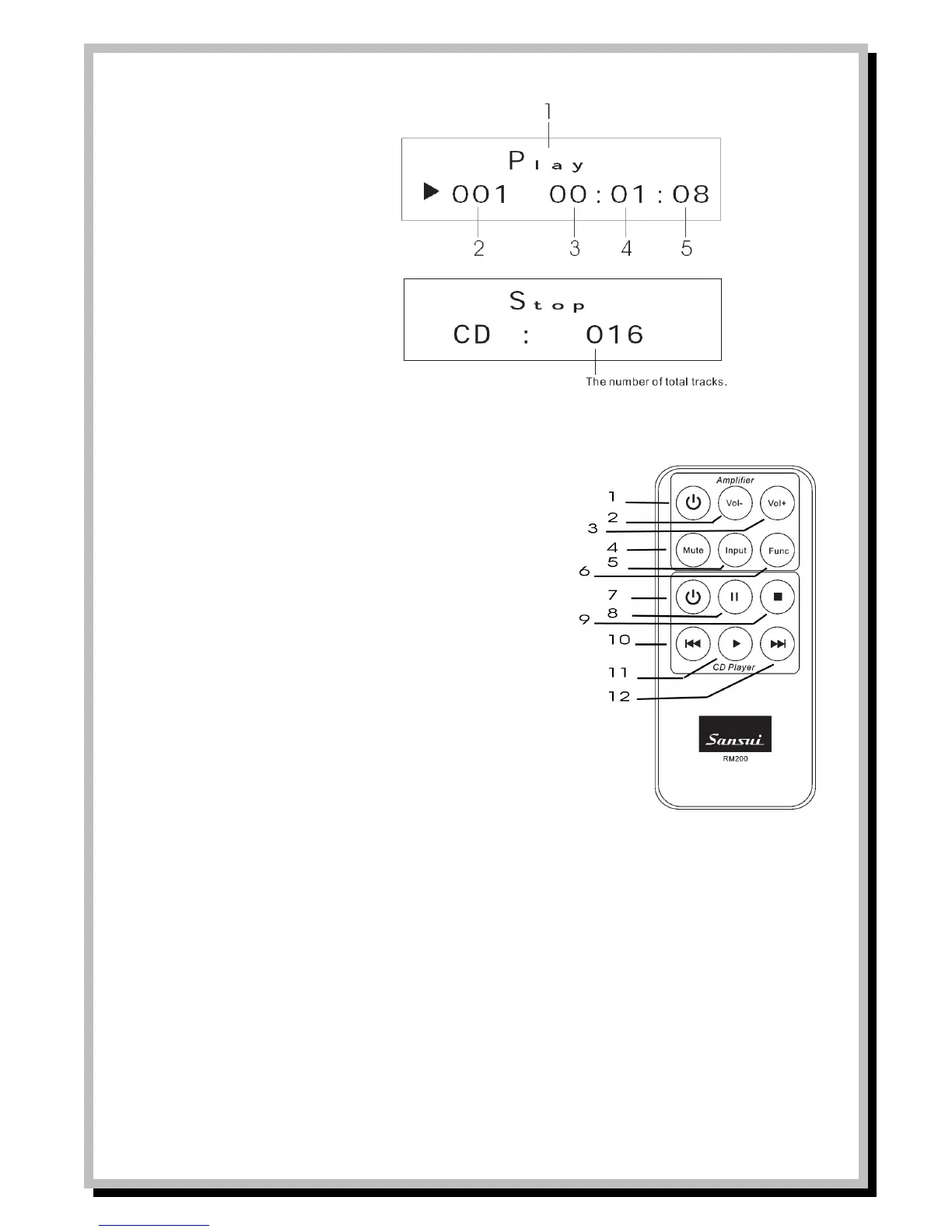
1. Mode Display
a. Play
b. Random
c. Intro
d. Repeat one
e. Repeat all
2. Track number
3. Hour
4. Minute
5. Seconds
Sansui RM200 Remote Control Handset
Buttons 1-6 are for controlling the Sansui SAP201V amplifier
1 Switch amp power to Standby or power on from Standby
2 Reduce Volume
3 Increase Volume
4 Mute Volume
5 Scroll through the Input functions on amp
6 Scroll through the Tone functions on amp
Buttons 7-11 are for controlling the Sansui CDD201V CD Player
7 Switch CD Player power to Standby or power on from Standby
8 Pause control
9 Stop button
10 Press to skip to previous track.
11 Play button
12 Press to skip to next track.


 To Next Page