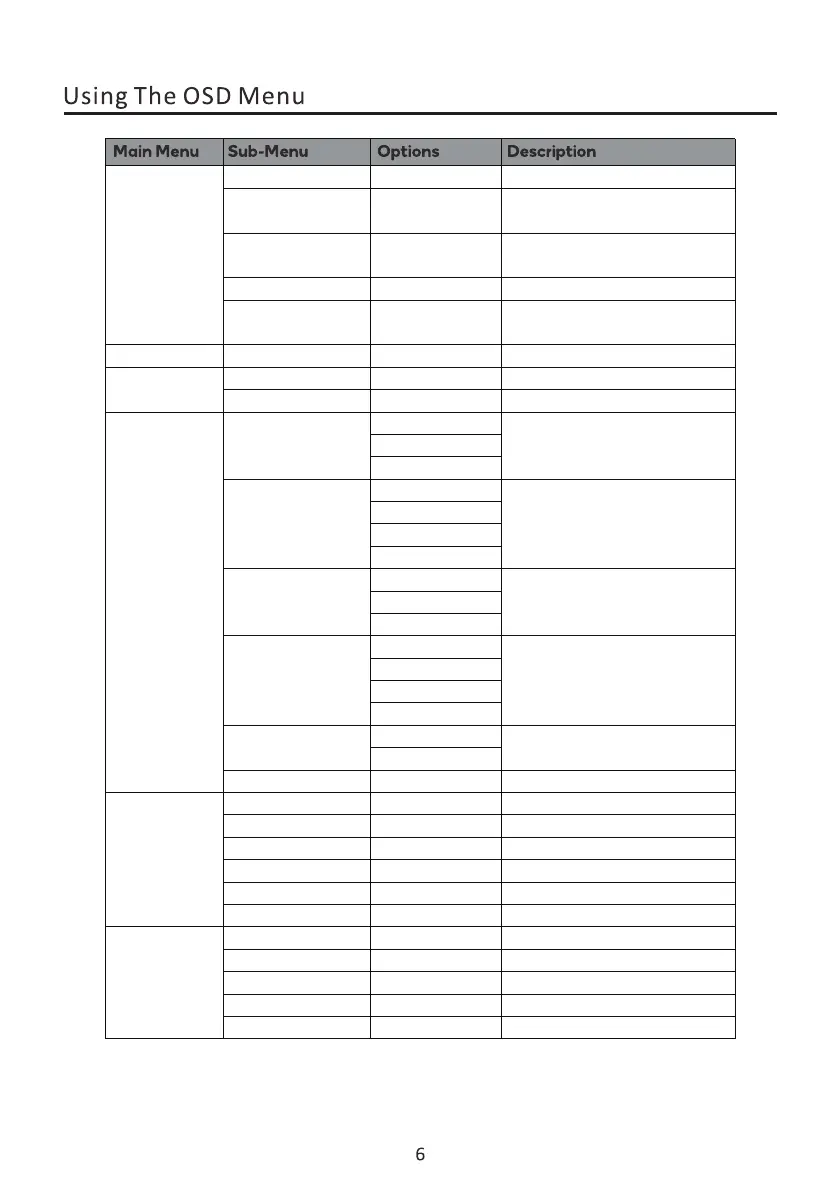
Set aspect ration
Sharpness
Response Time
Super Resolution
BlackLevel
OwlSight
Image Ratio
Off/Weak/
Medium/Strong
0-100
Auto/16:9/4:3/21:9
Picture Quality
Setting
Display
Adjust display sharpness
Set response time
Adjust the Super Resolution of
the monitor
Turn OwlSight off/on
Adjust display Blacklevel
0-100
Off/Weak/
Medium/Strong
Off/Weak/
Medium/Strong
Multi-Window
OSD
Audio
Sub Win2 Input
PIP Size
PIP Position
OSD Rotation
Other
On/Off
0-100 Adjust audio volume
Mute
Volume
Off
PIP ModeMulti-Window
PBP Mode
HDMI2
Small
Medium Setting the PiP size
Select sub-window'sinput source
Setting the PiP position
DP1
DP2
HDMI1
BottomRight
BottomLeft
Swap
Large
TopRight
TopLeft
0-100
0-100
0-100
10-60
English
H.Position
V.Position
Transparence
Time Out
Language
Adjust the horizontal position
Adjust the vertical position
Adjust the OSD transparence value
Set how long the OSD remains
Adjust the OSD Rotation
Setting the OSD language
Normal/90/180/270
/
/
On/Off
On/Off
Reset
FreeSync Premium
HDR
Select window mode of the monitor
Swap the PlP window
Restore to factory settings
Sound Source
Window1
Window2
On/Off
On/Off
MPRT
Cross
Select Sound Source of the monitor
Turn Mute function off/on


 To Next Page