Unoicial Sansui F50 User Manual
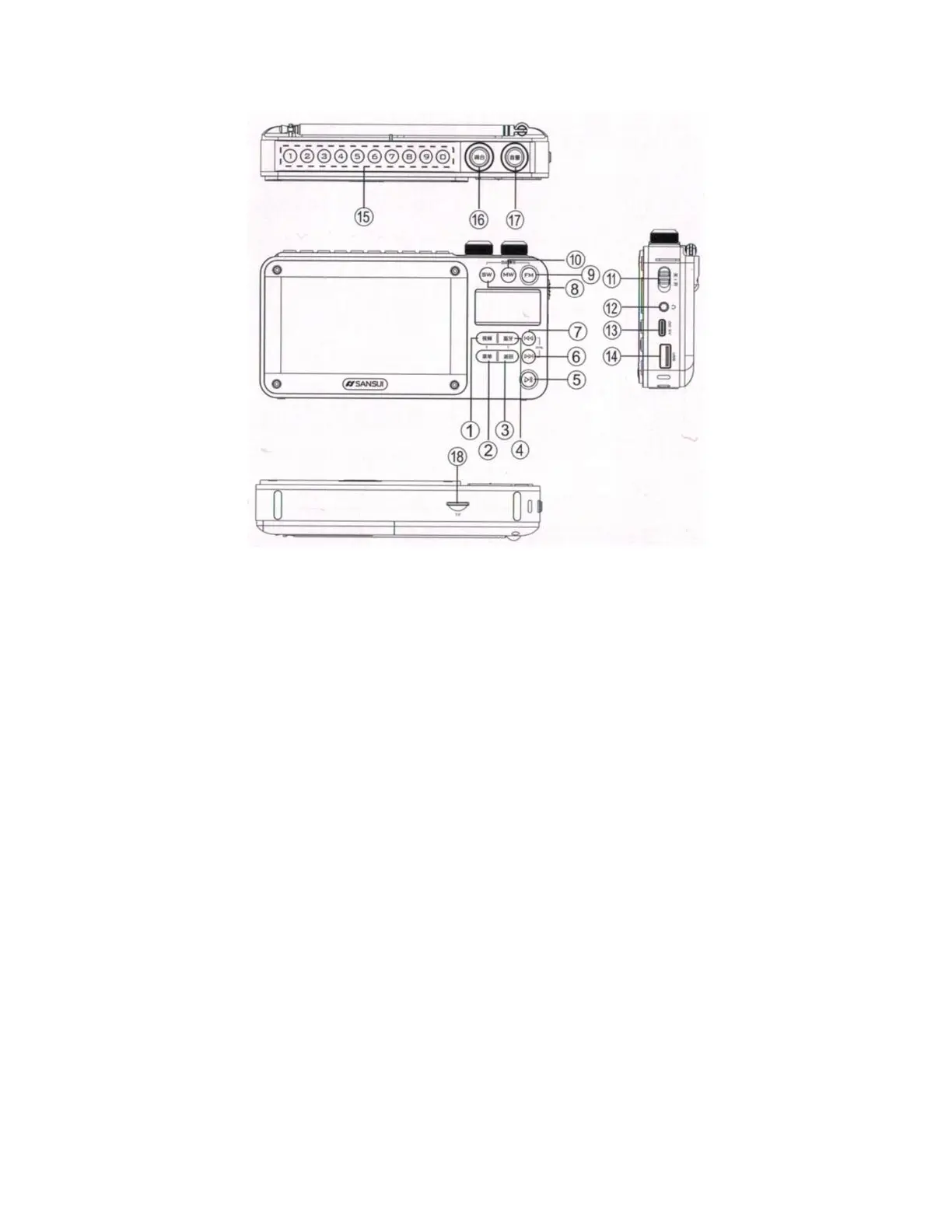
Product Overview (refer to diagram preceding)
1. Video Button: Press briey to switch to activate the video display. In Video mode,
short press to turn the LCD display on or o.
2. Menu Button: When the video display is active, press briey to view le information,
edit settings, select play mode, etc.
3. Back Button: Press briey to return from the current page to the previous page.
4. BT (Bluetooth) Button: Press briey to switch to Bluetooth speaker mode.
5. Play/Pause Button: During music playback, press briey to play or pause. When
the display is active, this button selects the currently highlighted le or function. In
radio mode, the sound is muted.
6. Next Track Button: In Video and Music modes, press briey to go to the next track.
Hold to fast forward and press briey again to stop fast forwarding. In Radio mode,
press briey to move to the next station.
7. Previous Track Button: In Video and Music modes, press briey to return to the
previous track. Hold to rewind and press briey again to stop rewinding. In Radio
mode, press briey to go to the previous station.



 To Next Page