6
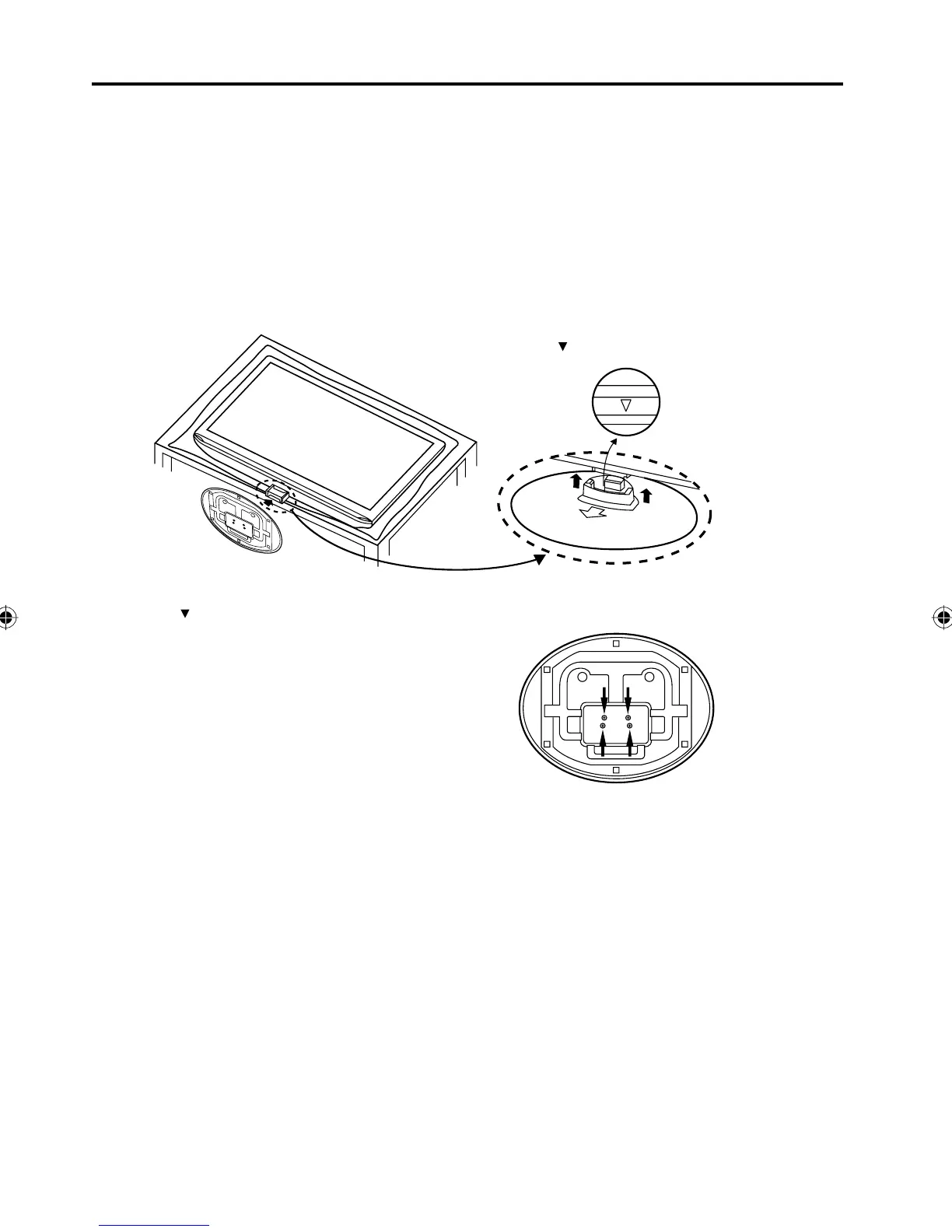
How to attach the stand
NOTE:
• Unplug the AC cord from the AC INPUT terminal.
• Before performing work spread cushioning over the base area to lay the TV on.
• Do not touch or press the TV-screen, glass might break under pressure.
Place the TV on its back on a fl at surface (as shown).
IMPORTANT: Do not touch or press on the LCD Screen.
Panel could break under pressure.
Align the stand’s bottom-plate as pictured.
Note: The stand will only attach in one direction.
Press in the direction of the arrow until you hear a “click”.
Finally secure the bottom-plate with 4 screws
(supplied).
L
C
D
P
A
N
E
L
S
I
D
E
Please note “ ” mark on the stand is facing the LCD panel side.
Finally secure the bottom-piate with 4 screws (included).
ATTACHING THE STAND
Please note “ ” mark on the stand is facing the LCD
panel side.
NOTE:
To detach the stand, perform the step in reverse order.•
38B0121A_En.indd 638B0121A_En.indd 6 3/9/09 5:48:55 PM3/9/09 5:48:55 PM



 To Next Page