5
When DX is selected, rotate the volume knob to select ON or OFF. ON to select the long distance radio
station mode (DX), select OFF for short or local distance radio stations (LOC).
STEREO
Press the VOL knob to select STEREO or MONO in radio reception.
X-BASS
Set X-BASS on or off. X-BASS function is to emphasize the bass output.
Mode setting
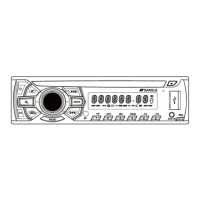
Press MODE button to select a mode: FM1->DISC->USB->SD/MMC->AUX->FM1.
(*Disc, USB, and CARD modes will only show on the display when a disc, a USB device, or a memory card
is inserted into the unit).
EQ setting
Press EQ button to select a predefined equalizer sound effect according your liking in the following
sequence: ROCK →POP →CLASSIC → DISP OFF.
AUX jack
AUX-in jack is intended for a connecting external audio to amplify the sound. If connection is made correctly,
the audio signal from the external source will be translated through the acoustics of the head unit. This
enables to adjust the volume and quality of the sounding. For example, you can connect an MP3-player to
listen to tracks using the car acoustic system.
Digital Tuner Operations
Tuner Select
Press BAND button repeatedly on the panel or RC to select TUNER mode.
Press BAND to select: FM1->FM2->FM3->MW1->MW2.
Manual / Auto tuning
- Automatic search mode:
Press the
or button briefly to launch the automatic search forwards or backwards. The radio will
search up or down for a strong signal radio station within the current band.
- Manual search mode:
Press and hold the
or button until “MANUAL” appears on display, it will change into manual
searching mode. Press the or button repeatedly to manually search upward or downward step by
step for the desired radio station within the current band.
To store / recall a preset radio stations
You can store up to a total of 18FM or 12MW radio stations in the memory, manually or automatically.
Auto memory store
Select a band, press AS/PS button and hold for 2 seconds on the front panel to enter auto store mode. The
radio will automatically store 6 stations to the 6 preset memories of the current band. To stop auto store,
press this button again.
Preset scan
Select a band, press SEARCH button on the front panel to scan all preset stations in the memories of the
current band, each preset scan for 5 seconds. To stop preset scan, press the button again.
CD - USB – SD/MMC Card Operation
Inserting the SD/MMC card/USB device
Insert the SD/MMC card or USB device into SD/MMC slot or USB socket. Then the playing mode will be
changed into SD/MMC, USB mode automatically.
Note: When SD/MMC card and USB device are both inserted, the playing mode will be changed into the
mode of the device inserted later.
Playing/pausing
Press PAUSE button on the front panel to break playback, press it again to resume playback.
Select track
1. Press the
button to play the next track, press button to play from the beginning of the current
track.
2. Press 5 / -10 button on the front panel to rewind 10 tracks. And press 6 / +10 button on the front panel to
skip 10 tracks.
Fast forward/rewind
Keep the
or button pressed to start fast forward or rewind.
Intro playback
Press the 3 / INT button on the front panel to scan all tracks. “INTRO” is shown on the display. All tracks are
played in sequence for around 10 seconds. Press again to resume normal playback.
Repeat function


 To Next Page
 Loading...