EasyManua.ls Logo

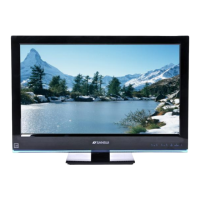
Sansui SLED2280 - User Manual

Sansui SLED2280
56 pages
Print Icon
To Next Page IconTo Next Page
Loading...
22” CLASS WIDE LED TV
TÉLÉVISEUR DEL GRAND ÉCRAN CATÉGORIE 22 PO
OWNER’S MANUAL
GUIDE D’UTILISATION
ATTENTION
ATTENTION
If you purchase a universal remote control from your local retailer, please contact the remote manufacturer for the
required programming code.
Si vous utilisez avec cet appareil une télécommande universelle (autre que celle vendue avec ce téléviseur),
consultez la documentation accompagnant la télécommande universelle afin de connaître le code numérique cor-
respondant au téléviseur.
AIR/CABLE MODE SELECTION
SÉLECTION DU MODE AIR/CABLE
When shipped from the factory, the Signal Type option is set to the “Cable” (Cable Television) mode.
If not using Cable TV, set this menu option to the Air” position.
Lorsque l’appareil sort de l’usine, l’option « Signal Type » est en mode « Cable » (câblodistribution). Si vous
n’utilisez pas la câblodistribution, sélectionnez l’option « Air ».
Before operating the unit, please read this manual thoroughly.
Avant de faire fonctionner l’appareil, veuillez lire le présent guide attentivement.
IF CONTACT WITH CUSTOMER SERVICE IS REQUIRED
PLEASE HAVE THE MODEL NUMBER READY PRIOR TO THE CALL
S’IL FAUT CONTACTER LE SERVICE CLIENTÈLE, PRENEZ SOIN D’ÊTRE MUNI
DU NUMÉRO DE MODÈLE AVANT D’APPELER.
CUSTOMER SERVICE – 1-800-289-0980
SERVICE/SERVICE CLIENTÈLE: 1-800-289-0980
ORION WEBSITE
SITE WEB ORION
FOR INFORMATION ON OUR OTHER PRODUCTS AND RECYCLING INFORMATION, PLEASE VISIT OUR WEBSITE AT
POUR OBTENIR DES INFORMATIONS SUR NOS AUTRES PRODUITS ET LE RECYCLAGE, VEUILLEZ VISITER NOTRE SITE WEB:
www.orionsalesinc.com
FRANÇAIS ENGLISH
SLED2280
3AV0121A.indb 13AV0121A.indb 1 3/24/10 3:11:19 PM3/24/10 3:11:19 PM

Questions and Answers

  • T
    Troy GilmoreAug 17, 2025
    Why is my Sansui LED TV remote not working?
    • R
      Roy HarperAug 17, 2025
      If your Sansui LED TV remote isn't working, first replace or reinsert the batteries, ensuring they are correctly positioned. If that doesn't solve the issue, move closer to the TV (within 15 feet), make sure the remote is aimed at the sensor, and confirm there are no obstructions between the remote and the TV. Also, verify that the power cord is plugged in.
  • K
    Kyle Butler DDSAug 20, 2025
    Why is the picture quality poor on my Sansui SLED2280?
    • A
      Alex FriedmanAug 20, 2025
      If you're experiencing poor picture or no picture on your Sansui LED TV, tune to another station to rule out station or cable TV problems. Ensure channels are properly set into memory. Check the antenna or cable TV connections, adjusting the antenna as needed. Look for potential sources of interference and check picture control adjustments.
  • K
    Kathy ProctorAug 23, 2025
    Why is the sound poor or absent on my Sansui SLED2280 LED TV?
    • T
      tjonesAug 23, 2025
      If you're getting poor sound or no sound on your Sansui LED TV, try tuning to another station to rule out issues with the current broadcast. Check the sound adjustments, specifically the volume and mute settings. Also, check for any potential sources of interference.
  • S
    steinjulieAug 26, 2025
    Why is the color quality poor on my Sansui LED TV?
    • K
      Keith MccormickAug 26, 2025
      If you're experiencing poor color or no color on your Sansui LED TV, first tune to another station to rule out station or cable TV problems. Make sure the channels are set into memory. Check the picture control adjustments, antenna or cable TV connections (adjusting the antenna if necessary), and look for sources of possible interference.
  • J
    Jason PrestonAug 28, 2025
    Why is the reception poor on some channels on my Sansui SLED2280?
    • M
      Mr. Jordan Harvey MDAug 28, 2025
      If you're experiencing poor reception on some channels with your Sansui LED TV, try tuning to another station to rule out station or cable TV issues. Ensure that channels are set into memory. Adjust the antenna to improve reception of the desired station. Also, check for any sources of possible interference.
  • C
    Catherine RileyAug 31, 2025
    Why are there horizontal or diagonal bars on my Sansui SLED2280 LED TV screen?
    • S
      spearsbradleyAug 31, 2025
      If you're seeing horizontal or diagonal bars on the screen of your Sansui LED TV, check the antenna connections, adjust or redirect the antenna. Also, check for sources of possible interference.
  • F
    Felicia WilsonSep 3, 2025
    What to do if my Sansui LED TV does not operate?
    • H
      Holly BonillaSep 3, 2025
      If your Sansui LED TV isn't operating, ensure the power cord is securely plugged in and try a different AC outlet. Also, inspect the fuse or circuit breaker. If problems persist, unplug the unit for an hour, then plug it back in.
  • D
    Debra HendrixSep 5, 2025
    Why does my Sansui LED TV keep shutting off?
    • S
      Stacy HuntSep 5, 2025
      If your Sansui LED TV is shutting off unexpectedly, the Sleep Timer may be activated. Turn off the Sleep Timer in the settings menu. Also, check the power supply to ensure there are no interruptions.
  • M
    Megan SavageSep 8, 2025
    What to do if there is no CATV reception on Sansui SLED2280 LED TV?
    • W
      Walter MartinSep 8, 2025
      If you are not receiving CATV on your Sansui LED TV, check all Cable TV connections. Set the Air/Cable menu option to the Cable mode. If the problem persists, it might be station or Cable TV system problems, try another station.
  • A
    Austin BrooksSep 12, 2025
    What to do if closed caption is not activated on Sansui SLED2280 LED TV?
    • A
      alvaradopatriciaSep 12, 2025
      If you're having trouble with closed captions on your Sansui LED TV, try switching to another channel, as the current TV station may be experiencing problems or the program might not be closed captioned. Check the Cable TV connection or VHF/UHF antenna, repositioning or rotating the antenna if needed. Also, ensure the closed caption decoder is properly set in the menu.

Sansui SLED2280 Specifications

General IconGeneral
Screen Size22 inches
Display TechnologyLED
Aspect Ratio16:9
Refresh Rate60 Hz
HDMI Ports1
USB Ports1
Built-in SpeakersYes
Speaker Output5W x 2
Brightness200 cd/m²
Contrast Ratio1000:1
Response Time5 ms
Operating SystemNot Applicable

Related product manuals