EasyManua.ls Logo

Sansui SLED3200 - User Manual

Sansui SLED3200
27 pages
Print Icon
To Next Page IconTo Next Page
Loading...
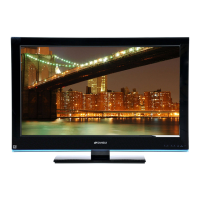
32” CLASS LED-LCD HDTV
LED-LCD HDTV CATÉGORIE 32 PO
OWNER’S MANUAL
GUIDE D’UTILISATION
ATTENTION
ATTENTION
If you purchase a universal remote control from your local retailer, please contact the remote manufacturer for the
required programming code.
Si vous utilisez avec cet appareil une télécommande universelle (autre que celle vendue avec ce téléviseur),
consultez la documentation accompagnant la télécommande universelle afin de connaître le code numérique cor-
respondant au téléviseur.
AIR/CABLE MODE SELECTION
SÉLECTION DU MODE AIR/CABLE
When shipped from the factory, the Signal Type option is set to the “Cable” (Cable Television) mode.
If not using Cable TV, set this menu option to the Air” position.
Lorsque l’appareil sort de l’usine, l’option Signal Type est en mode « Cable » (câblodistribution). Si vous
n’utilisez pas la câblodistribution, sélectionnez l’option « Air ».
Before operating the unit, please read this manual thoroughly.
Avant de faire fonctionner l’appareil, veuillez lire le présent guide attentivement.
FRANÇAIS ENGLISH
SLED3200
SLED3200A
IF CONTACT WITH CUSTOMER SERVICE IS REQUIRED
PLEASE HAVE THE MODEL NUMBER READY PRIOR TO THE CALL.
SI VOUS DEVEZ COMMUNIQUER AVEC LE SERVICE CLIENTÈLE, PRENEZ NOTE
DU NUMÉRO DE MODÈLE AVANT D’APPELER.
CUSTOMER SERVICE – 1-800-289-0980
SERVICE/SERVICE CLIENTÈLE: 1-800-289-0980
ORION WEBSITE
SITE WEB ORION
FOR INFORMATION ON OUR OTHER PRODUCTS, TO ORDER ACCESSORIES ONLINE,
OR FOR RECYCLING INFORMATION, PLEASE VISIT OUR WEBSITE AT
POUR OBTENIR DES INFORMATIONS SUR NOS AUTRES PRODUITS, POUR COMMANDER DES ACCESSOIRES,
OU LE RECYCLAGE, VEUILLEZ VISITER NOTRE SITE WEB:
www.sansuiproducts.com
J3PF0121A_EN.indd 1J3PF0121A_EN.indd 1 8/14/12 5:22:42 PM8/14/12 5:22:42 PM

Questions and Answers

  • J
    Jonathan MillerAug 19, 2025
    What to do if Sansui LCD TV remote not working?
    • E
      Ebony KleinAug 19, 2025
      If your Sansui LCD TV remote isn't working, first replace the batteries or correct their insertion. Ensure you are within 15 feet of the TV and pointing the remote directly at the sensor. Check for any obstructions between the remote and the TV. Also, verify that the TV's power cord is plugged in.
  • A
    Andrea BrownAug 21, 2025
    Why Sansui LCD TV does not operate?
    • C
      Cory ScottAug 21, 2025
      If your Sansui LCD TV isn't turning on, ensure the power cord is securely plugged into the outlet. Try using a different AC outlet to rule out power issues. Also, check your fuse or circuit breaker. As a last resort, unplug the unit for an hour, then plug it back in.
  • K
    Kevin Lawrence DDSAug 25, 2025
    Why Sansui LCD TV has poor sound?
    • C
      Christopher HayesAug 25, 2025
      If you're experiencing poor or no sound on your Sansui LCD TV, the broadcasting station may be experiencing problems, so try tuning to another station. Also, check your volume and mute settings by pressing VOL +/- or MUTE. Finally, check for any potential sources of interference.
  • C
    Craig Green DDSAug 26, 2025
    What to do if Sansui LCD TV shuts off?
    • D
      David CaseAug 26, 2025
      If your Sansui LCD TV shuts off unexpectedly, check if the Sleep Timer is enabled and adjust or turn it off. It's also possible that the power was interrupted.
  • C
    Colleen KellyAug 28, 2025
    Why Sansui LCD TV has poor picture?
    • S
      Sharon MartinezAug 28, 2025
      If you're experiencing poor or no picture quality on your Sansui LCD TV, the broadcasting station may be experiencing problems, so try tuning to another station. Make sure your channels are properly set into memory. Check your antenna or Cable TV connections and adjust the antenna. Check for any potential sources of interference. Also, check your picture control adjustments.
  • M
    Matthew StevensAug 30, 2025
    Why Sansui LCD TV has poor reception?
    • C
      Chad GardnerAug 30, 2025
      If you're experiencing poor reception on some channels on your Sansui LCD TV, the broadcasting station may be experiencing problems, so try tuning to another station. Make sure channels are set into memory. If a station is weak, adjust the antenna to receive the desired station. Also, check for sources of possible interference.
  • C
    Christopher RichardsonSep 1, 2025
    Why Sansui LCD TV has poor color?
    • P
      pamelapooleSep 1, 2025
      If you're experiencing poor or no color on your Sansui LCD TV, the broadcasting station may be experiencing problems, so try tuning to another station. Make sure your channels are set into memory. Check the picture control adjustments, antenna or Cable TV connections, and adjust the antenna. Also, check for sources of possible interference.
  • H
    Hannah PowersSep 3, 2025
    How to fix digital broadcasting screen problem on Sansui LCD TV?
    • H
      herrerarachelSep 4, 2025
      To fix digital broadcasting screen problems on your Sansui LCD TV, check the digital signal strength.
  • G
    gfloydSep 5, 2025
    How to fix horizontal bars on Sansui LCD TV screen?
    • S
      Sharon FisherSep 5, 2025
      To fix horizontal or diagonal bars on your Sansui LCD TV screen, check the antenna connections and adjust or re-direct the antenna. Also, check for sources of possible interference.
  • D
    Drew HillSep 8, 2025
    What to do if Sansui LCD TV has no CATV reception?
    • L
      Laura AndersonSep 8, 2025
      If your Sansui LCD TV has no CATV reception, check all Cable TV connections. Set the Signal Type menu option to the Cable mode. If the issue persists, the broadcasting station may be experiencing problems, so try tuning to another station.

Summary

FCC Declaration of Conformity

Location of Required Markings

Identifies the location of rating sheets and safety cautions on the unit.

Important Safety Instructions

Child Safety and Installation Guidelines

Wall Mounting Guidelines

Provides instructions and precautions for safely mounting the display on a wall.

Safety Precautions and LCD Handling

LCD Panel Handling and Care

Details on how to handle the LCD panel to prevent damage and potential injury.

Stand Installation and Removal

Product Features

Power Source Information

Parts and Functions Overview

Remote Control Usage

Battery Installation and Precautions

Instructions for installing batteries in the remote and safety precautions.

Antenna and Cable TV Connections

Connecting Other Equipment

Connecting Video Devices

Guidance for connecting VCRs, DVD players, and camcorders to the TV.

Audio System Connections

Connecting AV Amplifiers

Instructions for connecting AV amplifiers, including digital surround sound.

HDMI, DVI, and PC Connections

Starting Setup Procedure

Basic TV Operation

Quick Guide to Menu Operation

Convenience Functions

Picture Settings and Adjustments

Customizing picture quality like brightness, contrast, and color.

Audio Settings and Options

Adjusting sound settings, volume, and audio languages.

Channel Management Features

Options for managing channels, including adding, deleting, and labeling.

Setup and System Options

System configuration like language, timers, and auto setup.

Memorizing Channels

Adding and Deleting Channels

How to add new channels or remove unwanted ones from memory.

Signal Strength and Input Labeling

Setting the V-Chip

Password Management for V-Chip

Registering, changing, and managing the V-Chip password.

Closed Captioning

Advanced Closed Caption Settings

Customizing display options for digital closed captions.

Setting the Picture Size

Time Shift Recording Function

Reception Disturbances and Maintenance

Troubleshooting Guide

Product Specifications

Limited Warranty Information

Sansui SLED3200 Specifications

General IconGeneral
3DNo
Response time16 ms
Display diagonal32 \
Display brightness300 cd/m²
Display resolution1366 x 768 pixels
Native aspect ratio16:9
LED backlighting type-
Supported video modes1080i, 1080p, 480i, 480p, 720p
Contrast ratio (dynamic)1000000:1
Supported graphics resolutions1366 x 768
Tuner typeAnalog & digital
Analog signal format systemNTSC
Digital signal format systemATSC
Number of speakers2
USB 2.0 ports quantityUSB 2.0 ports have a data transmission speed of 480 Mbps, and are backwards compatible with USB 1.1 ports. You can connect all kinds of peripheral devices to them.
S-Video inputs quantity0
Component video (YPbPr/YCbCr) in1
Product colorBlack
Panel mounting interface100 x 100 mm
Power consumption (standby)- W
Power consumption (typical)56 W
Sustainability certificatesENERGY STAR
CertificationEnergy Star 5.3
Package weight7620 g
Weight and Dimensions IconWeight and Dimensions
Depth (with stand)169.926 mm
Height (with stand)470.91 mm
Depth (without stand)68.32 mm
Width (without stand)732.79 mm
Height (without stand)445.26 mm
Weight (without stand)5988 g

Related product manuals