15
10
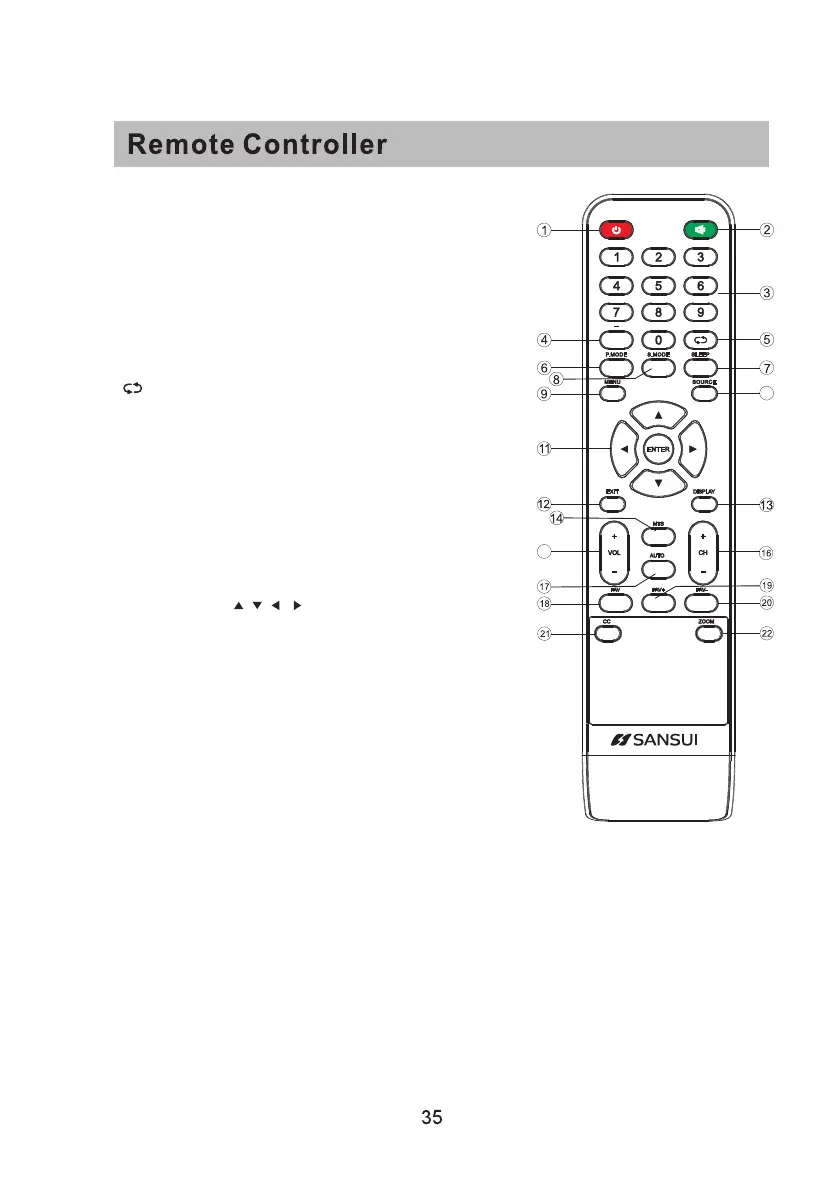
1.Power: Set your TV to power on or standby mode.
2.MUTE: Press to mute the sound. Press again or press VOL+
to unmute.
3.0-9: Press 0-9 to select a TV channel directly when you are
watching TV. The channel will change after a few seconds.
4.- : Press “-” to enter a program number for multiple program
channel, such as2-1etc.Return to the previous channel
viewed.
5. : Return to the previous channel viewed.
6.P.MODE: Press to cycle through the different picture settings.
7.SLEEP: Select the amount of time before TV turns off
automatically.
8.S.MODE: Press to cycle through the different sound settings.
9.MENU: Allows you to navigate the on-screen menus.
10.SOURCE: Press to cycle through the input source in following:
TV → AV → YPBPR→ HDMI1 → HDMI2 → HDMI3→PC
11.THUMBSTICK( / / / / ENTER):
Allows you to navigate the on-screen menus and adjust the
system settings to your preference.
12.EXIT: Exit from the menu or sub- menu and cancel the
function in progress (if possible).
13.DISPLAY: Press to display the source and channel’s
information.
14.MTS: Press to select the audio mode,you can select Stereo,
Mono,or SAP (second audio program).
15.V +/-: Press to increase or decrease the sound level.
16.CH+/-: Press to scan through or to select a channel.
17.AUTO: Adjusting the PC image rate automatically.
18.FAV: Set or cancel current channel to be a favourite channel.
19.FAV+: Down move Favourite program.
20.FAV-: Up move Favourite program.
21.CC: Press to display the closed caption.
22.ZOOM: Select display mode.



 To Next Page