EasyManua.ls Logo

Santana Zebop - User Manual

Santana Zebop
2 pages
Print Icon
To Next Page IconTo Next Page
Loading...
ZEPOB
Studio Quality
Wireless Headphones
OVERVIEW OPERATION
Thank you for purchasing the Zebop Studio Quality Wireless
Headphones. Please read these instructions carefully for proper
operation and save for future reference.
Turning ON/OFF
Power ON: Hold the Power On/Off button until the LED
indicator ashes green/blue.
Power OFF: Hold the Power On/Off button for 5 seconds.
Release the button, then the headphones will turn off.
Connecting with Bluetooth
To play audio from a Bluetooth device, you need to pair the
device with your headphones.
1. Turn on the headphones. The light blinks green and blue,
indicating the headphones are ready to connect with your
Bluetooth device.
2. Turn on Bluetooth mode on your device.
3. Select “Santana Zebop” to initiate pairing, and the
headphones will automatically connect with your
Bluetooth device, indicated by a green light and
voice prompt “Connected”. Some devices ask you
to input the PIN “0000” as the password.
Note: Generally, there is a 5 minute maximum to pair the
headphones with your Bluetooth device, otherwise retry
steps 1 to 3 to pair again.
Connecting to a Micro TF Card
1. Insert the micro TF Card into the TF Card slot on the
headphones.
2. Turn on the headphones. The LED indicator ashes blue,
and now you can play music from your TF Card.
Note: The headphones can only support a TF Card up to 32GB.
VOLUME (+)
CHARGING PORT
MIC
AUX INPUT
TF CARD
LED
POWER ON/OFF
MODE BUTTON
MFB
(PHONE/PAUSE/PLAY)
VOLUME (–)
Question and Answer IconNeed help?

Do you have a question about the Santana Zebop and is the answer not in the manual?

Summary

Overview of Santana Zebop Headphones

Operating Your Santana Zebop Headphones

Turning Headphones On and Off

Instructions for powering the headphones on and off using the power button.

Connecting Via Bluetooth

Steps to pair the headphones with a Bluetooth-enabled device.

Connecting to a Micro TF Card

Guide on how to use a Micro TF card for music playback.

Using the Santana Zebop Headphones

Call Management

How to answer, reject, and end calls using the MFB button.

Music Playback and Volume Control

Controls for playing/pausing music, adjusting volume, and skipping tracks.

Voice Assistant and Mode Switching

Activating voice assistant and changing operational modes.

Charging and Wired Mode

Charging the Zebop Headphones

Instructions for charging the headphones and charging time details.

Using Wired Mode

How to connect and use the headphones in wired mode.

Specifications and Important Information

Product Specifications

Technical details including range, battery, sensitivity, and impedance.

Safety and Attention Warnings

Important safety precautions for using the headphones.

Product Warranty Details

Information regarding warranty coverage, limitations, and claims.

Regulatory and Legal Statements

FCC/Bluetooth statements, state law rights, and trademark information.

Overview

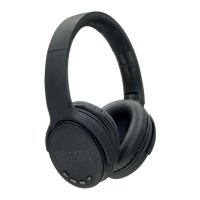
The Santana Zebop Studio Quality Wireless Headphones are designed to provide a high-quality audio experience with the flexibility of both wireless and wired connectivity. These headphones are branded with the "Santana by Carlos Santana" logo, indicating a focus on sound quality and style.

Function Description

The primary function of these headphones is to play audio wirelessly via Bluetooth or through a wired connection using a 3.5mm auxiliary cord. They also support music playback directly from a micro TF card. Integrated controls allow users to manage calls, adjust volume, skip tracks, and activate a voice assistant.

Important Technical Specifications

  • Product Name: Zebop
  • Product Type: Headphones
  • Wireless Range: 33 feet (approximately 10 meters)
  • Standby Time: 200 hours
  • Playtime: 6 hours
  • Charging Time: 2.5 hours
  • Sensitivity (SPL): 96±3dB
  • Impedance: 16Ω
  • Rated Input Power: 10mW
  • TF Card Support: Up to 32GB
  • Battery: Non-detachable built-in rechargeable battery
  • Charger Voltage: 5V (requires original cable for charging)

Usage Features

Turning ON/OFF:

  • Power ON: Hold the Power On/Off button until the LED indicator flashes green/blue.
  • Power OFF: Hold the Power On/Off button for 5 seconds. Release the button, and the headphones will turn off.

Connecting with Bluetooth:

  1. Turn on the headphones. The LED light will blink green and blue, indicating they are ready for Bluetooth pairing.
  2. Enable Bluetooth mode on your device.
  3. Select "Santana Zebop" from the list of available devices to initiate pairing.
  4. The headphones will automatically connect, indicated by a green light and a "Connected" voice prompt.
  5. Some devices may require a PIN, which is "0000". Note: There is a 5-minute maximum for pairing. If pairing fails, retry steps 1-3.

Connecting to a Micro TF Card:

  1. Insert a micro TF Card (up to 32GB) into the TF Card slot on the headphones.
  2. Turn on the headphones. The LED indicator will flash blue, and music will play from the TF Card.

Call Management:

  • Answering a Call: Press the MFB button once or answer via your mobile phone.
  • Rejecting a Call: Long press the MFB button.
  • Ending a Call: Press the MFB button once or hang up via your mobile phone.

Music Playback:

  • Play/Pause: Press the MFB button once.
  • Volume Adjustment: Short press Volume (+) to increase volume, short press Volume (-) to decrease volume.
  • Skip Track: Long press Volume (+) for the next track, long press Volume (-) for the previous track.

Voice Assistant:

  • Activation: Double press the MFB button.

Mode Switching:

  • Switch between modes by short pressing the Power On/Off button.

Wired Mode:

  • The headphones can be used in wired mode by plugging the included 3.5mm auxiliary cord into the AUX input.
  • In wired mode, the headphones do not use battery power.
  • The remote buttons (volume, track control, MFB) will not function in wired mode.
  • The headphones will power off automatically when in wired mode.

Charging:

  1. Ensure headphones are switched off before charging.
  2. Plug the USB cable into the charging port on the headphones and the other end into a USB charger or other charging device.
  3. Charging is indicated by a red light, which turns off when fully charged (approximately 2.5 hours). Warning: Use only the original cable to charge the Bluetooth headphones to prevent damage. The proper charger voltage is 5V. Do not attempt to remove the built-in battery.

Maintenance Features

  • Cleaning: Clean the headphones with a soft cloth, moistened only with mild soap and water. Avoid stronger cleaning agents, as they can damage the surface.
  • Environmental Care: Avoid prolonged sun exposure, high temperatures, and dusty or humid environments to ensure normal use.
  • Hearing Protection: Avoid prolonged and continuous use at high volumes to prevent hearing damage.
  • Safety: Do not wear headphones while driving or cycling.

Warranty Information:

  • Coverage: Any defect in materials and workmanship.
  • Duration: 1 year from the date of purchase.
  • Replacement/Repair:
    • Within 30 days of purchase: Free replacement.
    • After 30 days but within 1 year: Repair or replacement (new or reconditioned parts/unit) at no charge.
  • Limitations: Implied warranties (fitness for a particular purpose, merchantability) are limited to 1 year. The warranty does not cover loss of time, inconvenience, property damage, personal injury, or incidental/consequential damages. Some states may not allow these limitations.
  • Service Request: Provide proof of purchase date. For service within 30 days, return to place of purchase. After 30 days, contact SantanaSounds.com for a return authorization. Include name, address, phone number, proof of purchase, and problem description. Repaired/replaced products will be shipped within four weeks.
  • Exclusions: Defects from accidents, unauthorized repair, failure to follow directions, misuse, fire, floods, and acts of God are not covered.
  • Warranty Activation: Activate your warranty at SantanaSounds.com.

Regulatory Compliance:

  • FCC Compliance: The device complies with part 15 of the FCC Rules, ensuring it does not cause harmful interference and accepts any received interference.
  • Bluetooth®: The Bluetooth® word mark and logos are registered trademarks of Bluetooth SIG, Inc., used under license by Santana Sounds, LLC.

Santana Zebop Specifications

General IconGeneral
BrandSantana
ModelZebop
CategoryWireless Headphones
LanguageEnglish