Page 22
03.
The End Point Adjustment function allows you to adjust servo travel in each direction. This makes it possible to balance servo
travel in both directions and set the maximum desired amount of servo travel. For example, on a gas-powered model, if you pull
the throttle trigger and the carburetor does not open completely, you can increase the Throttle High End Point Adjustment so
that the carburetor opens completely. Another example is with steering. If your model turns sharper to the right than to the left,
you can increase the Steering Left End Point Adjustment to balance the steering. The End Point Adjustment function can be
adjusted for the Steering channel (Right and Left), the Throttle channel (Throttle High Side and Throttle Brake Side), Auxiliary 1
Channel 3 (High and Low) and Auxiliary 2 Channel 4 (High and Low).
PRO TIP: Use the Servo Monitor at the bottom of the End Point Adjustment menu to see your programming changes in
virtual real time.
WARNING End Point Adjustment percentage values should not be increased to the point where your linkages and servos
bind when moved all the way to the right or left. Binding will cause the servos to 'buzz', resulting in a quicker loss of battery
power and eventual damage to the servos.
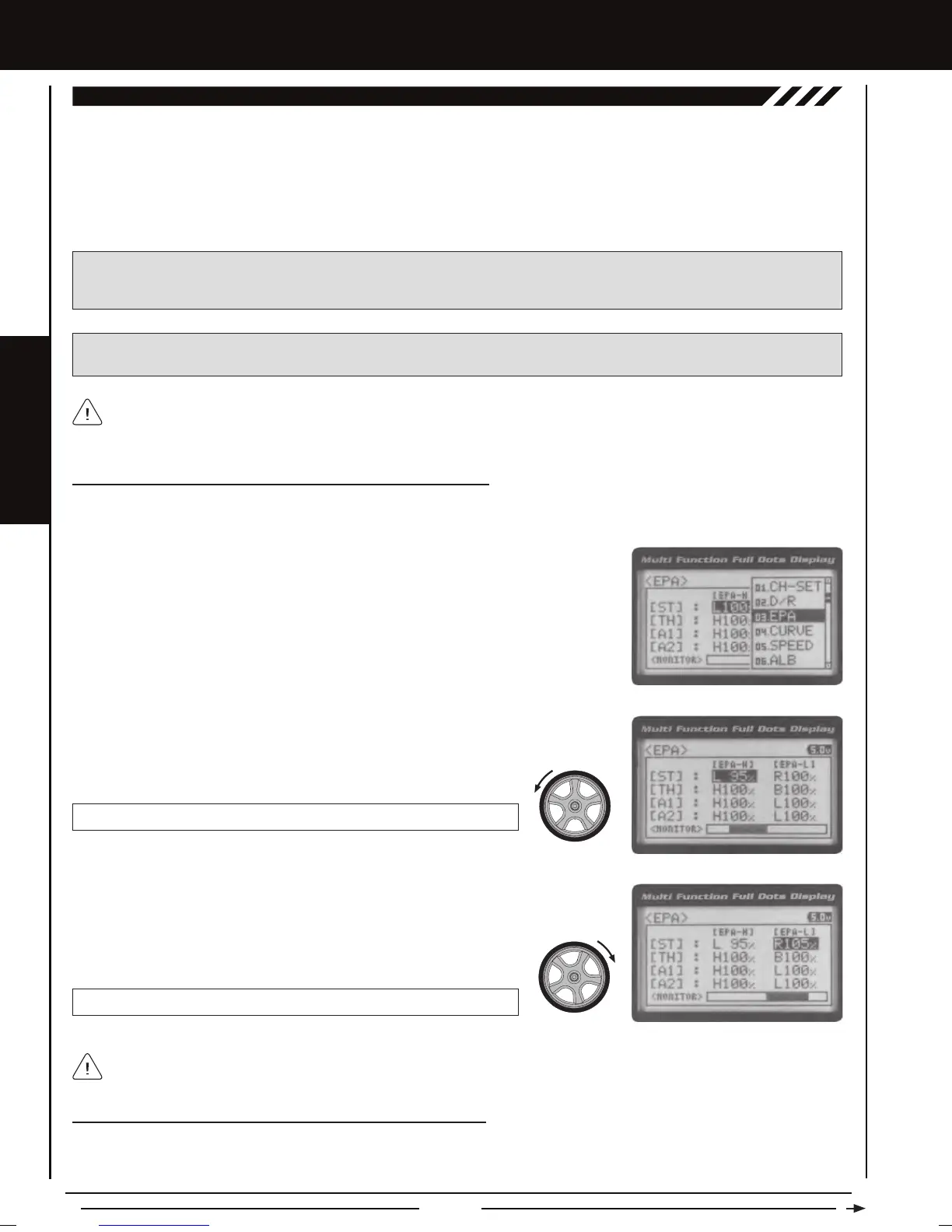
1) From the Top Screen, press the ENTER key to open the Programming Menu list.
2) Scroll UP or DOWN to highlight the EPA menu, then press the ENTER key. The EPA
menu will be displayed and [ST] : EPA L100% will be highlighted.
Before making End Point Adjustments, the servo horn needs to be centered. Install the servo horn onto the servo, making
sure it's as close to being centered as possible, then use the Servo Sub-Trim function to center the servo arm exactly. For
more information, see the Adjusting the Servo Sub-Trim Values section on page 42.
Adjusting the Steering End Point Adjustment Percentage Values
Your model’s turning radius can differ from left to right because of variations in linkage, suspension balance, tire diameter, or
weight distribution. In such cases, Left Steering servo travel and Right Steering servo travel are adjustable using the End Point
Adjustment function.
EPA ST R setting range is 0% to 150%. The default setting is 100%.
4) From within the EPA menu, scroll DOWN to highlight [ST] : EPA R100%. Press the
ENTER key, then scroll UP or DOWN to increase or decrease the Steering Right End
Point Adjustment percentage value. Increasing the percentage value will increase
steering servo travel in that direction and decreasing the percentage
value will decrease steering servo travel in the direction.
3) Press the ENTER key, then scroll UP or DOWN to increase or decrease the Steering Left
End Point Adjustment percentage value. Increasing the percentage value will increase
steering servo travel in that direction and decreasing the percentage value will decrease
steering servo travel in the that direction.
EPA ST L setting range is 0% to 150%. The default setting is 100%.
Adjusting the Throttle End Point Adjustment Percentage Values
Your model's carburetor may not open completely, or it may open too much and cause the throttle servo to bind. If you're using an
Electronic Speed Control, the Electronic Speed Control may not command full power, or the brake may not engage adequately.
In such cases, Throttle High servo travel and Throttle Brake servo travel are adjustable using the End Point Adjustment function.
Steering EPA L/R can be adjusted from within the Channel Set menu. This option changes both Left and Right Steering
End Point Adjustment percentage values equally at the same time, which is similar to adjusting Steering Dual Rate.
[[PROGRAMMING MENUS
EPA (END POINT ADJUSTMENT)


 To Next Page