EasyManua.ls Logo

Sanyipace S610ASMKTCP - User Manual

Sanyipace S610ASMKTCP
19 pages
Print Icon
To Next Page IconTo Next Page
Loading...
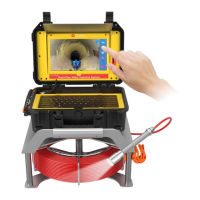
Touch Screen Sewer Camera System
User Manual
Model NoS610ASMKTCP
NOTE: All accessories are under the keyboard!
-------------------------------------------------------------------------------------------------------------------------------------------
Please contact us at first time if you got issues with the product
Amazon After-sale: support@sanyipace.com
Website After-sale: service@sanyipace.com

Questions and Answers

  • K
    Kristy ShawAug 9, 2025
    Why does my Sanyipace S610ASMKTCP screen flash?
    • A
      Andre GonzalezAug 9, 2025
      If your Sanyipace Digital Camera screen flashes, fully charge the device and check again. The device might not have enough power to function correctly.
  • S
    Steven NguyenAug 14, 2025
    What to do if my Sanyipace S610ASMKTCP can't record videos?
    • V
      vazqueztroyAug 14, 2025
      If your Sanyipace Digital Camera won’t record videos, ensure the SD card is correctly inserted and has sufficient memory. Also, verify that the power isn't interrupted during recording.
  • G
    Gregory WoodwardAug 19, 2025
    How to fix Sanyipace S610ASMKTCP Digital Camera with no power?
    • K
      kallenSep 12, 2025
      If your Sanyipace Digital Camera has no power, check that all interfaces are correctly connected. Also, check the battery level and power display to ensure the battery is not depleted.
  • J
    Jeffrey MorrisAug 25, 2025
    What to do if Sanyipace S610ASMKTCP Digital Camera screen freezes?
    • L
      Lindsey WrightAug 25, 2025
      If your Sanyipace Digital Camera screen freezes when you turn it on, remove the SD card and check again. If the device works without the card, format the SD card on a PC or try using a different SD card.
  • H
    helen43Aug 30, 2025
    Why my Sanyipace S610ASMKTCP can’t be charged?
    • K
      kennethlandryAug 30, 2025
      If your Sanyipace Digital Camera isn’t charging, ensure the DC adapter is correctly plugged in and that the adapter's indicator light is on.
  • B
    Benjamin ThorntonSep 3, 2025
    How to fix black and white video recording on Sanyipace S610ASMKTCP Digital Camera?
    • T
      timothy65Sep 3, 2025
      If your Sanyipace Digital Camera records videos in black and white, adjust the LED light button to the appropriate brightness. Observe the screen and choose a brightness level that appears clearer and more colorful.

Sanyipace S610ASMKTCP Specifications

General IconGeneral
BrandSanyipace
ModelS610ASMKTCP
CategoryDigital Camera
LanguageEnglish