EasyManua.ls Logo

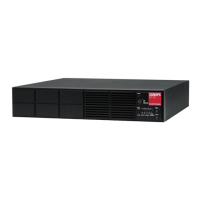
Sanyo Denki SANUPS E11A Series - User Manual

Sanyo Denki SANUPS E11A Series
50 pages
Print Icon
To Next Page IconTo Next Page
Loading...
Instruction Manual
100V Model
1kVA, 1.5kVA, 2kVA, 3kVA
Uninterruptible Power Supply
M0010662

Other manuals for Sanyo Denki SANUPS E11A Series

Questions and Answers

  • L
    larryrobersonAug 14, 2025
    What to do if Sanyo Denki SANUPS E11A UPS has no output power?
    • M
      Mary MooreAug 14, 2025
      If your Sanyo Denki UPS has no output power, several things could be the cause. First, ensure the input wiring is correctly connected and that the input voltage and frequency are within the rated range. Second, check that the MAIN SW is set to “ON”. Third, verify that the output voltage is set correctly in the User Settings Guide. Lastly, the bypass breaker may be tripped and need to be reset.
  • S
    Sara HuntAug 18, 2025
    Why does Sanyo Denki UPS switch to battery frequently?
    • J
      Julia GomezAug 18, 2025
      If your Sanyo Denki UPS switches to battery power frequently, check whether the MAIN SW on the back panel is set to 'ON'. Also, verify that the input voltage and input frequency are within the rated limits.
  • L
    Lisa WhiteAug 21, 2025
    Why does Sanyo Denki UPS output stop during outage?
    • J
      Jesus AllenAug 21, 2025
      If the output power from your Sanyo Denki UPS stops during a power outage, the battery may have deteriorated. Check the battery's condition and consider replacing it earlier than scheduled.
  • N
    Nancy GonzalezAug 25, 2025
    What to do if Sanyo Denki UPS output won't stop?
    • T
      Timothy HayesAug 25, 2025
      If the output power from your Sanyo Denki UPS doesn't stop, ensure that the power button is pressed for at least 1 second to initiate shutdown. Also, check the 'UPS Shutdown Operation' setting in the user setting menu, as it may be set to '3 seconds' or 'Special operation'. Finally, verify the 'UPS Operation at OFF' setting in the user setting menu; it might be set to 'Bypass'.
  • E
    Edward HillAug 27, 2025
    How to fix Sanyo Denki SANUPS E11A buzzer and blinking light?
    • S
      scotttheresaAug 27, 2025
      If the buzzer sounds and the “Green BATT.TEST” light blinks when your Sanyo Denki UPS starts, check that the battery connectors are connected properly. Stop the UPS and firmly connect the battery connectors.
  • D
    Denise RichardsAug 30, 2025
    How to turn on alarm on Sanyo Denki SANUPS E11A?
    • D
      David MooreAug 30, 2025
      If the alarm buzzer on your Sanyo Denki UPS does not sound, the alarm buzzer sound may be set to “OFF”. Check the setting of “Buzzer Sound” in the user setting menu.
  • A
    Angela WrightSep 3, 2025
    Why won't my Sanyo Denki SANUPS E11A UPS restart automatically?
    • M
      Melissa ThompsonSep 3, 2025
      If your Sanyo Denki UPS doesn't automatically restart after a shutdown due to battery exhaustion following a power outage, check the setting of 'UPS Operation Upon Power Recovery' in the user setting menu. Automatic UPS restart does not occur if this item is set to 'OFF'.
  • H
    hansenabigailSep 6, 2025
    How to switch Sanyo Denki UPS from bypass?
    • M
      Mallory JonesSep 7, 2025
      If your Sanyo Denki UPS does not switch from bypass power supply to UPS power supply, check that Forced Bypass is set to 'Inverter'.
  • D
    David ReevesSep 10, 2025
    How to fix Sanyo Denki UPS serial communication failure?
    • B
      Billy MckinneySep 10, 2025
      If serial communication fails when using the power management software with your Sanyo Denki UPS, check that 'Interface' in the user setting menu is set to 'Workstation'. Also, verify the setting of 'Serial Baud Rate'.

Summary

Notes about UPS Model

§1. Before Use

§2. Safety Precautions

1. Relocation and Transportation Precautions

Precautions to avoid injury and damage during UPS relocation and transport.

2. Installation Precautions

Instructions for safe and correct UPS installation in suitable environments.

3. Wiring Precautions

Guidelines for safe wiring to prevent electric shock and fire.

4. Operating Precautions

Important instructions for safe UPS operation and avoiding hazards.

5. Maintenance and Inspection Precautions

Safety guidelines for maintenance and inspection to prevent injury or damage.

6. Radio Frequency Interference

Information on FCC compliance and potential radio interference.

7. Battery Handling Precautions

Precautions for safe handling, charging, and disposal of batteries.

§3. For Proper Operation

§3.1 UPS Input Power Supply

Details on input voltage, frequency, and breaker capacity requirements for the UPS.

§3.2 Installation Precautions

Precautions for proper installation, considering leakage current and magnetic flux.

§3.3 Usage Precautions

Guidelines for correct UPS usage, including load connection and environment.

§4. Checking the Contents of the Package

§5. External Dimensions and Part Names

§5.1 Front and Back Panels of UPS

Identification and layout of front and back panels of the UPS unit.

§5.2 Control Panel and Indicators

Description of the UPS control panel, buttons, and LED indicators.

§5.3 External Interfaces

Details on external interface connectors for PC and LAN cards.

§6. Installation

§6.1 Installation Environment Check

Checking the ambient temperature, humidity, and environment for installation.

§6.2 Installation Space Check

Ensuring adequate space around the UPS for ventilation and clearances.

§6.3 Horizontal Installation

Instructions for installing the UPS horizontally.

§6.4 Vertical Installation

Instructions for installing the UPS vertically.

§6.5 Rack Mounting

§7. Wiring

§7.1 Battery Connector Connection

Procedure for connecting the battery connectors inside the UPS.

§7.2 Input Plug Connection

Steps for connecting the UPS input power plug to a utility outlet.

§8. Procedure Until Load Device Operation

§9. Preparation Before Operation

§9.1 User Settings Check

Checking and configuring user settings before operation.

§9.2 UPS Charge

Procedure for charging the UPS batteries before use.

§9.3 Outage Simulation Test

Performing a test to confirm the UPS functions during a simulated power outage.

§10. Load Devices Connection

§11. Operating Procedures

§11.1 UPS Startup

Step-by-step guide to starting up the UPS.

§11.2 UPS Shutdown (Daily)

Procedure for performing a daily shutdown of the UPS.

UPS Battery Power Startup

Procedure to operate the UPS during abnormal AC input power supply.

§11.3 UPS Shutdown (If Not to Be Used for More Than a Week)

Procedure for shutting down the UPS for extended periods.

§12. User Settings

§12.1 Prior to Modifying the User Settings

Instructions and recommendations before modifying user settings.

§12.2 Setup Menu List

List of available user settings, their functions, and default values.

§13. Maintenance

§13.1 Routine Checks

Regular checks to perform for maintaining UPS health and detecting issues.

§13.2 Battery Test

Procedure for performing a battery test to check its condition.

§13.3 Bypass Breaker Reset

Steps to reset the bypass breaker if it trips.

Battery Replacement

Procedure for replacing the UPS battery pack.

§14. Buzzer Sounds

§15. Troubleshooting

§17. Characteristic of UPS

§17.1 Basic Operation

Explanation of the UPS's operational modes and power flow.

§17.2 Protective Functions

Overview of the UPS's built-in protective functions.

§17.3 Protective Function Table

Table detailing UPS protective functions and indicator status.

§17.4 Specifications

Detailed technical specifications of the UPS models.

§18. Warranty

Sanyo Denki SANUPS E11A Series Specifications

General IconGeneral
ModelSANUPS E11A Series
TypeLine Interactive
Input Frequency50/60 Hz
Output Frequency50/60 Hz
Operating Humidity20% to 90% (non-condensing)
Battery TypeSealed Lead Acid
Backup TimeVaries by model and load (e.g., 5-30 minutes at half load)
Communication InterfaceUSB, RS-232
Operating Temperature0°C to 40°C
DimensionsVaries by model
WeightVaries by model

Related product manuals