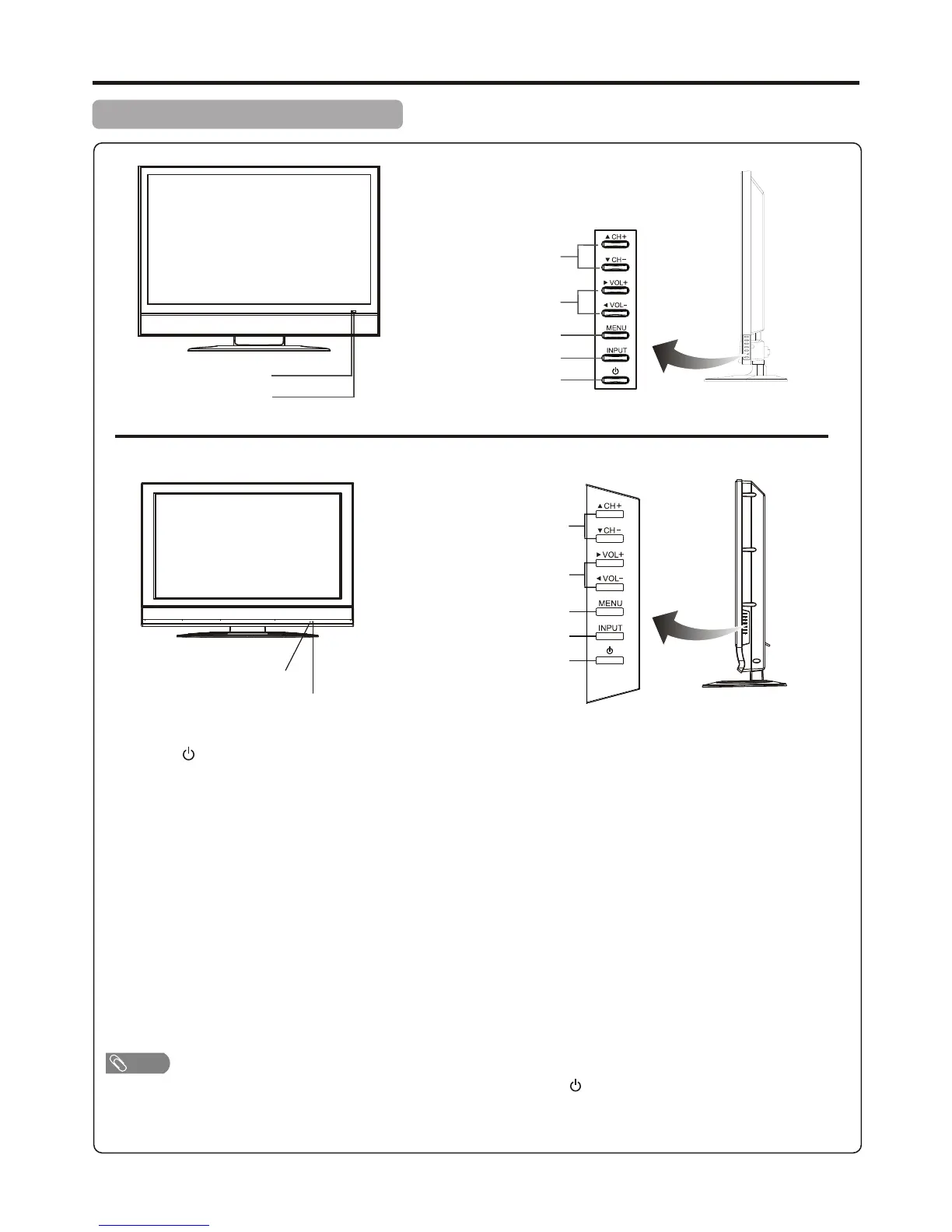
Main Unit (front view/side view)
Identification of Controls
Functions of CH 5/6 , VOL 4/3 , MENU, INPUT and POWER are also provided to the remote control. This
operation manual provides a description based on operating functions with the remote control.
+/–( ) +/–( )
1. POWER
2. INPUT
To access INPUT SOURCE menu
3. MENU
Press this button to access the menu main page
4. VOL+/– ( )
Press the VOL+ or VOL– button to directly increase or decrease the sound volume level;
In menu operations, these buttons serve as right/left buttons.
5. CH+/– ( )
Press these two buttons to directly change the TV channel;
In menu operations, these buttons serve as up/down buttons.
Press this button to turn the unit ON from STANDBY mode. Press it again to turn the set back to STANDBY.
4/3
5/6
Note
9
Power Indicator
Remote Sensor
Channel Up/Down
Volume Up/Down
MENU
Select Input Source Signal
Power On/Standby
Power Indicator
Remote Sensor
Channel Up/Down
Volume Up/Down
MENU
Input Source Select
Power On / Standby
Model AVP4232/AVP504
Model AVL472



 To Next Page