Main Unit (rear panel)
Identification of Controls (Continued)
1
2
3
4
5
6
7
8
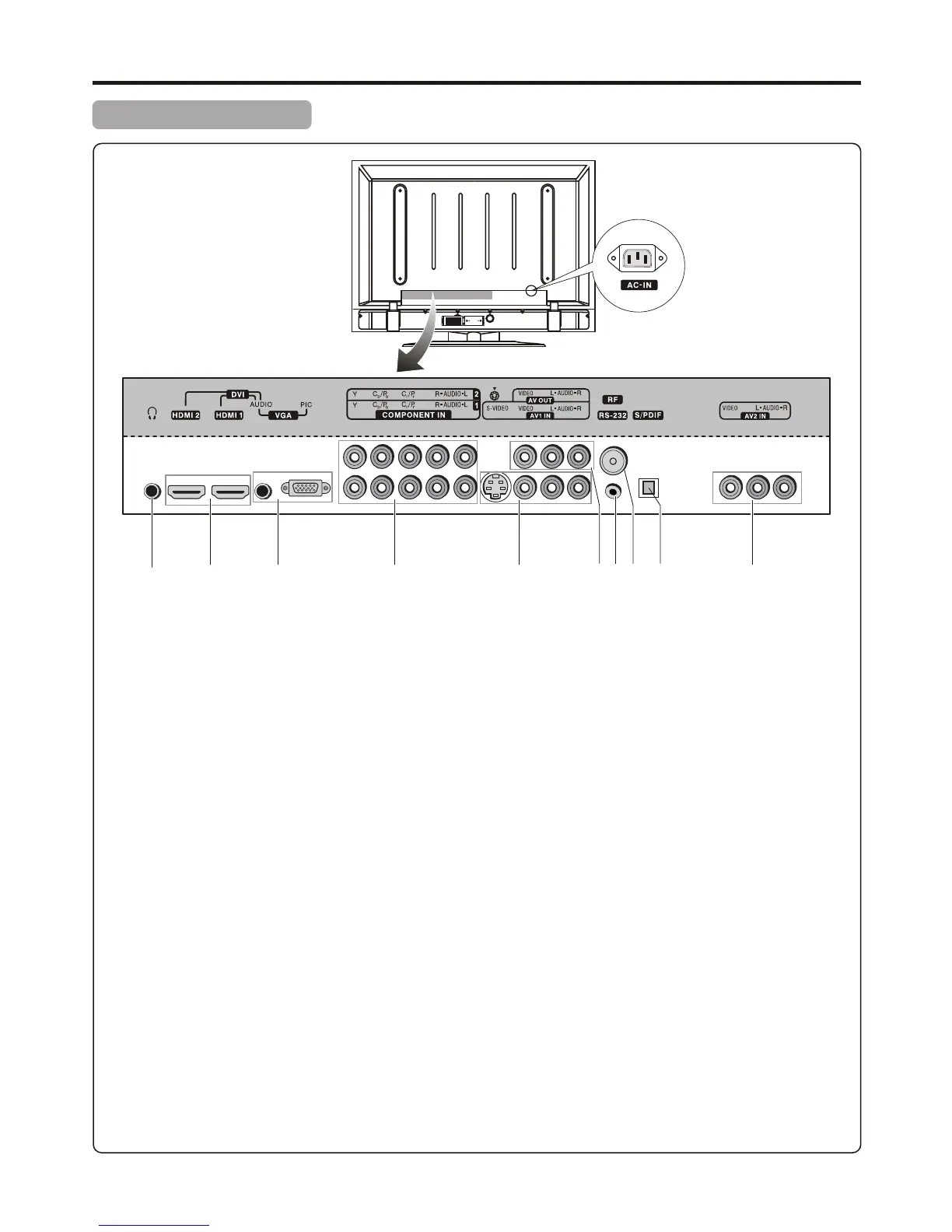
Headphones jack: Connects to your headphones. If your headphones do not match the jack, use a suitable plug
adaptor (not supplied).
HDMI input 1/2: HDMI (High-Definition Multimedia Interface) provides an uncompressed, all-digital audio/video
interface between this TV and any HDMI-equipped audio/video component, such as a set-top box and DVD player.
HDMI supports enhanced, or high-definition video, plus two-channel digital audio.
VGA (Video)/AUDIO input: Connects to a PC or other Analog RGB devices such as Video Conferencing.
COMPONENT INPUT 1/2: Connects to your DVD player and high-definition cable/satellite receivers.
Component video provides better picture quality than the S-VIDEO or the composite video connections.
S-VIDEO input: Connects to the S-VIDEO output jack of your VCR or other video equipment that has S-VIDEO.
S-VIDEO provides better picture quality than the composite video connection.
AV1 INPUT: Connects to the composite video and audio output jacks on your VCR or other video device.
AV OUTPUT: Connects to your VCR to record programs as desired or connects to your audio amplifier.
Only analog TV programs, AV1, AV2 and S-VIDEO input sources can be output through the AV output jacks.
RS – 232 terminal: For service only. The user should not use this terminal.
RF input: Connects to your cable system or outdoor antenna.
S/PDIF digital audio output (optical): Connects to the digital audio input of a digital audio component.
AV2 INPUT: Connects to the composite video and audio output jacks on your VCR or other video device.
9
10
1 2 3 4 5 6 7 8 9 10
10
Model AVP4232/AVP504


 To Next Page
 Loading...