EN-44
Erasing Images
Erasing at Photography Mode (Quick Delete Function)
The quick delete function enables you to delete the last-captured image during capture.
1. Slide the mode switch to [
] or [ ].
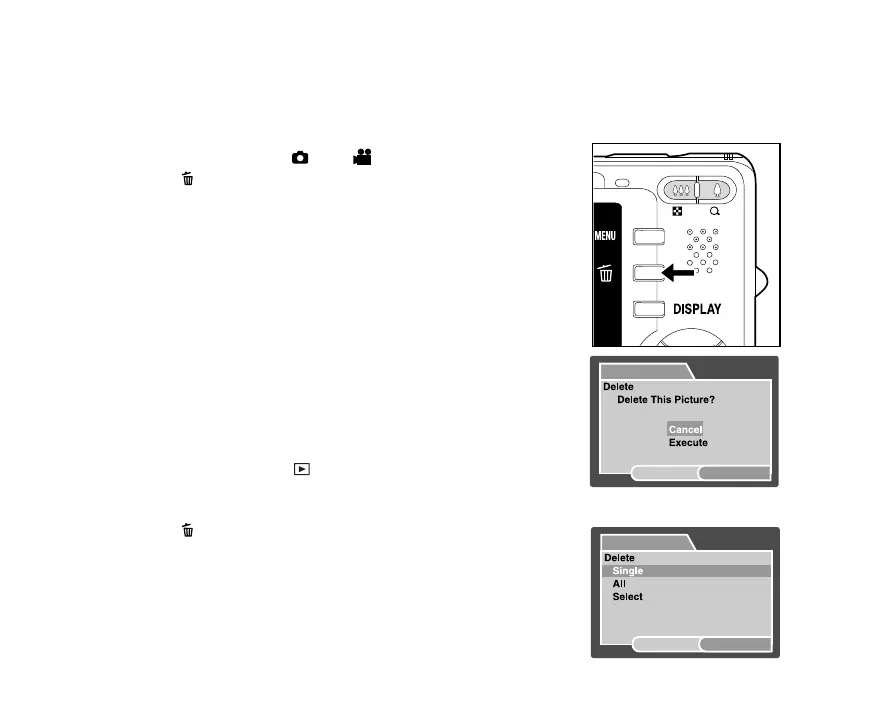
2. Press the
button.
J The last image and quick delete menu appear on the
screen.
3. Select [Execute] with the S / T buttons.
4. Press the SET button to confirm the deletion.
J To not delete, select [Cancel], and press theSET
button.
Erasing at Playback Mode
Erasing single image / Erasing all images
1. Slide the mode switch to [
].
J The last image will be displayed on the screen.
2. Select the image you want to erase with the W / X buttons.
3. Press the
button.
J The deletion menu will be displayed.
4. Select [Single] or [All] with the S / T buttons, and press the SET
button.
J [Single]: Erases the selected image or the last image.
J [All]: Erases all of the images except for the protected images.
J [Select]: Erases a number of selected images.
Delete
MENU:Exit
SET:Enter
Delete
SET:Enter
MENU:Exit


 To Next Page