| 3
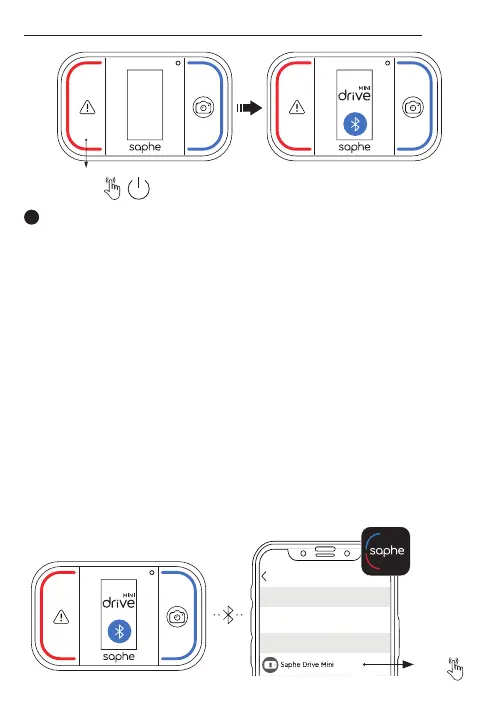
Pair your device in the Saphe Link app and not from the
phones Bluetooth settings. Go to: ’Menu’ > ’Devices’ >
’Unknown device’ and select your ’Saphe Drive Mini’.
Koppeln Sie Ihr Gerät in der Saphe Link-App und nicht über
die Bluetooth-Einstellungen des Telefons Gehen Sie zu:
Menü” > ”Geräte” > ”Unbekanntes Gerät” und wählen Sie Ihr
”Saphe Drive Mini”.
Appairez votre appareil dans l’application Saphe Link et non
à partir des paramètres Bluetooth du téléphone. Allez sur : «
Menu » > « Appareils » > « Appareil inconnu » et sélectionnez
votre « Saphe Drive Mini ».
Accoppiare il dispositivo nell’app Saphe Link app e non dalle
impostazioni Bluetooth del telefono. Andare a: ’Menu’ > ’Dis-
positivi’ > ’Dispositivo sconosciuto’ e selezionare il ’Saphe
Drive Mini’.
Empareje su dispositivo usando la aplicación Saphe Link,
nunca desde los ajustes de Bluetooth de su móvil. Navegue
de esta forma: ’Menú’ > ’Dispositivos’ > ’Dispositivo desco-
nocido’ y seleccione ’Saphe Drive Mini’.
EN
DE
FR
IT
ES
12:34 4G
Unknown devices
Saphe Link
Paired devices
Saphe Drive Mini
12:34 4G
Unknown devices
Saphe Link
Paired devices
Saphe Drive Mini
1 x
3 sec.
Turned on


 To Next Page