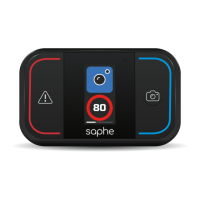
The Saphe Drive is a traffic alarm designed to enhance road safety by providing real-time warnings about traffic hazards, accidents, and speed control cameras. It connects to a smartphone app via Bluetooth, displaying information on an advanced screen.
Function Description
The Saphe Drive system consists of a device placed in the car that pairs with the "Saphe Link 2" app on a smartphone. This connection enables the device to receive and display data about various traffic incidents. The device serves as an extra speedometer when no incidents are nearby, showing current speed. When an alarm is detected, it switches to an "Alarm Screen" displaying the type of alarm, distance to the incident, and current speed.
Users can report four types of alarms: Congestion, Speed Camera, Hazard, and Car on Shoulder. These can be set up using the side buttons as hotkeys (left for Speed Camera, right for Hazard) or by holding a side button for a few seconds to access a setup menu for Congestion or Car on Shoulder alarms. Alarms can be confirmed by pressing the center button when an arrow appears below the current speed, ideally when the user is right next to the incident to improve location accuracy.
The device categorizes alarms into three types, identified by colors in the app:
- Warnings (Red): Hazard, Accident, Car on Shoulder.
- Cameras (Blue): Mobile Speed Camera, Fixed Speed Camera, Red Light Camera.
- Traffic Information (Yellow): Congestion, Roadwork, Blocked Road.
Some alarms (Hazard, Car on Shoulder, Mobile Speed Camera, Congestion) can be set up by the user, while others are received from third parties.
The Saphe Drive also functions abroad, providing warnings for over 60,000 fixed speed cameras worldwide. However, it's important to note that providing warnings about speed cameras is illegal in some countries, including Turkey, Switzerland, Cyprus, and Macedonia.
Important Technical Specifications
- Dimensions: 65 x 38 x 10 mm
- Weight: 32 g
- Screen: 1.54"
- Temperature Range (Use): 0° - 50° Celsius
- Temperature Range (Charging Battery): 0° - 45° Celsius
- Temperature Range (Short-term Storage): -20° - 60° Celsius
- Temperature Range (Long-term Storage): 0° - 35° Celsius
- Charge Cycle: Approx. 8 hours (full charge)
- Battery Type: Rechargeable Lithium-Ion
- Charging Plug: Micro USB
- Frequency Range (EU): 2.4 - 2.483 GHz
- Maximum Transmission Power (EU): ≤10 dBm
Usage Features
- Initial Setup: Before first use, the device needs to be charged and the "Saphe Link 2" app downloaded. Pairing with the phone is done through the app, not the phone's Bluetooth menu.
- On/Off: For daily use, manual on/off is not required as the device automatically enters rest mode when not driving. To manually switch on/off, press the center button until the power off icon appears, then confirm with the left button to switch off. To switch on, simply press the center button.
- Pairing with Multiple Phones: To pair with several phones, ensure Bluetooth is turned off on previously paired phones to facilitate the process.
- Pre-Drive Connection: When entering the car, Saphe Drive searches for Bluetooth, then GPS, and finally establishes a data connection. Icons for Bluetooth, GPS, and data connection will blink until connected, after which the device makes a sound.
- GPS/Location Services: For iPhone users, the Location service for Saphe Link 2 must be set to "Always" to ensure the app can use GPS while driving. "While using" requires the app to be open and the screen on. Users are advised to check GPS functionality with Google Maps, aiming for an accuracy of less than 50 meters (preferably 10-20 meters).
- Temperature Effect: Extreme temperatures (below 0°C or above 50°C) can affect the display, showing cold or hot icons. While visual alarms may not be displayed, audible alarms will still be received.
Maintenance Features
- Battery: The Saphe Drive contains a rechargeable Lithium-Ion battery. A full charge takes approximately 8 hours and can last 3-6 months for an average motorist. It is recommended to charge overnight.
- Firmware Updates: The device will require new firmware updates throughout its lifespan, which will be notified via the Saphe Link 2 app. Users should ensure the device has sufficient power before starting an update.
- Installation: The device comes with a holder offering two different angles for mounting on the windscreen or instrument panel. It should be placed within the driver's vision and reach, ensuring it is not covered by the sun visor. Third-party magnetic mobile phone holders can also be used if the provided holder is unsuitable.
- Cleaning: Only clean the product with a dry cloth.
- Disposal: The device, including its battery, should not be disposed of with normal household waste. It must be collected and disposed of separately in accordance with the Waste Electrical and Electronic Equipment (WEEE) Directive to protect the environment. For battery issues or disposal questions, contact support@saphe.com.

 Need help?
 General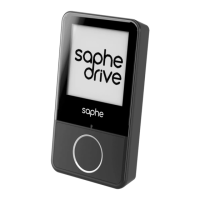

 To Next Page