11
Last updated 14.02.2019 www.saphe.dk
ENGLISH
Set up alarm
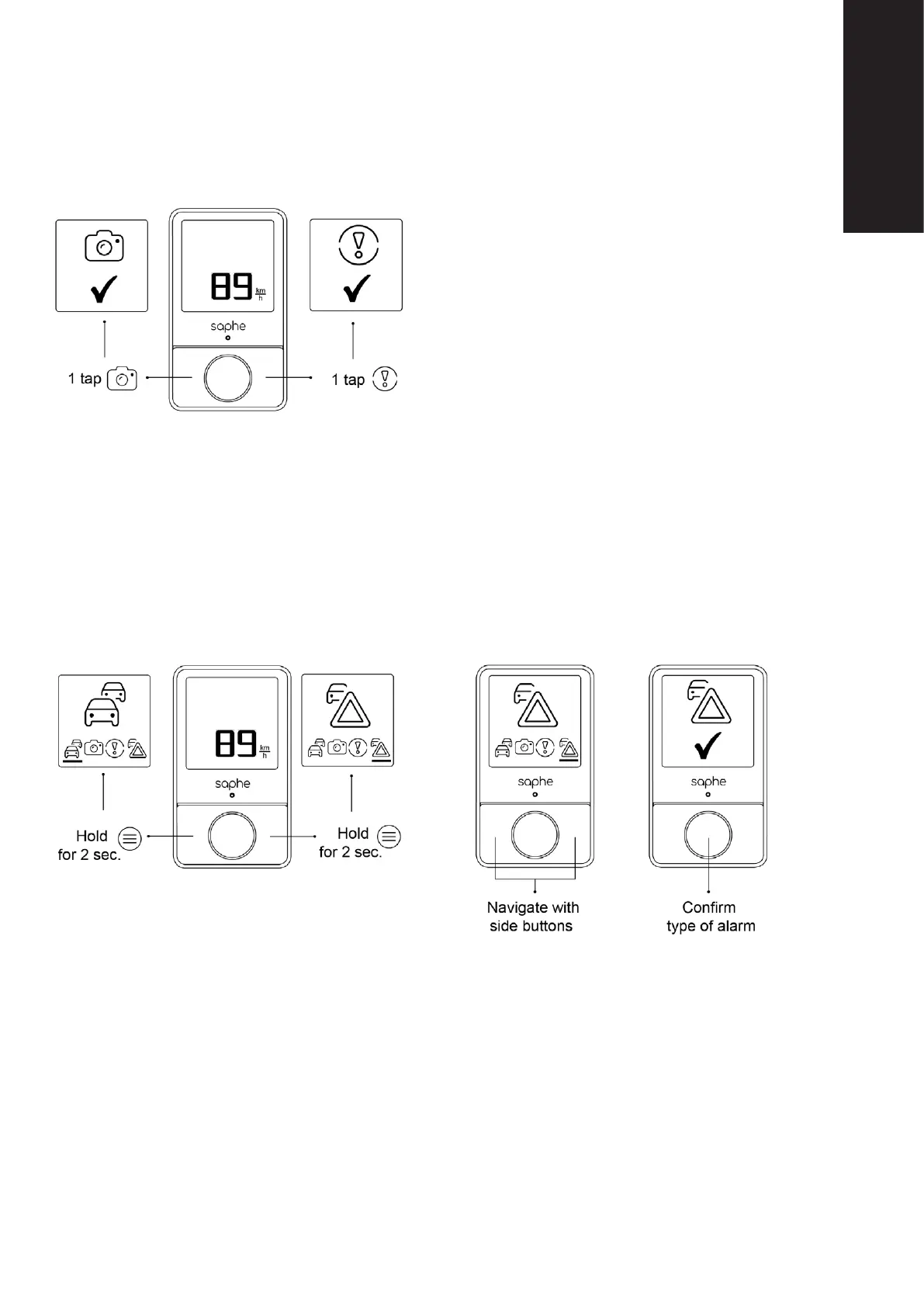
Simply press a side button to set up either a Speed Cam-
era alarm or a Hazard alarm.
Press the side buttons for a few seconds to enter the
Set-up menu.
Navigate by using the side buttons and conrm the alarm
type by pressing the centre button.
In case you experience an incident that has not yet been reported, you have the opportunity to set
it up yourself. You can set up four dierent types of alarms: Congestion. Speed Camera, Hazard
and Car on shoulder. You can use the side buttons as hot keys to set up either a Speed Camera
alarm or Hazard alarm. Press the left side button one time to set up Speed Camera, or the right side
button to set up a Hazard.
If you would like to set up a Congestion alarm or a Car on Shoulder alarm, then press one of the
side buttons for a few seconds. If you press the left side button for a few seconds, then the Set-up
menu will appear, and it will initially display Congestion. If you press the right side button for a few
seconds, then the menu will display Car on shoulder. When you are in the Set-up menu, you can
use the side buttons to navigate. Conrm your choice by pressing the centre button and the alarm is
set up. The GPS coordinates for the alarm are calculated from the time you press the side buttons.


 To Next Page