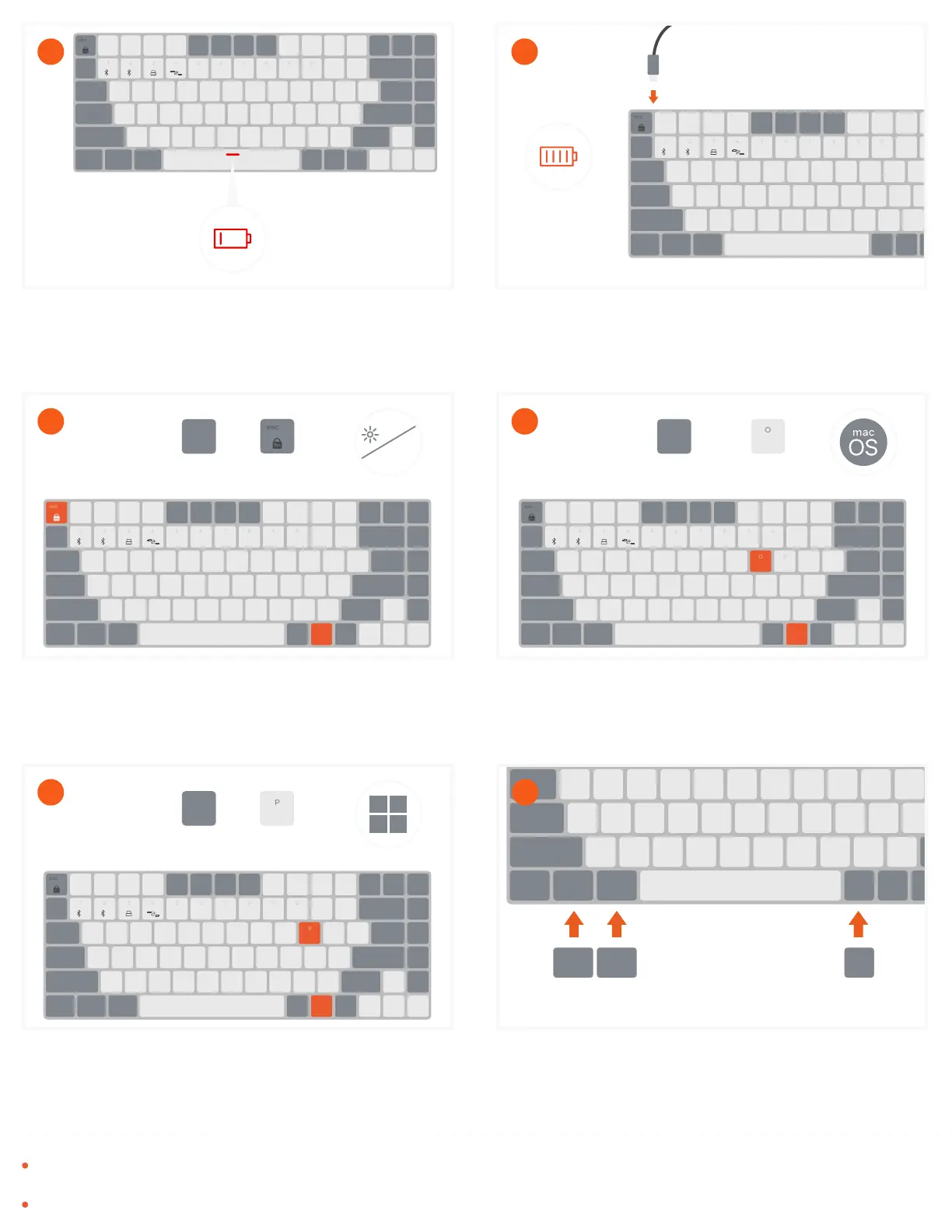
With a wireless connection, after 1 minute of inactivity, the backlight will turn o. After 30 minutes, the keyboard will enter
sleep mode to help conserve battery life. Press any key to wake and the keyboard will automatically reconnect.
Switches are not hot-swappable.
fnopt cmd cmd
win alt alt
When using with Windows you can swap the OPT, and both
CMD keys with the included Win & Alt keys.
Lift the macOS keycaps straight up and push Windows
caycaps down into place
12
Press “FN + P” to change to Windows functions.
11
mac
win
fn
1 2
O
fn
+
win
Press “FN + O” to change the keyboard to macOS functions.
10
mac
win
fn
1 2
fn
+
mac
Press “FN + Esc” to activate the function key lock and
swap between the Media and Function keys (F1-F12).
Esc key will flash when function lock is enabled
9
fn
1 2
fn
+
F1
fn
1 2
To recharge, connect the keyboard to a powered USB-C port
using the included cable.
Charge for 2-3 hours or until the red light turns off
8
2-3h
fn
1 2
Power indicator on the space bar will flash red when on low
battery.
7



 To Previous Page